A contract renewal dashboard can tell you:
47 contracts are renewing in the next 90 days.
A risk-scoring system improves that:
Six contracts are Critical and eleven are High Risk.
A priority engine goes further:
These five contracts deserve attention first.
But the user still has one fundamental question:
What should I actually do next?
That is where a Contract Renewal Next-Best-Action Engine becomes valuable.
Instead of simply displaying dates, scores, alerts, and dashboards, the system converts contract intelligence into specific recommendations:
Verify the renewal clause.
Review license utilization.
Start supplier negotiation.
Request Finance approval.
Escalate the overdue decision.
Evaluate replacement options.
Prepare termination notice.
Renew under existing terms.
This represents an important evolution for Contract Renewal Tracker.
The product moves from:
System of Record
to:
System of Intelligence
and ultimately:
System of Action.
Current procurement platforms are already moving in this direction: for example, SAP describes renewal optimization that analyzes usage and supplier performance to recommend renewal actions and trigger workflows, while other procurement-intelligence approaches emphasize recommendations backed by underlying evidence and human-controlled approval.
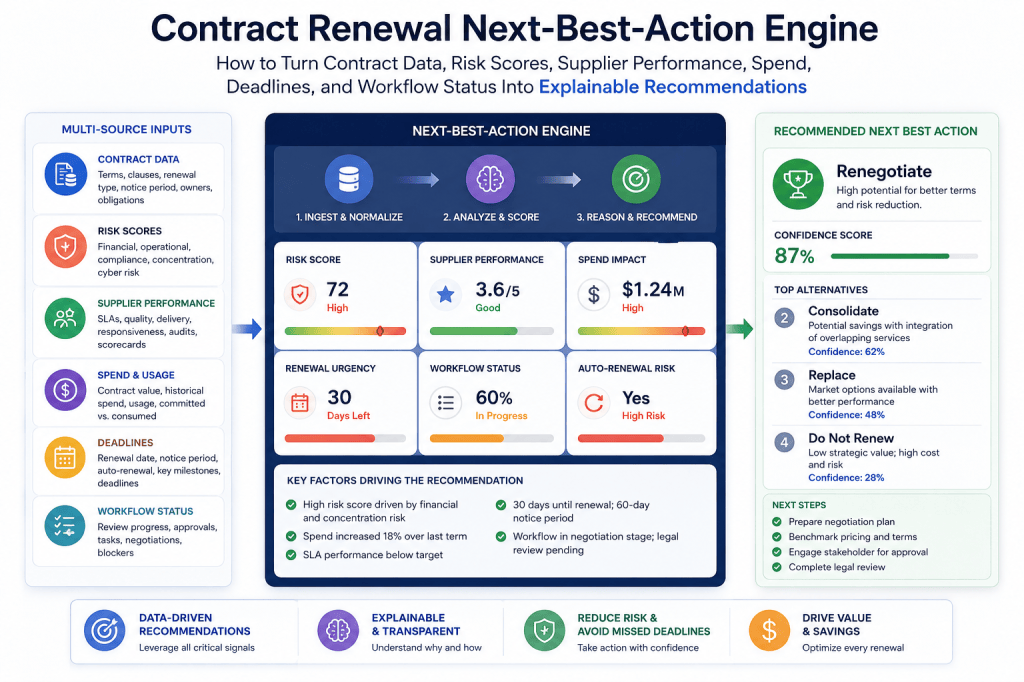
What Is a Contract Renewal Next-Best-Action Engine?
A Next-Best-Action Engine evaluates the current state of a contract and determines:
What is the most useful action that should happen next?
The engine might analyze:
- notice deadline;
- expiration date;
- annual contract value;
- auto-renewal;
- renewal decision;
- supplier performance;
- price changes;
- utilization;
- risk score;
- opportunity score;
- priority score;
- approval status;
- owner;
- outstanding tasks;
- data quality;
- business criticality.
It then produces:
Recommended Action
Reason
Priority
Owner
Due Date
Supporting Evidence
That last element is important.
A recommendation without an explanation is:
just another alert.
From Data to Action
The architecture can be viewed as:
Contract Data
↓
Derived Signals
↓
Risk Score
↓
Opportunity Score
↓
Priority Score
↓
Recommendation
↓
Human Decision
↓
Workflow
↓
Outcome
↓
Learning
That creates a closed-loop renewal-management system.
The Difference Between an Alert and a Recommendation
An alert might say:
Notice deadline in 30 days.
Useful.
But limited.
A recommendation says:
Complete the renewal decision within five business days because this €450,000 contract auto-renews in 30 days and no approved decision exists.
That contains:
context,
priority,
reason,
and:
action.
Much better.
The Difference Between Recommendation and Automation
This distinction is extremely important.
A recommendation says:
Prepare termination notice.
Automation might:
create the Legal task.
Autonomous execution might:
send the termination notice.
These are:
three very different levels of authority.
Contract Renewal Tracker should treat them separately.
Level 1 — Recommendation
System:
Review this contract for termination.
Human decides:
whether to proceed.
Level 2 — Workflow Initiation
Human accepts recommendation.
System:
creates Legal review task.
This is controlled automation.
Level 3 — Prepared Action
System:
prepares a draft termination notice.
Human:
reviews and approves.
Level 4 — Execution
System:
sends the notice.
This requires:
much stronger controls.
For many material contractual actions, keeping AI in recommendation/preparation mode with accountable human approval is a sensible governance model. (OPAG)
Recommended Product Principle
For Contract Renewal Tracker:
Recommend freely. Execute carefully.
That is a strong architectural principle.
The Core Next-Best-Actions
You do not need:
hundreds of recommendations.
A useful first engine could support perhaps:
12–15 actions.
For example:
- Assign Contract Owner
- Verify Renewal Clause
- Complete Renewal Decision
- Review Contract Usage
- Review Supplier Performance
- Start Supplier Negotiation
- Request Updated Supplier Proposal
- Evaluate Consolidation
- Evaluate Replacement
- Request Approval
- Escalate Decision
- Prepare Termination
- Execute Termination
- Complete Renewal
- Close Renewal Cycle
These cover:
most common renewal situations.
Action 1 — Assign Contract Owner
Trigger:
Owner = Missing
Recommendation:
Assign a business owner before continuing the renewal process.
Reason:
Without an accountable owner:
the business requirement cannot be validated.
Priority Modifier
If notice deadline is:
180 days away,
priority:
Moderate.
If:
14 days away,
priority:
Critical.
Same problem.
Different urgency.
Action 2 — Verify Renewal Clause
Trigger:
Notice Period = Unknown
or:
Notice Confidence = Low
or:
Conflicting Renewal Terms = Yes
Recommendation:
Verify the governing renewal and termination clause.
Supporting evidence should include:
the relevant contract documents.
High-Value Rule
For example:
IF annual_value >= 250000AND notice_period_status != VERIFIEDTHEN recommend = VERIFY_RENEWAL_CLAUSE
Simple.
Explainable.
Critical Override
IF notice_period_status != VERIFIEDAND estimated_deadline <= 30_daysTHEN priority = CRITICAL
This ensures:
uncertain deadlines
do not disappear into:
normal workflow.
Action 3 — Complete Renewal Decision
Trigger:
- contract approaching decision deadline;
- decision missing.
Recommendation:
Complete the business renewal review.
Possible decisions:
Renew
Renegotiate
Reduce
Replace
Extend
Terminate
This becomes:
one of the engine’s most common recommendations.
Example
Contract:
€180K.
Auto-renewal:
Yes.
Notice deadline:
45 days.
Decision:
None.
Recommendation:
Complete renewal decision within 10 business days.
Why:
The contract auto-renews and no approved renewal direction exists.
Clear.
Action 4 — Review Contract Usage
Especially useful for:
SaaS,
telecom,
cloud,
licenses,
fleet,
and:
consumption-based services.
Trigger:
utilization below:
defined threshold.
Example:
IF utilization < 70%AND renewal_window = OPENTHEN recommend = REVIEW_USAGE
Example Recommendation
Review license quantity before supplier negotiation.
Why:
Only 62% of 1,200 purchased licenses were active during the previous 90 days.
Potential implication:
reduce:
quantity before negotiating price.
This Is Important
A Procurement manager might otherwise negotiate:
10% discount
on:
licenses the company does not need.
Demand reduction can be:
more valuable than:
unit-price reduction.
Action 5 — Review Supplier Performance
Trigger:
supplier score below:
threshold.
Inputs could include:
- SLA performance;
- incidents;
- delivery;
- service quality;
- business-owner feedback.
Recommendation:
Complete supplier performance review before approving renewal.
Example
Supplier Score:
54/100.
Annual Value:
€600K.
Notice deadline:
100 days.
Recommendation:
Review supplier performance and remediation options before entering renewal negotiation.
This is:
early enough to create leverage.
Action 6 — Start Supplier Negotiation
This could become:
one of the highest-value recommendations.
Potential triggers:
- supplier increase;
- high contract value;
- benchmark gap;
- poor performance;
- consolidation opportunity.
Example:
IF price_increase >= 10%AND annual_value >= 100000AND notice_deadline <= 120_daysTHEN recommend = START_NEGOTIATION
Example
Current:
€400K.
Supplier proposal:
€460K.
Increase:
15%.
Recommendation:
Start commercial negotiation.
Reason:
The proposed renewal increases annual spend by €60,000 and exceeds the organization’s 10% negotiation threshold.
This is highly actionable.
Action 7 — Request Updated Supplier Proposal
Sometimes the problem is:
not negotiation.
It is:
missing information.
Trigger:
supplier proposal not received
and:
commercial review window open.
Recommendation:
Request updated renewal pricing and terms from supplier.
Owner:
Procurement.
Due:
based on workflow.
Action 8 — Evaluate Consolidation
Trigger:
multiple contracts with:
same supplier
or:
same category.
Example:
Supplier X.
Six contracts.
Three entities.
Combined spend:
€1.8M.
Renewals:
within six months.
Recommendation:
Evaluate consolidation before renewing separately.
This can unlock:
additional leverage.
Consolidation Evidence
The recommendation should show:
- related contracts;
- entities;
- combined spend;
- renewal windows.
This makes the recommendation:
defensible.
Action 9 — Evaluate Replacement
Potential triggers:
- poor performance;
- high price increase;
- strategic misalignment;
- severe underutilization;
- unacceptable risk.
Recommendation:
Evaluate replacement alternatives before renewal.
This should not mean:
automatically replace supplier.
It means:
begin analysis.
Replacement Requires Lead Time
The engine should understand:
switching complexity.
For example:
ERP replacement:
365 days.
Standard SaaS:
120 days.
Simple subscription:
30 days.
Then compare:
remaining time.
Replacement Readiness Rule
IF decision = REPLACEAND days_to_notice <= required_transition_daysTHEN priority = CRITICAL
This is:
very powerful.
The system recognizes:
the organization is already inside:
the required transition window.
Action 10 — Request Approval
Trigger:
decision ready
but:
required approval missing.
Example:
€750K renewal.
Policy:
CFO approval required above €500K.
Recommendation:
Request CFO approval for €750,000 renewal commitment.
Reason:
Contract value exceeds the €500,000 approval threshold.
This is straightforward:
policy-as-code.
Action 11 — Escalate Decision
Escalation should be:
a recommendation
when:
normal workflow has failed.
Trigger:
decision overdue.
For example:
IF decision_status = MISSINGAND internal_deadline < TODAYTHEN recommend = ESCALATE_DECISION
Escalation Target
Could depend on:
severity.
5 days overdue:
Manager.
10 days:
Renewal Operations.
Critical deadline:
Executive sponsor.
The engine can determine:
the next escalation path.
Action 12 — Prepare Termination
Trigger:
Decision = Terminate.
But before execution:
verify:
- notice clause;
- deadline;
- notice method;
- approval.
Recommendation:
Prepare termination notice for Legal review.
This creates:
controlled execution.
Action 13 — Execute Termination
This recommendation should only appear when:
all prerequisites are complete.
For example:
Decision Approved
✓
Legal Verified
✓
Notice Draft Approved
✓
Deadline Open
✓
Then:
Send approved termination notice before September 30.
At this stage:
the system is coordinating execution.
Do Not Let AI Jump Ahead
If:
Legal Verification = Pending,
the engine should not recommend:
Send Notice.
It should recommend:
Complete Legal verification.
This is:
state-aware recommendation logic.
Action 14 — Complete Renewal
Trigger:
- decision approved;
- commercial terms finalized;
- approvals complete.
Recommendation:
Complete renewal execution.
Potential workflow:
signature,
purchase order,
supplier confirmation,
document upload.
Action 15 — Close Renewal Cycle
After execution:
recommend:
Close renewal cycle and schedule next renewal review.
Then update:
- new start date;
- new end date;
- notice period;
- annual value;
- savings;
- next review date.
The cycle begins again.
This Creates a Renewal State Machine
Conceptually:
Detected
↓
Review Required
↓
Decision Required
↓
Commercial Action
↓
Approval
↓
Execution
↓
Closed
Each state has:
valid next actions.
This is much safer than:
letting an AI invent arbitrary workflows.
State Machines Are Important
Suppose contract is:
Awaiting Approval.
Valid actions might be:
- approve;
- reject;
- request changes.
Not:
send termination notice.
The system constrains:
what can happen.
This creates:
guardrails.
Recommendation Eligibility
For every recommendation define:
Trigger Conditions
Required Data
Excluded Conditions
Required Role
Priority Logic
Explanation Template
Workflow Action
This gives the recommendation engine:
structure.
Example Recommendation Definition
Recommendation
Start Negotiation.
Trigger
Supplier increase >10%.
Required Data
Current price.
Renewal proposal.
Annual value.
Notice deadline.
Exclusion
Decision = Terminate.
Owner
Procurement.
Explanation
Supplier proposes X% increase on €Y annual spend.
Action
Create negotiation workflow.
That is:
clean system design.
Recommendation Confidence
Not every recommendation has:
equal certainty.
A useful model:
High Confidence
Medium Confidence
Low Confidence
High Confidence Example
Rule:
decision overdue.
Data:
verified.
Recommendation:
Complete Decision.
Confidence:
High.
Low Confidence Example
AI detects:
possible duplicate supplier.
But supplier names differ:
“Microsoft BV”
and:
“Microsoft Netherlands.”
Recommendation:
Review possible supplier consolidation opportunity.
Confidence:
Medium.
Do not state:
they definitely should be consolidated.
Evidence Should Accompany Recommendations
A recommendation should answer:
Why?
For example:
Start negotiation
because:
- annual spend = €840K;
- supplier increase = 14%;
- utilization = 64%;
- notice deadline = 95 days.
That is:
evidence-based decision support.
Explainability and source-linked recommendations are increasingly emphasized in procurement AI precisely because buyers need to inspect the basis for a suggested action rather than accept a black-box conclusion. (OPAG)
Recommendation Explanation Structure
A useful explanation could contain:
Recommendation
Start negotiation.
Why
Supplier proposes 14% increase.
Financial Exposure
€840K → €957.6K.
Additional Opportunity
36% unused licenses.
Timing
95 days before notice deadline.
Suggested Owner
Procurement.
Suggested Due Date
Within 10 business days.
Very clear.
Risk Score Is an Input, Not the Recommendation
Risk:
That does not automatically mean:
Terminate.
It means:
attention required.
The recommendation depends on:
why the score is high.
Example
Risk:
Driver:
missing owner.
Recommendation:
Assign Owner.
Another contract:
Risk:
Driver:
termination deadline.
Recommendation:
Execute Termination.
Same score.
Completely different action.
This demonstrates why:
risk scoring alone
is insufficient.
Priority Score Determines Ordering
Once recommendations exist:
Priority Score can determine:
which recommendations appear first.
For example:
1 — Execute Termination
Priority:
2 — Complete Renewal Decision
3 — Start Supplier Negotiation
4 — Review License Quantity
5 — Verify Renewal Clause
Now:
the dashboard becomes:
an action queue.
One Contract Can Have Multiple Recommendations
Example:
SaaS contract.
Potential actions:
- review usage;
- start negotiation;
- verify owner;
- request approval.
But showing:
four equal actions
creates:
confusion.
The engine needs:
sequencing.
Primary Next-Best-Action
Choose:
one primary action.
Example:
Review license utilization.
Why first?
Because:
quantity should be determined before:
negotiation begins.
Then:
secondary actions remain:
queued.
Action Dependencies
Example:
Review Usage
↓
Determine Quantity
↓
Start Negotiation
↓
Request Approval
↓
Execute Renewal
This becomes:
an action graph.
Dependency Rules Prevent Bad Recommendations
Do not recommend:
Request Approval
before:
final commercial terms exist.
Do not recommend:
Execute Renewal
before:
approval.
Do not recommend:
Terminate
before:
Legal verification when required.
This is:
workflow intelligence.
Recommendation Suppression
Sometimes the correct behavior is:
show nothing.
Example:
low-value contract.
Decision approved.
Renewal executed.
Next deadline:
11 months away.
No action required.
Do not invent:
busywork.
This is essential.
Alert Fatigue Applies to Recommendations Too
If the system produces:
200 recommendations every morning,
users will ignore:
all of them.
The engine should surface:
the smallest useful set.
Recommendation Threshold
For example:
only surface:
Priority >50
on the main dashboard.
Lower priority actions:
remain available
but:
do not interrupt users.
Recommendation Deduplication
Do not show:
“Complete Decision”
and:
“Renewal Decision Missing”
as separate items.
They describe:
the same underlying issue.
Merge them.
Recommendation Expiration
Recommendations should:
expire
when:
conditions change.
Example:
Start Negotiation.
Supplier proposal withdrawn.
Decision changed:
Terminate.
Old recommendation should disappear.
This keeps:
the queue current.
Recommendation Recalculation
Recalculate when:
- contract changes;
- task completed;
- deadline moves;
- proposal received;
- decision changes;
- approval occurs;
- supplier score changes.
Potentially also:
daily
for time-based conditions.
Event-Driven Architecture
Events might include:
CONTRACT_UPDATEDNOTICE_WINDOW_ENTEREDDECISION_SUBMITTEDSUPPLIER_PROPOSAL_RECEIVEDAPPROVAL_COMPLETEDTASK_OVERDUETERMINATION_SENTRENEWAL_EXECUTED
Each event can trigger:
recommendation recalculation.
This fits naturally with:
the rules-engine architecture already planned for Contract Renewal Tracker.
Recommendation Engine Architecture
A practical architecture could be:
Event
↓
Context Builder
↓
Rule Evaluation
↓
Risk / Opportunity / Priority
↓
Candidate Recommendations
↓
Eligibility Filter
↓
Dependency Resolver
↓
Recommendation Ranker
↓
Explanation Generator
↓
User Queue
This is a strong technical design.
Context Builder
The Context Builder collects:
all relevant information.
For example:
ContractSupplierOwnerSpendUsagePerformanceRenewal TermsRisk ScoreDecisionTasksApprovalsHistory
Then:
the engine evaluates.
Candidate Generation
Multiple rules may fire.
Example:
- review usage;
- negotiate;
- consolidate;
- request approval.
These become:
candidate recommendations.
Eligibility Filtering
Remove:
actions that cannot yet happen.
Example:
Request Approval
removed because:
commercial terms incomplete.
Dependency Resolution
Determine:
which action comes first.
Usage review before:
negotiation.
Negotiation before:
approval.
Approval before:
execution.
Ranking
Then rank remaining actions by:
Priority Score.
The highest becomes:
Next Best Action.
Explanation Generation
Finally:
generate:
human-readable explanation.
This could initially use:
templates.
Later:
AI.
Template-Based Explanation
Example:
Start negotiation because the supplier proposes a {price_increase}% increase on {annual_value} annual spend and the notice deadline is {days_remaining} days away.
Reliable.
Deterministic.
AI-Generated Explanation
Later AI can turn:
structured evidence
into:
natural language.
But AI should not determine:
the underlying facts.
The system should provide:
grounded inputs.
Rule Engine vs AI
This is one of the most important architectural decisions.
The core Next-Best-Action Engine should initially be:
rule-based.
AI should initially handle:
interpretation and explanation.
Not:
uncontrolled decision logic.
Rule Engine Handles
- thresholds;
- deadlines;
- approvals;
- workflow state;
- permissions;
- deterministic recommendations.
AI Handles
- summarization;
- contract interpretation;
- explanation;
- contextual insights;
- alternative suggestions.
This hybrid architecture combines:
control
with:
intelligence.
Human Decision Layer
Users should be able to:
Accept
Dismiss
Snooze
Modify
Escalate
a recommendation.
That feedback is:
extremely valuable.
Accept Recommendation
Example:
Start Negotiation.
User:
Accept.
System:
creates:
Procurement task.
Now:
recommendation becomes:
workflow.
Dismiss Recommendation
Require optional reason:
- Not relevant.
- Already handled.
- Incorrect data.
- Business exception.
- Other.
This provides:
model feedback.
Snooze Recommendation
Example:
supplier meeting:
next week.
Snooze:
7 days.
Useful.
But critical deadline recommendations should:
restrict excessive snoozing.
Modify Recommendation
System says:
Renegotiate.
User decides:
Replace.
Capture:
the override.
This becomes:
valuable historical data.
Recommendation History
Store:
Recommendation
Score
Evidence
Timestamp
User Decision
Override Reason
Final Outcome
This creates:
an audit trail.
Why Override History Matters
Over time:
you can measure:
recommendation quality.
For example:
Recommendations Accepted:
72%.
Modified:
18%.
Dismissed:
10%.
This becomes:
a product metric.
Recommendation Accuracy
Track:
which recommendations produced:
successful outcomes.
For example:
Start Negotiation:
80% accepted.
Review Consolidation:
35%.
Maybe:
consolidation rules need improvement.
This creates:
continuous learning.
Role-Based Recommendations
Recommendations should go to:
the right person.
Example:
Verify Clause:
Legal.
Review Usage:
IT / Business Owner.
Start Negotiation:
Procurement.
Request Approval:
Finance.
Complete Decision:
Business Owner.
This avoids:
irrelevant notifications.
Permission-Aware Recommendations
Suppose:
Finance user
cannot access:
supplier performance notes.
The recommendation explanation should not expose:
restricted data.
Authorization must apply:
before recommendation presentation.
This is critical.
Role-Based Next-Best-Action Queue
Procurement
Start negotiation.
Review consolidation.
Request proposal.
Finance
Approve renewal.
Review budget variance.
Validate savings.
Legal
Verify clause.
Review termination.
Resolve conflicting terms.
IT
Review usage.
Assess replacement.
Review technical dependency.
Business Owner
Complete decision.
Confirm demand.
Review supplier performance.
This makes:
the product highly personalized.
Organizational Next-Best-Action Queue
Management may see:
all critical actions.
For example:
Critical
Procurement
Finance
Legal
Business Owners
This gives:
operational visibility.
Daily Next-Best-Action Brief
A powerful feature:
Good morning. Five renewal actions need attention today.
- Execute termination for Supplier A.
- Complete decision for Supplier B.
- Start negotiation with Supplier C.
- Verify renewal clause for Supplier D.
- Review unused licenses for Supplier E.
This is:
far more useful than:
“23 contracts renewing.”
Conversational Next-Best-Action
The user could ask:
What should I work on today?
Contract Renewal Tracker:
Three renewals deserve immediate attention. The highest priority is Supplier A because its €650K agreement auto-renews in nine days and the termination decision has not yet been executed.
This is where:
the conversational interface
becomes genuinely useful.
“Why?” Follow-Up
User:
Why Supplier A?
Assistant:
The agreement represents €650K annual spend, auto-renews for another 12 months, and has nine days remaining before the contractual notice deadline. The business decision is Terminate, but Legal verification remains incomplete.
Excellent.
“What Happens If We Do Nothing?”
Another useful query:
What happens if we do nothing?
System:
Based on the recorded terms, the contract is expected to renew for another 12 months if valid notice is not delivered before the deadline. The recorded annual value is €650K.
That is:
decision intelligence.
“What Can I Do?”
Assistant:
Complete Legal verification today, approve the termination notice, and deliver it using the contractual notice method before the deadline.
Now:
conversation becomes:
action-oriented.
Next-Best-Action and Workload
The system can also consider:
available capacity.
But:
do not lower contract importance
because:
somebody is overloaded.
Instead:
recommend:
reassignment.
Example:
Procurement owner has nine Critical/High actions. Consider reassigning this negotiation.
This is:
better.
Team Capacity View
Example:
| Owner | Critical | High | Medium |
|---|---|---|---|
| Sarah | 5 | 7 | 12 |
| Mark | 1 | 3 | 9 |
| Emma | 0 | 2 | 6 |
Now:
Renewal Operations can:
rebalance work.
Next-Best-Action and Savings
Recommendations can also estimate:
potential impact.
Example:
Review License Quantity
Estimated annual opportunity:
€84K.
This helps:
prioritize.
Impact Estimate
Possible categories:
Financial
Risk
Operational
Compliance
One recommendation may affect:
several.
Example
Evaluate Replacement.
Financial:
Medium.
Operational:
High.
Risk:
High.
This gives:
context beyond:
euros.
Recommended Action Card
A strong UI component could show:
Start Supplier Negotiation
Priority: 91 — Immediate
Why: Supplier proposes a 14% increase on €840K annual spend. Utilization is 64%, and 95 days remain before the notice deadline.
Potential Opportunity: €120K–€200K.
Owner: Procurement.
Due: August 28.
Buttons:
Start Action
Dismiss
Snooze
View Evidence
That could become:
a signature Contract Renewal Tracker interface.
Recommendation Inbox
Instead of:
only a contract table,
provide:
My Actions
This could become:
the product homepage.
My Actions
Immediate
This Week
Upcoming
Completed
Users manage:
work,
not:
records.
This is a major UX improvement.
Contract-Centric vs Action-Centric UX
Traditional:
Contracts → Contract → Tasks
More intelligent:
Actions → Contract Context → Decision
Both views remain useful.
But:
daily users may prefer:
action-centric workflow.
Beta Version
The September 21 beta does not need:
the full recommendation architecture.
A useful Beta Next-Best-Action Engine could support only:
five recommendations.
1. Assign Owner
2. Verify Notice Date
3. Complete Renewal Decision
4. Review Auto-Renewal
5. Escalate Overdue Decision
That is enough:
to test the concept.
Beta Recommendation Model
Use:
simple deterministic rules.
Example:
IF owner = NULLTHEN recommendation = ASSIGN_OWNER
IF notice_deadline <= 60_daysAND decision = NULLTHEN recommendation = COMPLETE_DECISION
IF auto_renewal = TRUEAND notice_deadline <= 30_daysAND decision = NULLTHEN recommendation = URGENT_RENEWAL_REVIEW
Very manageable.
Beta Success Metric
Measure:
What percentage of recommendations lead to completed actions?
This tells you:
whether recommendations are useful.
Post-Beta Phase 1
Add:
Procurement actions.
- negotiate;
- request proposal;
- review price increase.
Phase 2
Add:
usage and supplier performance.
Phase 3
Add:
approval recommendations.
Phase 4
Add:
termination workflow.
Phase 5
Add:
AI-generated explanations.
Phase 6
Add:
historical learning.
Phase 7
Add:
predictive recommendations.
This is:
a substantial product roadmap.
Predictive Next-Best-Action
Eventually:
the system might recommend:
Start this negotiation 30 days earlier than standard.
Why?
Supplier X has delivered renewal proposals an average of 24 days late during the previous three cycles.
That is:
historically informed recommendation.
Another Predictive Example
Begin replacement assessment now.
Why?
Similar technology migrations in your organization require an average of 220 days, while only 205 days remain before the notice deadline.
This is:
excellent operational intelligence.
Learning From Outcomes
Every renewal generates:
new data.
Recommendation:
Reduce Licenses.
Outcome:
€120K saved.
Next cycle:
the system knows:
usage review was valuable.
This creates:
a learning loop.
Supplier Memory
Over time:
Contract Renewal Tracker could remember:
- historical increases;
- negotiation outcomes;
- renewal delays;
- performance trends;
- concessions.
Then recommendations become:
more informed.
Example
Start negotiation 120 days before deadline. Supplier historically proposes 10–15% increases and typically requires three negotiation rounds.
That is:
valuable institutional memory.
Business Owner Memory
The system might learn:
Department X needs:
extra escalation.
Not because:
AI judges them,
but because:
historical workflow metrics show:
longer completion times.
Then:
workflow can start earlier.
Recommendation Evaluation Framework
Measure:
Acceptance Rate
How often accepted?
Completion Rate
How often completed?
Override Rate
How often changed?
Outcome Value
What financial or risk benefit resulted?
Time to Action
How quickly did users respond?
Explanation Usefulness
Did users understand why?
These metrics allow:
continuous improvement.
Recommendation Precision
If the engine recommends:
100 actions
and users dismiss:
70,
the engine is:
too noisy.
Reduce:
false positives.
Recommendation Coverage
If important renewal problems occur
without:
recommendations,
coverage is:
too low.
Balance:
precision and recall.
Recommendation Fatigue
Never confuse:
more recommendations
with:
more intelligence.
The goal is:
fewer, better actions.
This could become:
another product principle.
Governance of Recommendations
Recommendations should always preserve:
accountability.
The system recommends.
Authorized users decide.
High-impact actions require:
appropriate approvals.
Audit trails preserve:
what happened.
This aligns with broader procurement-AI governance approaches emphasizing role-based access, approval thresholds, human review, source evidence, and decision history. (OPAG)
AI Safety Architecture
For higher-impact actions:
Recommendation
↓
Human Acceptance
↓
Policy Check
↓
Required Approval
↓
Execution
↓
Audit Log
That is:
much safer
than:
AI → Execute.
Example: Termination
AI recommends:
Terminate.
Human:
accepts.
Legal:
verifies.
Approver:
approves.
System:
prepares notice.
Authorized user:
sends.
Audit:
records everything.
This is:
controlled automation.
Example: Renewal
AI recommends:
Renew.
Business Owner:
accepts.
Finance:
approves.
Authorized signatory:
executes.
Again:
clear authority.
Product Positioning Opportunity
This functionality could significantly differentiate:
Contract Renewal Tracker.
Instead of:
Never Miss a Renewal
you can eventually say:
Know What to Do Before Every Renewal.
That is stronger.
Another Positioning Message
From Contract Deadlines to Next Best Actions.
Excellent.
Another
Contract Renewal Tracker Doesn’t Just Tell You What’s Renewing. It Tells You What Needs Attention Next.
Very clear.
Another
Turn Every Contract Renewal Into an Explainable Action Plan.
Strong for:
enterprise buyers.
Another
Your Renewal Portfolio, Prioritized and Actionable.
Concise.
SEO Opportunity
This capability also creates:
new content clusters.
Potential topics:
AI Contract Renewal Recommendations
Contract Renewal Decision Engine
Contract Renewal Next Best Action
AI Contract Renewal Assistant
Contract Renewal Workflow Automation
Contract Renewal Intelligence
These support:
future product positioning.
Interactive Website Tool
Build:
Contract Renewal Next-Best-Action Advisor
Visitor enters:
- annual value;
- days to deadline;
- auto-renewal;
- decision;
- price increase;
- utilization;
- supplier performance.
Result:
Recommended Next Action
Start Supplier Negotiation
Priority:
88/100.
Why:
Your €500K contract renews in 75 days, the supplier proposes a 12% increase, and current utilization is 68%.
Then:
Manage All Your Renewals With Contract Renewal Tracker →
This could be:
a strong product-led acquisition tool.
Lead Magnet
Create:
Contract Renewal Next-Best-Action Playbook
Include:
50 scenarios.
For each:
Situation
Risk
Recommended Action
Owner
Timing
Escalation
This could be:
extremely useful.
Suggested CTA
Download the Contract Renewal Next-Best-Action Playbook
Turn common renewal situations into structured actions with practical rules for missing owners, approaching notice deadlines, auto-renewals, supplier price increases, low utilization, poor performance, approval requirements, replacements, and terminations.
Download the Free Next-Best-Action Playbook →
Contract Renewal Tracker Beta Launch — September 21, 2026
Contract Renewal Tracker is launching its first SaaS beta on September 21, 2026. The beta starts with the essential data needed to make renewal management actionable: contract dates, notice periods, owners, values, auto-renewal status, reminders, and explicit renewal decisions. As the platform evolves, that foundation can support explainable next-best-action recommendations that identify what needs attention, why it matters, who should act, and which step should happen next. [Notify Me When the Beta Launches →] (One launch notification only — no newsletter or ongoing marketing emails.)
The Bigger Product Architecture
We can now see a much clearer intelligence stack emerging for Contract Renewal Tracker:
Contract Repository
↓
Renewal Calendar
↓
Deadline Intelligence
↓
Risk Score
↓
Opportunity Score
↓
Priority Score
↓
Next-Best-Action Engine
↓
Workflow
↓
Approval
↓
Execution
↓
Outcome
↓
Renewal Memory
↓
Better Future Recommendations
This is considerably more ambitious than:
a contract reminder tool.
But importantly:
you do not have to build it all at once.
The first beta establishes:
the structured data foundation.
Everything above it can be added:
incrementally.
Final Thoughts
The real purpose of contract renewal intelligence is not:
producing more dashboards.
It is reducing:
the distance between information and action.
A traditional tracker says:
This contract renews in 60 days.
A risk engine says:
This renewal is High Risk.
A priority engine says:
This is your third-most-important renewal.
A Next-Best-Action Engine says:
Review license utilization before beginning negotiation because 34% of purchased licenses appear unused and the supplier has proposed a 12% price increase.
That is a major improvement.
And the next stage is even more valuable.
Once Contract Renewal Tracker can recommend:
what should happen next,
it needs to determine:
whether the recommendation actually created value.
That closes the intelligence loop.
Next Article in the Contract Renewal Tracker Series
Article 107 can build the outcome layer of Contract Renewal Tracker: recording the baseline contract value, supplier proposal, final negotiated value, licenses or quantities removed, avoided increases, realized savings, termination value, replacement economics, and the eventual ROI of each renewal decision. This is important because it connects the workflow directly to measurable financial results and gives Finance and Procurement a defensible answer to: “What value did our contract renewal process actually create?”

