Contracts rarely become a problem on the day they are signed.
The problems usually appear months or years later.
A software agreement automatically renews because nobody noticed the cancellation deadline. A supplier contract expires while negotiations are still underway. A department continues paying for a service it barely uses. An important agreement has a 90-day notice requirement, but the business starts reviewing it only 30 days before expiration.
These situations have one thing in common:
The organization had the contract, but it didn’t have an effective system for managing the renewal.
A Contract Renewal Tracker solves this problem by turning contract dates, clauses, responsibilities, alerts, decisions, and actions into a structured renewal-management process.
Instead of asking employees to remember when contracts require attention, the system continuously monitors the contract portfolio and identifies what needs to happen next.
In this guide, we’ll examine exactly what a Contract Renewal Tracker is, how it works, what information it manages, and how a basic renewal calendar can evolve into an intelligent contract renewal platform.
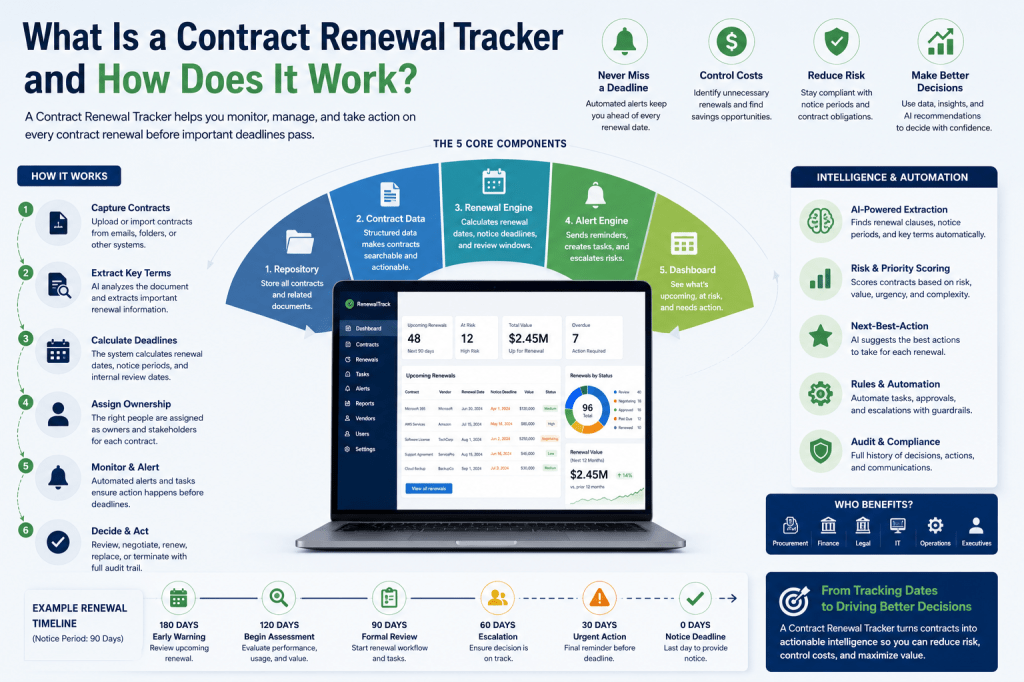
What Is a Contract Renewal Tracker?
A Contract Renewal Tracker is software that helps organizations monitor contracts approaching renewal, expiration, termination, extension, or renegotiation.
At a basic level, the system records:
- contract names;
- counterparties;
- contract owners;
- effective dates;
- expiration dates;
- renewal dates;
- renewal terms;
- notice periods;
- notice deadlines;
- contract values; and
- renewal statuses.
The tracker then monitors these dates and alerts responsible people before action is required.
A more advanced system can also manage:
- contract documents;
- renewal clauses;
- automatic renewals;
- approval workflows;
- renewal tasks;
- supplier information;
- risk scores;
- priority scores;
- renewal recommendations;
- audit histories;
- automated policies; and
- AI-assisted contract analysis.
The fundamental objective is to ensure that important renewal decisions happen before contractual deadlines remove the organization’s options.
A Contract Renewal Tracker Is More Than a Calendar
It is tempting to think of contract renewal tracking as calendar management.
For example:
Contract A renews on September 30.
Contract B expires on November 15.
Contract C renews on January 1.
Those dates are useful, but they don’t tell the entire story.
Consider this contract:
Contract: Enterprise Software Agreement
Expiration: December 31
Automatic renewal: Yes
Renewal term: 12 months
Notice requirement: 90 days
Annual value: €150,000
If the organization waits until December to decide whether it wants to renew, it may already be too late.
The important operational date isn’t December 31.
It is the notice deadline.
And the organization’s internal decision date should probably be earlier still.
The renewal tracker therefore needs to understand the relationship between multiple dates.
The Core Renewal Timeline
A simplified contract renewal timeline might look like this:
Contract Start
↓
Active Contract Period
↓
Internal Review Window Opens
↓
Renewal Assessment
↓
Renewal Decision
↓
Notice Deadline
↓
Negotiation / Termination / Renewal
↓
Current Term Ends
↓
New Term or Contract Closure
This timeline is what the Contract Renewal Tracker monitors.
The system isn’t simply counting down to expiration.
It is monitoring the decision window surrounding the contract.
The Five Core Components of a Contract Renewal Tracker
Most renewal-tracking systems can be understood as five interconnected layers.
1. Contract Repository
The original agreement and related documents are stored or referenced.
2. Structured Contract Data
Important information is extracted from the document and stored as searchable data.
3. Renewal Engine
The system calculates renewal dates, notice deadlines, review windows, and other important milestones.
4. Workflow and Alert Engine
The correct people receive tasks, reminders, escalations, and approval requests.
5. Renewal Dashboard
Users can see which contracts require attention and what actions are outstanding.
More sophisticated platforms add a sixth layer:
6. Intelligence Layer
AI, scoring, recommendations, semantic search, and automation help determine which renewals matter most and what should happen next.
Let’s examine each layer.
1. The Contract Repository
Everything starts with the contract itself.
A Contract Renewal Tracker should provide a reliable way to associate the renewal record with the underlying agreement.
Documents might include:
- original contract;
- master service agreement;
- statement of work;
- order form;
- amendments;
- addenda;
- pricing schedules;
- service-level agreements;
- renewal letters;
- termination notices; and
- subsequent versions.
This matters because renewal information isn’t always contained in a single document.
For example, the original agreement may say:
Initial term: 36 months.
An amendment signed two years later may change the expiration date.
A later order form may change pricing.
A renewal letter may modify the next renewal period.
The system therefore needs to understand the current contractual position, not simply the original agreement.
2. Structured Contract Data
PDFs are useful for humans, but automation requires structured information.
Suppose a contract contains the following language:
The Agreement shall remain in effect for an initial period of twelve months and shall thereafter automatically renew for successive twelve-month periods unless either party provides written notice at least sixty days before expiration of the then-current term.
A human can read this.
Software needs the information converted into data.
For example:
Initial term: 12 months
Auto-renewal: Yes
Renewal period: 12 months
Notice period: 60 days
Notice type: Written notice
Once the information is structured, the tracker can calculate deadlines and automate actions.
Contract Metadata
A renewal tracker normally stores several groups of metadata.
Basic Information
- Contract ID
- Contract title
- Contract category
- Description
- Status
Counterparty
- Vendor
- Supplier
- Customer
- Partner
- Contact person
Dates
- Effective date
- Start date
- End date
- Renewal date
- Notice deadline
- Internal review date
Renewal Terms
- Automatic renewal
- Renewal period
- Notice period
- Termination requirements
- Renewal clause reference
Financial Data
- Monthly value
- Annual value
- Total contract value
- Currency
- Cost center
- Budget owner
Ownership
- Contract owner
- Business owner
- Department
- Procurement contact
- Legal contact
Together, these fields create the structured contract record used by the renewal engine.
3. The Renewal Engine
The renewal engine is where the system begins becoming more than a database.
Its job is to understand dates and contractual rules.
Consider:
Renewal date: December 31, 2026
Notice period: 90 days
The system can calculate the relevant notice deadline.
But it can go further.
Suppose company policy states:
All contracts worth more than €100,000 must enter formal review 180 days before the notice deadline.
Now the system can calculate an internal review date as well.
Conceptually:
Renewal Date
−
Contractual Notice Period
=
Notice Deadline
Then:
Notice Deadline
−
Internal Review Lead Time
=
Internal Review Date
This calculation transforms static contract information into an operational schedule.
Why the Notice Deadline Matters
One of the most common mistakes in contract renewal management is monitoring expiration dates while ignoring notice requirements.
Suppose a contract expires on:
December 31
but requires:
90 days’ notice
If the organization wants to terminate the agreement, the practical deadline is much earlier.
That means an alert saying:
Contract expires in 30 days.
may be almost useless.
A properly configured tracker should instead warn:
Notice deadline approaching in 30 days.
This distinction is fundamental.
The system should manage action deadlines, not merely document dates.
4. The Alert Engine
Once important dates have been calculated, the system needs to make sure somebody acts on them.
This is the role of the alert engine.
A simple alert configuration might be:
180 days before notice deadline
Early warning.
120 days
Prepare renewal review.
90 days
Create renewal assessment.
60 days
Escalate unresolved renewal.
30 days
Urgent warning.
7 days
Critical escalation.
These intervals should be configurable.
A €500 subscription and a €2 million outsourcing agreement should not necessarily use the same workflow.
Alerts Should Be Risk-Based
A more advanced system can determine alert frequency based on contract characteristics.
For example:
Low Risk
30-day notification.
Medium Risk
60- and 30-day notifications.
High Risk
180-, 120-, 90-, 60-, and 30-day notifications.
Critical
Custom monitoring and management escalation.
This reduces alert fatigue while ensuring strategically important contracts receive appropriate attention.
5. Contract Ownership
Alerts are useless if nobody knows who should respond.
Every important contract should therefore have an owner.
The owner might be:
- IT manager;
- procurement manager;
- finance manager;
- department head;
- account manager;
- operations manager; or
- another designated employee.
The system might record:
Contract Owner: Sarah
Department: IT
Procurement Reviewer: David
Finance Approver: Maria
Legal Reviewer: Required if terms change
Now the system knows where to route tasks.
Renewal Tasks
When a review window opens, the tracker can automatically create tasks.
For example:
Task 1
Review current contract usage.
Task 2
Evaluate supplier performance.
Task 3
Confirm business requirement.
Task 4
Review pricing.
Task 5
Check available alternatives.
Task 6
Determine renewal recommendation.
The renewal process becomes repeatable rather than improvised.
6. Renewal Workflow
A contract shouldn’t simply be marked:
Renewed: Yes/No
There is usually a decision process.
A useful workflow could look like:
Upcoming
↓
Review Required
↓
Under Review
↓
Decision Required
↓
One of:
Renew
Renegotiate
Replace
Terminate
Extend
↓
Approval
↓
Execution
↓
Completed
This creates a renewal pipeline that management can monitor.
Renewal Decisions
A structured renewal decision should capture more than the outcome.
For example:
Recommendation: Renegotiate
Reason: Price increase
Current annual value: €85,000
Proposed renewal: €102,000
Supplier performance: Acceptable
Usage: 72%
Alternative available: Yes
Decision owner: IT Director
Approval required: Procurement + Finance
This information creates context around the decision.
It also becomes valuable historical data.
7. Approval Workflows
Some renewals require formal approval.
The tracker can determine approval requirements according to rules.
For example:
Contract value < €10,000
Contract owner approval.
€10,000–€50,000
Department manager approval.
€50,000–€250,000
Department + Procurement + Finance.
Above €250,000
Executive approval.
Additional conditions can also apply.
For example:
If contract terms change, send to Legal.
Or:
If supplier risk is High, require Procurement review.
This creates controlled, auditable renewal governance.
8. Renewal Dashboard
A renewal tracker should make the current situation understandable within seconds.
A dashboard might display:
Upcoming Renewals
Next 30 days: 8
Next 60 days: 17
Next 90 days: 31
Next 12 months: 146
Financial Exposure
Renewal value next 90 days: €1.2 million
Auto-renewal exposure: €420,000
Contracts under negotiation: €310,000
Workflow Status
Review required: 14
Under review: 11
Awaiting approval: 7
Negotiating: 6
Completed: 23
Risk
Critical: 2
High: 9
Medium: 26
Low: 74
The dashboard changes the question from:
Where are our contracts?
to:
What needs our attention?
How Does a Contract Enter the System?
There are several possibilities.
Manual Entry
A user creates the contract record and enters the renewal information.
This is simple and reliable for smaller portfolios.
Spreadsheet Import
Existing contract inventories can be imported from Excel or CSV.
This is useful when migrating from a manual tracker.
Contract Upload
A user uploads the contract document.
The system stores the file and associates it with a contract record.
AI-Assisted Intake
A more advanced system analyzes the uploaded document and proposes extracted information.
For example:
Contract detected: Software Subscription Agreement
Vendor: CloudTech Ltd.
Effective date: March 1, 2026
Initial term: 12 months
Auto-renewal: Yes
Renewal period: 12 months
Notice period: 60 days
Confidence: 94%
The user verifies the information before activating the renewal record.
This human-review step is important because contract interpretation can have legal and financial consequences.
How AI Finds Renewal Clauses
Traditional extraction often relies on keywords.
Search for:
renewal
and return nearby text.
That approach has limitations.
Contracts may use terminology such as:
- successive term;
- extension period;
- continuation;
- evergreen;
- additional term;
- subsequent term; or
- automatic extension.
Semantic retrieval can search for the meaning of renewal provisions rather than relying exclusively on exact words.
A modern pipeline might therefore be:
Upload Contract
↓
Extract Text
↓
Split Document into Sections
↓
Create Embeddings
↓
Retrieve Renewal-Relevant Sections
↓
Analyze Clauses
↓
Extract Structured Terms
↓
Show Supporting Evidence
↓
Human Verification
↓
Create Renewal Record
This makes large contract portfolios much easier to process.
Why Evidence Matters
Suppose AI determines:
Notice period: 90 days
A user should be able to see exactly why.
For example:
Source: Section 14.2 — Term and Termination
“…unless either party provides notice…”
The interface can highlight the relevant passage.
This allows users to verify AI-generated information against the actual contract.
An important design principle is:
AI extraction should be evidence-grounded.
The system shouldn’t simply provide an answer.
It should provide the answer and the contractual evidence supporting it.
Confidence Scores
AI-generated contract information can also include confidence.
For example:
| Field | Extracted Value | Confidence |
|---|---|---|
| Effective Date | Jan 1, 2026 | 99% |
| Renewal Term | 12 months | 97% |
| Notice Period | 90 days | 95% |
| Auto-Renewal | Yes | 98% |
| Price Increase | CPI-based | 78% |
Low-confidence fields can automatically require manual review.
This creates a safer workflow.
From Alerts to Renewal Intelligence
Basic systems answer:
Which contracts renew soon?
More advanced systems can answer:
Which renewals are most important?
To do that, the tracker needs additional intelligence.
Renewal Risk Score
A Renewal Risk Score estimates how dangerous or problematic a renewal situation may be.
Inputs might include:
- days remaining;
- contract value;
- automatic renewal;
- supplier risk;
- missing owner;
- unresolved issues;
- price increases;
- poor service performance;
- missing documentation;
- unusual termination conditions; and
- incomplete renewal review.
For example:
Risk Score: 87/100 — HIGH
Reasons:
- €240,000 annual contract;
- auto-renews for 24 months;
- notice deadline in 38 days;
- supplier performance below target;
- renewal assessment incomplete.
This tells the user much more than a date alone.
Renewal Priority Score
The tracker can separately determine priority.
Priority might consider:
Urgency
How soon is action required?
Financial Impact
How much money is involved?
Risk
What happens if the renewal is mishandled?
Strategic Importance
How important is the contract to operations?
Complexity
How much time will replacement or renegotiation require?
The system can then generate a prioritized work queue.
Next-Best-Action Recommendations
Once the tracker understands the contract and business context, it can suggest actions.
For example:
Recommended next action: Start renegotiation
Why?
- Notice deadline in 82 days.
- Annual spend increased 14%.
- Utilization is 63%.
- Supplier performance remains acceptable.
- Comparable services are available.
- Current renewal decision is pending.
The user remains responsible for the business decision, but the system helps surface the evidence.
Rules-Based Automation
Not every action requires AI.
Many renewal processes are deterministic.
For example:
IF notice deadline is within 90 days
AND renewal status = Pending
THEN create renewal review.
Another rule:
IF annual value > €100,000
THEN require Finance approval.
Another:
IF auto-renewal = Yes
AND notice deadline < 30 days
AND decision = Pending
THEN escalate to department manager.
These are examples of a renewal rules engine.
Event-Driven Automation
The system can also react to events.
Examples include:
contract.created
contract.uploaded
renewal.detected
review.window.opened
notice.deadline.approaching
decision.created
approval.requested
approval.rejected
renewal.completed
contract.terminated
Each event can initiate one or more workflows.
For example:
Event: review.window.opened
↓
Check policy
↓
Create renewal assessment
↓
Assign owner
↓
Generate tasks
↓
Send notification
↓
Start SLA timer
The renewal process becomes proactive.
Scheduled Policies
Some checks should happen even when no event occurs.
For example:
Every morning:
Find contracts with notice deadlines within 90 days.
Every Monday:
Send managers their department’s renewal summary.
First day of every month:
Generate a 12-month renewal forecast.
Every night:
Identify overdue renewal tasks.
Scheduled policies complement event-driven automation.
Guardrails
Automation involving contracts requires controls.
A system shouldn’t automatically terminate a €5 million agreement simply because a rule fired.
Actions can therefore be divided into categories.
Safe to Automate
- calculate dates;
- create tasks;
- send reminders;
- generate reports;
- update internal scores.
Approval Required
- approve renewal;
- send external notices;
- accept pricing;
- modify contract terms;
- initiate termination.
Human Only
Certain legally or strategically significant actions may always require explicit human authorization.
This is guardrailed automation.
The Contract Renewal Tracker Data Flow
Putting everything together, a modern system might operate like this:
1. Contract enters system
↓
2. Document is stored
↓
3. Text is extracted
↓
4. Renewal clauses are retrieved
↓
5. AI proposes structured terms
↓
6. User verifies critical information
↓
7. Renewal engine calculates deadlines
↓
8. Monitoring begins
↓
9. Review window opens
↓
10. Workflow starts
↓
11. Risk and priority are calculated
↓
12. Recommendation is generated
↓
13. Human makes decision
↓
14. Approval workflow runs
↓
15. Action is executed
↓
16. Outcome is recorded
↓
17. Next renewal cycle begins
That is the full lifecycle behind what initially appears to be a simple “renewal tracker.”
An Example
Imagine an organization uploads a cloud-services agreement.
The tracker extracts:
Vendor: ExampleCloud
Annual value: €120,000
Start: January 1, 2026
Term: 12 months
Auto-renewal: Yes
Renewal: January 1, 2027
Notice period: 90 days
The system calculates the notice deadline and determines that company policy requires high-value contracts to enter review 180 days before that deadline.
When the review window opens, the system:
- creates the renewal assessment;
- assigns it to the IT contract owner;
- requests usage information;
- requests supplier-performance information;
- notifies Procurement;
- calculates risk;
- calculates priority; and
- places the contract on the renewal dashboard.
Suppose the analysis finds:
Usage: 58%
Price increase: 12%
Supplier performance: Good
Alternative products: Available
The system might recommend:
Renegotiate
with supporting reasoning:
Service remains operationally valuable, but utilization is significantly below contracted capacity and proposed pricing has increased 12%. Review license volume and pricing before accepting renewal.
The contract owner can accept, reject, or modify the recommendation.
The renewal tracker has therefore moved from:
Remember this date.
to:
Here is the decision you need to make, the evidence you need to consider, and the time available to act.
Contract Renewal Tracker vs Contract Lifecycle Management
A Contract Renewal Tracker and a full Contract Lifecycle Management platform can overlap, but their scope is different.
A traditional CLM platform may cover:
Contract request
↓
Drafting
↓
Negotiation
↓
Approval
↓
Electronic signature
↓
Repository
↓
Obligations
↓
Renewal
↓
Termination
A Contract Renewal Tracker focuses much more specifically on the post-signature renewal problem.
That narrower focus can be valuable.
Organizations may already have contracts stored in SharePoint, Google Drive, Dropbox, a document management system, or a CLM platform.
They may not need another contract-authoring platform.
They may simply need better answers to:
What’s renewing?
When do we need to act?
What’s the financial exposure?
Who owns the decision?
What should we do?
This creates a distinct product category around renewal intelligence.
Who Benefits Most?
A Contract Renewal Tracker becomes particularly useful for organizations managing substantial recurring contractual commitments.
Typical users include:
IT Teams
Software, cloud, hosting, cybersecurity and support contracts.
Procurement
Supplier agreements and vendor negotiations.
Finance
Recurring expenditure, budgeting and financial exposure.
Legal
Notice requirements, contractual terms and compliance.
Operations
Facilities, maintenance and service agreements.
Sales and Customer Success
Customer renewal opportunities.
Executives
Portfolio-level renewal risk and financial visibility.
The Three Levels of Contract Renewal Tracking
It is useful to think about renewal management as three maturity levels.
Level 1 — Tracking
Question: When does the contract renew?
Capabilities:
- contract records;
- dates;
- reminders;
- calendar;
- basic dashboard.
Level 2 — Management
Question: What needs to happen before renewal?
Capabilities:
- notice periods;
- owners;
- workflows;
- tasks;
- approvals;
- escalations;
- audit history.
Level 3 — Intelligence
Question: What should we do about this renewal?
Capabilities:
- AI contract extraction;
- semantic retrieval;
- risk scoring;
- priority scoring;
- recommendations;
- portfolio intelligence;
- workflow automation;
- predictive analysis.
This third level represents the larger opportunity.
From Contract Renewal Tracker to Renewal Intelligence Platform
The name Contract Renewal Tracker accurately describes the entry point.
Businesses need to track renewals.
But once contracts, dates, clauses, values, suppliers, decisions, and outcomes are structured, the system can do considerably more.
It can identify:
- contracts approaching dangerous deadlines;
- high-value automatic renewals;
- underused subscriptions;
- suppliers requiring renegotiation;
- contracts without owners;
- unusual renewal provisions;
- increasing renewal costs;
- delayed decisions;
- concentrated vendor exposure; and
- potential savings opportunities.
The tracker becomes an intelligence layer across the contract portfolio.
Final Thoughts
A Contract Renewal Tracker works by connecting several pieces of information that are usually scattered across documents, spreadsheets, calendars, inboxes, and employees’ memories.
The core process is:
Capture the contract.
Understand the renewal terms.
Calculate the real deadlines.
Assign responsibility.
Monitor continuously.
Alert early.
Prioritize important renewals.
Support the decision.
Execute the appropriate workflow.
Record the outcome.
At its simplest, this prevents missed renewal dates.
At its most advanced, it creates a system capable of understanding contracts, identifying risks, recommending actions, orchestrating workflows, and helping organizations manage millions in recurring contractual commitments.
That is the difference between merely storing contracts and actively managing their renewal lifecycle.
Next in the Contract Renewal Tracker Series
Article 3 — Why Businesses Need a Contract Renewal Tracking System
The next article examines the business case for renewal management: accidental auto-renewals, missed notice periods, unnecessary SaaS expenditure, fragmented contract ownership, financial forecasting problems, compliance risk, negotiation leverage, and the hidden cost of managing contracts reactively.

