Excel is one of the most common tools used for contract renewal tracking.
And in many cases, that is perfectly reasonable.
A simple spreadsheet can track:
- supplier;
- contract value;
- start date;
- end date;
- renewal date;
- owner;
- notes.
For a small number of contracts, that may be all an organization needs.
The problem starts when the spreadsheet quietly becomes responsible for processes it was never designed to control reliably.
For example:
- calculating notice periods;
- sending reminders;
- escalating overdue actions;
- preserving ownership when employees leave;
- tracking approvals;
- maintaining audit evidence;
- reporting renewal exposure;
- monitoring auto-renewal risk.
At that point, the real question is no longer:
Can Excel store the contract data?
Of course it can.
The better question is:
Can Excel reliably control the renewal process as contract volume, financial exposure, and organizational complexity increase?
That is where the difference between a contract renewal spreadsheet template and dedicated Contract Renewal Tracker software becomes important.
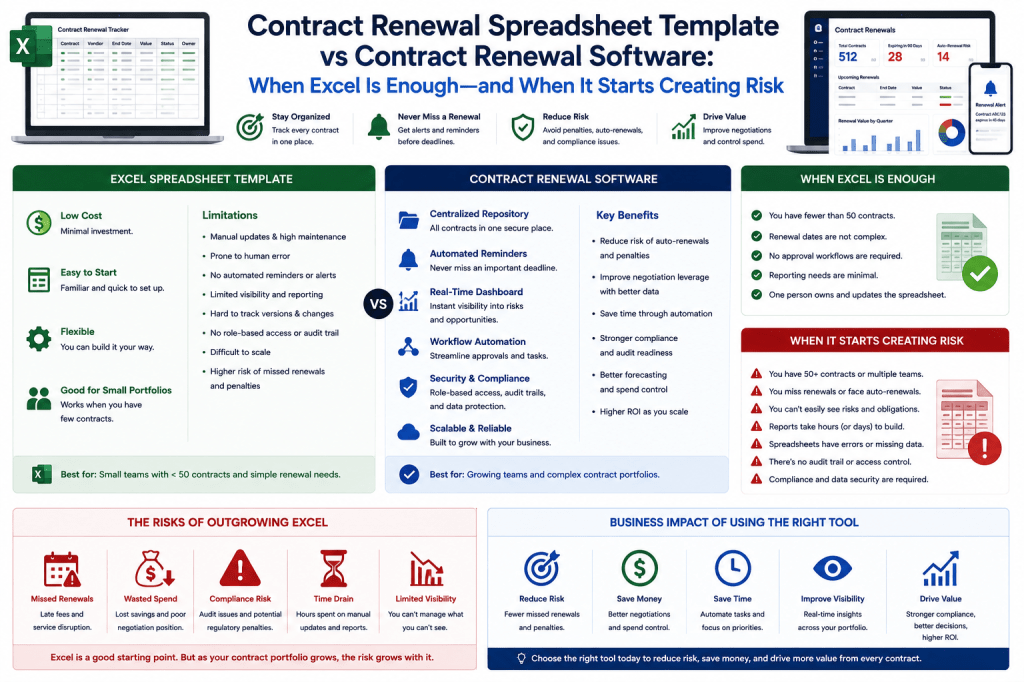
Excel Is Not the Problem
It is worth being clear about this.
Excel is an excellent tool.
It is flexible.
Widely understood.
Fast to deploy.
For many businesses, a well-designed spreadsheet is a perfectly sensible starting point for renewal management.
The mistake is assuming that because Excel works well as a table, it automatically works well as a workflow and control system.
Those are different requirements.
Wondering Whether You Really Need Contract Renewal Software?
If you have 20 relatively simple contracts and one person owns the process, a spreadsheet may be enough.
If you have hundreds of contracts, multiple owners, auto-renewal clauses, notice deadlines, approval workflows, and recurring supplier spend, the risk profile changes significantly.
Contract Renewal Tracker is designed for the point where renewal management needs to become an organizational process rather than a personal spreadsheet.
See when it makes sense to move beyond Excel →
What Can a Contract Renewal Spreadsheet Do Well?
A spreadsheet can be very effective at storing structured contract information.
For example:
| Supplier | Contract End | Notice | Owner | Value |
|---|---|---|---|---|
| ExampleCloud | Dec 31 | 90 days | IT | €120K |
| CyberSecure | Jun 30 | 120 days | Security | €250K |
| TelecomCo | Sep 30 | 60 days | Operations | €80K |
This immediately gives the organization more visibility than:
contracts scattered across email and shared drives.
Spreadsheet Advantage 1: Low Cost
If the organization already has:
Microsoft 365
or:
Google Workspace,
the incremental tool cost may be negligible.
That makes spreadsheets attractive for:
- startups;
- small businesses;
- low-volume portfolios.
Spreadsheet Advantage 2: Fast Setup
You can create a contract renewal register in:
minutes.
Typical columns include:
- supplier;
- contract name;
- expiration;
- notice period;
- owner;
- annual cost.
There is almost no implementation barrier.
Spreadsheet Advantage 3: Flexible
Users can add:
- columns;
- formulas;
- filters.
This makes spreadsheets excellent for early experimentation.
An organization can learn what information it really needs before adopting a dedicated system.
Spreadsheet Advantage 4: Familiarity
Most finance, procurement, and administrative users already know how to use Excel.
Training requirements are minimal.
That should not be underestimated.
Spreadsheet Advantage 5: Easy Export and Analysis
Excel is excellent for:
- ad hoc analysis;
- sorting;
- pivot tables.
Even organizations using dedicated renewal software will probably continue using spreadsheets for some analytical tasks.
The objective is not to eliminate Excel.
It is to stop relying on Excel for controls that require stronger workflow management.
When Is Excel Enough?
A spreadsheet may be completely adequate if most of the following are true:
- fewer than roughly 20–50 active contracts;
- one or two people manage renewals;
- contract values are relatively low;
- few contracts auto-renew;
- notice periods are simple;
- approval workflows are minimal.
In that environment:
dedicated software may create more complexity than value.
Example: Small Business
A 10-person consultancy has:
18 supplier contracts.
Most are:
simple SaaS subscriptions.
Annual supplier spend:
€30K.
One administrator owns everything.
A spreadsheet with calendar reminders may be sufficient.
There is no need to overengineer the process.
The Problem Is Growth
The spreadsheet often works well initially.
Then the portfolio grows.
20 contracts become:
100 become:
Ownership spreads across departments.
The contract register becomes:
an operational dependency.
That is where weaknesses begin to appear.
Warning Sign 1: You Are Tracking the End Date but Not the Notice Deadline
This is perhaps the most dangerous spreadsheet problem.
Suppose:
Contract End:
December 31.
Notice Period:
120 days.
The date that matters operationally is around:
early September.
If the spreadsheet only highlights December:
the organization may act too late.
A Formula Can Help
You can calculate:
Notice Deadline = Contract End − Notice Period
That is good.
But several complications remain.
For example:
- different notice periods;
- missing values;
- amendments;
- calendar rules.
The formula only works if the underlying data is correct.
Dedicated Software Advantage
Contract Renewal Tracker can store:
Contract End
Notice Period
Calculated Notice Deadline
and then automatically schedule actions around the deadline.
That turns a calculated field into an operational control.
Warning Sign 2: Reminders Depend on Manual Calendar Entries
A spreadsheet does not inherently notify users.
Someone must create:
- Outlook reminders;
- tasks;
- calendar events.
That introduces manual dependency.
What Happens When the Owner Leaves?
Suppose:
Sarah creates a reminder in Outlook.
Sarah leaves the company.
Her calendar is deactivated.
The contract still renews.
The organizational control disappeared with the employee.
This is a structural weakness.
Dedicated Software Advantage
A centralized system stores reminders against:
the contract.
Not:
an individual’s personal calendar.
When ownership changes:
the reminder remains.
This is a major difference.
Warning Sign 3: Nobody Knows Who Owns the Contract
A spreadsheet might say:
Owner:
IT.
That is not always enough.
Who inside IT is responsible?
If ownership is vague:
renewal action can stall.
Dedicated Software Advantage
Contract Renewal Tracker can assign:
Named Owner
and:
Department
Then track whether the owner has:
acknowledged
and:
completed
the renewal action.
This creates accountability.
Warning Sign 4: You Spend Time Chasing Owners
A common spreadsheet process is:
- Find contracts renewing.
- Email owner.
- Wait.
- Email again.
- Escalate manually.
This becomes time-consuming at scale.
Closed-Loop Reminder Difference
A spreadsheet can remind:
the administrator.
A renewal system can track:
Has the owner actually responded?
If not:
automatically escalate.
That is a major operational difference.
Example Workflow
90 days:
Owner notified.
75:
No response → reminder.
60:
No response → manager.
45:
Procurement escalation.
This is difficult to manage manually across hundreds of contracts.
Warning Sign 5: Multiple People Edit the Spreadsheet
Shared Excel or Google Sheets can support multiple users.
But complexity grows.
Common problems include:
- accidental deletion;
- inconsistent fields;
- overwritten values.
Version-Control Problem
Someone changes:
Notice Period:
120 → 90.
Later:
the team asks:
Who changed it and why?
Depending on the setup, reconstructing that may be difficult.
Dedicated Software Advantage
A renewal system can maintain:
Audit History
For example:
August 3.
Notice Period changed:
90 → 120.
User:
Legal Administrator.
Reason:
Amendment 3.
That creates traceability.
Warning Sign 6: You Have Multiple Spreadsheet Copies
This is particularly dangerous.
For example:
ContractList.xlsx
ContractList_Final.xlsx
ContractList_Final2.xlsx
ContractList_Updated_August.xlsx
Which is authoritative?
Once multiple copies circulate:
data divergence becomes almost inevitable.
Dedicated Software Advantage
One centralized system creates:
one operational source of truth.
Users can still export Excel.
But the export is not the master.
Warning Sign 7: Different Departments Maintain Separate Registers
Procurement has:
one spreadsheet.
IT:
another.
Legal:
another.
Finance:
another.
Now the organization may not know:
the total supplier exposure.
Example
IT records:
ExampleCloud — €400K.
Finance records:
another ExampleCloud contract — €250K.
Marketing:
€100K.
Total relationship:
€750K.
No individual spreadsheet shows it.
Dedicated Software Advantage
Contract Renewal Tracker can aggregate:
supplier families.
This reveals:
combined spend
and:
consolidation opportunities.
Warning Sign 8: Auto-Renewal Is Becoming Material
Suppose:
50 contracts contain automatic renewal.
Combined annual value:
€5M.
That is no longer merely an administrative problem.
It is a financial-control issue.
Spreadsheet Auto-Renewal Control
You can add:
Auto-Renew = Yes
and filter.
That helps.
But someone still needs to:
- inspect;
- make a decision;
- execute notice.
A dedicated system can make the status part of an active workflow.
At-Risk Auto-Renewal
A more useful system query is:
Show auto-renewing contracts above €100K with no decision and notice deadlines within 60 days.
This is much harder to operate reliably through manual spreadsheets.
Warning Sign 9: Contract Values Are Becoming Large
The higher the value:
the higher the cost of one mistake.
Suppose:
€25K contract.
Missed renewal:
annoying.
€1.5M contract.
Missed renewal:
potentially serious.
At higher values, stronger controls become easier to justify.
Risk Should Influence Tooling
The question is not only:
How many contracts?
It is also:
How much financial exposure is being controlled?
A business with 50 contracts worth:
€100M
may need stronger renewal governance than a business with:
500 contracts worth €500K total.
Warning Sign 10: You Need Approval Workflows
A spreadsheet can contain:
Approved = Yes
But structured approvals involve more.
For example:
- who approved;
- when;
- at what value;
- whether terms changed afterward.
This becomes difficult to govern in a spreadsheet.
Dedicated Software Advantage
Approval rules can be:
automatic.
For example:
<€50K:
Business Owner.
€50K–€500K:
Finance.
€500K:
CFO.
This keeps approvals consistent.
Warning Sign 11: You Need Legal Review
Legal may need to verify:
- notice clause;
- termination language;
- amendments.
A spreadsheet can record:
Legal Reviewed = Yes.
But it does not naturally coordinate the review process.
Workflow Difference
Dedicated software can create:
Legal Review Task
with:
deadline
and:
supporting documents.
This is much more structured.
Warning Sign 12: You Need Proof of Termination
Suppose:
the company decides to cancel.
The spreadsheet says:
Terminated
But:
where is the notice?
Who sent it?
When?
Was it received?
These questions matter.
Dedicated Software Advantage
A termination workflow can preserve:
- notice;
- delivery evidence;
- acknowledgment.
This turns termination from:
a status
into:
a defensible process.
Warning Sign 13: Reporting Takes Hours
A procurement manager may spend:
Friday afternoon
building:
next-quarter renewal report.
That usually indicates the system is no longer doing enough.
Common Manual Report
- copy spreadsheet;
- filter dates;
- calculate values;
- create PowerPoint.
Repeated every month.
This is administrative waste.
Dedicated Software Advantage
Dashboards can automatically show:
- renewal exposure;
- high-risk value;
- undecided spend.
No manual rebuild.
Warning Sign 14: Finance Wants a Forecast
A spreadsheet can forecast.
Excel is actually very good at financial modeling.
The issue is:
where does the forecast data come from?
If renewal decisions remain scattered:
the spreadsheet forecast becomes stale quickly.
Dedicated Software Advantage
When:
Renew
becomes:
Reduce,
the expected renewal spend changes automatically.
This keeps forecasts connected to operational decisions.
Warning Sign 15: Procurement Wants Savings Tracking
Suppose:
current spend:
€500K.
Supplier asks:
€600K.
Final:
€530K.
You may want to track:
Cost Avoidance: €70K
and:
Increase vs Current: €30K
This requires disciplined methodology.
Dedicated Software Advantage
Contract Renewal Tracker can maintain:
- current baseline;
- supplier proposal;
- final outcome.
Savings calculations then become repeatable.
Warning Sign 16: Supplier Consolidation Matters
If several departments buy from the same supplier:
the renewal system can identify:
combined spend.
A spreadsheet may contain that data.
But only if:
all contracts are already centralized
and:
supplier names are normalized.
That often does not happen.
Example
Microsoft Corp.
Microsoft Ireland.
Microsoft BV.
These may not group automatically.
Supplier-family normalization makes consolidation analysis more reliable.
Warning Sign 17: You Need User-Level Security
A shared spreadsheet may expose:
- pricing;
- negotiation strategy.
This may be acceptable for a small team.
Not necessarily for an enterprise.
Dedicated Software Advantage
Role-based access can restrict:
Legal terms.
Pricing.
Negotiation positions.
This is especially relevant for:
strategic contracts.
Warning Sign 18: You Need SSO and Access Governance
Enterprise IT may require:
- SSO;
- MFA;
- automatic deprovisioning.
This is not what a contract spreadsheet is designed to provide as an application layer.
Warning Sign 19: You Need an Audit Trail
Internal audit may ask:
Show who approved the renewal and which information they saw.
That becomes difficult if the process consists of:
spreadsheet + email.
A dedicated platform can preserve the sequence.
Warning Sign 20: Renewal Management Depends on One Person
This is one of the clearest signals.
If a key employee is absent and nobody knows:
- which contracts renew;
- which suppliers need notice;
the process is fragile.
Bus-Factor Risk
Ask:
If the contract administrator left tomorrow, could someone else reliably take over?
If the answer is:
No,
then the process needs more centralization.
Excel vs Contract Renewal Software Comparison
| Capability | Spreadsheet | Contract Renewal Tracker |
|---|---|---|
| Store contract data | Excellent | Excellent |
| Low initial cost | Excellent | Subscription required |
| Flexible analysis | Excellent | Good + export |
| Automatic reminders | Limited/manual | Yes |
| Notice deadline workflow | Formula/manual | Automated |
| Escalation | Manual | Automated |
| Ownership tracking | Basic | Structured |
| Approval workflow | Limited | Yes |
| Audit trail | Limited | Detailed |
| Termination evidence | Manual | Workflow-based |
| Executive dashboards | Manual | Automated |
| Supplier consolidation | Manual analysis | Portfolio intelligence |
| Spend forecasting | Possible | Connected to renewal state |
| Role-based access | Limited | Designed for it |
| AI assistance | External/manual | Integrated potential |
The spreadsheet remains a powerful tool.
The difference is:
operational control.
Do Not Buy Software Just Because You Have 51 Contracts
There is no magical threshold.
The decision should depend on:
- risk;
- complexity.
A Better Decision Framework
Consider five dimensions:
Contract Volume
How many active contracts?
Financial Exposure
How much annual spend?
Renewal Complexity
Auto-renewals, notice periods.
Organizational Complexity
How many owners, teams?
Governance Requirements
Approvals, audit, security.
As these increase:
the business case for dedicated software strengthens.
Simple Scoring Example
Score each:
1–5.
For example:
Contract Volume:
Financial Exposure:
Complexity:
Ownership:
Governance:
Total:
22/25.
This clearly suggests:
dedicated renewal management deserves consideration.
When Excel Is Probably Enough
Excel is likely still suitable when:
- portfolio is small;
- one person manages it;
- contracts are low risk;
- reminder volume is low;
- little reporting is required.
In that case:
keep the spreadsheet.
Improve the template.
Do not introduce unnecessary software.
When Contract Renewal Software Becomes Attractive
Consider dedicated software when:
- deadlines are being missed;
- reminders are manual;
- ownership is fragmented;
- approval/audit needs increase;
- spend becomes material.
These are operational signals.
Strongest Signal: You Have Already Lost Money
If the organization has already experienced:
- unwanted auto-renewal;
- missed cancellation notice;
the financial business case becomes much easier.
Example
Unwanted software renewal:
€85K.
Contract Renewal Tracker subscription:
€15K/year.
If the system prevents:
one similar incident,
it could cover several years of subscription cost.
This is a very understandable ROI story.
But Prevention Is Not the Only ROI
The software can also help identify:
- savings;
- license reduction;
- supplier consolidation.
Therefore, ROI should consider both:
risk avoidance
and:
spend optimization.
Example Combined ROI
Platform:
€20K/year.
Avoided renewal:
€70K.
License reduction:
€100K.
Negotiated hard savings:
€80K.
Tracked financial benefit:
€250K.
Value-to-cost:
12.5×
Actual results will depend on the portfolio.
Spreadsheet Administrative Cost
There is also hidden labor cost.
Suppose:
administrator spends:
8 hours/week
maintaining:
- spreadsheet;
- reminders;
- reports.
Annual:
416 hours.
At:
€50/hour:
€20,800
That alone may approximate the cost of a SaaS subscription.
Avoid Fake ROI
Do not assume every hour is fully eliminated.
A better argument is:
the platform reduces:
low-value administration
and:
reallocates time toward actual renewal decisions.
That is more credible.
Spreadsheet Template as an Entry Point
A good commercial strategy for Contract Renewal Tracker may actually include:
a free contract renewal spreadsheet template.
This may sound counterintuitive.
It is not.
Why Offer a Free Template?
People searching:
contract renewal spreadsheet template
may be early in the buying journey.
Give them:
a useful tool.
Then explain:
when the template begins to break down.
This builds trust.
Free Template → SaaS Funnel
The progression could be:
Download Free Template
↓
Use Spreadsheet
↓
Import into Contract Renewal Tracker
This creates a natural acquisition funnel.
Free Contract Renewal Template Fields
A downloadable template could contain:
- supplier;
- contract owner;
- annual value;
- start date;
- end date;
- notice period;
- notice deadline;
- auto-renewal;
- next action.
This is useful even before someone buys.
Add Conditional Formatting
For example:
Red:
Notice deadline <30 days.
Amber:
<60.
Green:
That makes the spreadsheet genuinely valuable.
Then Explain the Limit
The spreadsheet can highlight:
red.
But it cannot ensure:
someone actually acts.
That is where Contract Renewal Tracker enters the story.
Spreadsheet Import Should Be Frictionless
A prospect should be able to move from:
Excel
to:
Contract Renewal Tracker
without rebuilding everything manually.
Import:
CSV / XLSX.
Map columns.
Validate.
Go live.
This reduces buying resistance.
Ideal Product-Led Conversion
A stronger funnel might be:
- Upload spreadsheet.
- Contract Renewal Tracker analyzes it.
- Show:
- missing deadlines;
- contracts renewing soon;
- potential duplicates.
- Prospect sees immediate value.
- Offer subscription to activate:
- monitoring;
- workflows.
This is a very strong SaaS onboarding concept.
Example Free Spreadsheet Health Check
Upload:
400 contracts.
Result:
Contracts with Missing Notice Period
Renewals Within 90 Days
Missing Owners
Potential Auto-Renewal Exposure
€1.4M.
Now the prospect understands the problem using their own data.
That is much more persuasive than a generic product demo.
The Sales Message Should Not Attack Excel
This is important.
Do not say:
Excel is terrible.
Prospects may like Excel.
A better message:
Excel is a good place to start. Contract Renewal Tracker becomes valuable when the renewal process needs automation, accountability, and control that a spreadsheet was not designed to provide.
That feels much more credible.
Spreadsheet vs Software by Maturity
This connects directly with the maturity model.
Level 1
Excel.
Level 2+
Dedicated renewal software becomes increasingly useful.
That creates a natural progression.
Excel Does Not Need to Disappear
Even after adopting the SaaS:
users may still export data into Excel.
Finance will still use spreadsheets.
Procurement will still use them.
The change is:
Excel stops being the operational master for renewals.
Contract Renewal Tracker Becomes the Control Layer
Excel:
analysis.
Contract Renewal Tracker:
- dates;
- workflows;
- decisions;
- audit.
This is a sensible division.
A Hybrid Model
Some organizations may use:
CLM for contract documents.
Contract Renewal Tracker for renewals.
Excel for ad hoc analysis.
That is completely reasonable.
The objective is not tool purity.
It is:
reliable renewal control.
Common Objection: “We Already Have a Shared Excel File”
Response:
That is fine if:
the process is working.
The more relevant questions are:
Are deadlines being missed?
Can you prove notices were delivered?
Can management see renewal exposure instantly?
If yes:
you may not need more software.
If no:
the spreadsheet is probably no longer sufficient.
Common Objection: “We Can Add Formulas”
Absolutely.
Formulas can calculate:
deadlines.
But formulas do not provide:
- workflow;
- escalation;
- auditability.
This is where the software difference sits.
Common Objection: “We Can Use Outlook Reminders”
Yes.
For a few contracts.
But at larger scale:
someone still needs to create and maintain them.
They remain:
personal controls.
Dedicated renewal software makes reminders:
system controls.
Common Objection: “Dedicated Software Is More Expensive”
It has an explicit subscription cost.
Excel may appear free.
But compare it against:
- administrative time;
- missed renewal risk.
The correct comparison is:
Total Cost of Process
not:
License Fee vs Spreadsheet Fee
Common Objection: “We Do Not Have Enough Contracts”
Then Excel may be the right choice.
This is important commercially.
A good SaaS should not be sold to customers who do not have enough pain to justify it.
That leads to better retention.
Contract Renewal Software Break-Even Calculation
A simple calculation:
Annual platform cost:
€20K.
Annual contract spend managed:
€10M.
Required improvement:
€20K ÷ €10M
=
0.2%
If the platform helps improve outcomes by more than:
0.2%
it has financially broken even.
Example at €50M Managed Spend
Platform:
€25K.
Break-even:
€25K ÷ €50M
=
0.05%
This illustrates why dedicated renewal management can have strong economics for larger portfolios.
Software Decision Checklist
A prospect should consider dedicated renewal software if they answer Yes to several of these questions:
- Have you missed a notice deadline?
- Do contracts auto-renew?
- Do multiple departments own contracts?
- Is management asking for renewal forecasts?
- Are approvals difficult to track?
- Is contract spend material?
- Do you need audit evidence?
- Are you manually chasing contract owners?
- Does reporting require spreadsheet consolidation?
- Would one unwanted renewal cost more than the software subscription?
The more yes answers:
the stronger the case.
A Simple Rule of Thumb
Stay with Excel while it gives you:
visibility and control.
Move to dedicated software when Excel gives you:
visibility without control.
That is perhaps the simplest distinction.
What Contract Renewal Tracker Adds Beyond the Spreadsheet
A dedicated platform can add:
Automated Notice Deadlines
Automated Reminders
Escalation
Workflow
Ownership
Approvals
Audit Trails
Termination Evidence
Portfolio Dashboards
Spend Optimization
The value comes from turning data into:
managed action.
Contract Renewal Tracker Is Not Just a More Expensive Spreadsheet
This distinction is important.
If the product only stores:
supplier
and:
renewal date,
there is little reason to pay for it.
The SaaS must add operational value through:
- automation;
- intelligence.
That should remain the product-development test.
Product Strategy Implication
Every major Contract Renewal Tracker feature should answer:
What does this do that a spreadsheet cannot do reliably at scale?
Examples:
Reminder engine:
yes.
Escalation:
yes.
Audit history:
yes.
AI portfolio Q&A:
yes.
Another manual text field:
probably not much differentiation.
This keeps the product focused.
Strong CTA for Spreadsheet Users
A highly relevant CTA is:
Already Have a Contract Renewal Spreadsheet?
Keep the work you have already done. Import your Excel or CSV register into Contract Renewal Tracker, validate the critical dates, assign owners, and activate automated renewal reminders without rebuilding your contract portfolio from scratch.
Import Your Contract Renewal Spreadsheet →
This is likely stronger than a generic “Buy Now” CTA.
Another Strong Conversion Offer
Free Contract Renewal Spreadsheet Risk Check
Upload your current spreadsheet and identify missing notice periods, unassigned owners, near-term renewal deadlines, and potential auto-renewal exposure before deciding whether dedicated software is right for you.
This could become a very strong lead-generation mechanism for the product.
Ready to Decide Whether Excel Is Still Enough?
Excel is an excellent contract renewal starting point.
For a small, low-risk portfolio:
it may be all you need.
But as the organization grows, the renewal process may begin requiring:
- automated deadlines;
- ownership;
- escalation;
- approvals;
- evidence;
- financial forecasting.
That is where Contract Renewal Tracker becomes useful.
Use Contract Renewal Tracker when you need to move from:
tracking contract information
to:
controlling renewal outcomes.
The objective is not to replace Excel everywhere.
It is to make sure the organization no longer depends on a spreadsheet to perform controls that have become financially or operationally important.
Start Your Contract Renewal Tracker Subscription →
Final Thoughts
The spreadsheet-versus-software decision does not need to be ideological.
Excel is excellent at:
organizing and analyzing data.
Dedicated renewal software should be better at:
automation, accountability, workflow, and control.
That creates a simple progression:
Few Contracts + Low Complexity
→ Spreadsheet.
Growing Portfolio + Shared Ownership
→ Structured Renewal System.
Material Spend + Governance
→ Dedicated Renewal Operations Platform.
For Contract Renewal Tracker, this is an especially important bottom-of-funnel topic because the prospect is no longer asking:
What is contract renewal management?
They are asking:
Is my current process good enough, or has the business case for dedicated software already arrived?
That is a much closer buying question.
Next Article in the Contract Renewal Tracker Series
Article 76 — “Best Contract Renewal Software: What Features to Look for in a Contract Renewal Tracking System”
This should be one of the strongest commercial-intent articles in the entire series. It can cover renewal reminders, notice-period calculations, workflow automation, auto-renewal tracking, ownership, approvals, termination management, dashboards, integrations, security, AI, implementation, pricing, evaluation criteria, demo questions, and a buyer scorecard.
Crucially, it can be written as a genuinely useful buyer’s guide while positioning Contract Renewal Tracker naturally against the selection criteria, making it highly suitable for visitors who are already researching software rather than merely learning about contract renewals.

