Contract renewal reminders sound simple.
A contract has an end date.
Someone gets an email before that date.
Problem solved.
Unfortunately, real renewal management is more complicated.
The date that matters may be the notice deadline, not the contract expiration date. The contract owner may ignore the reminder. The owner may have left the company. Legal may need time to verify the termination clause. Procurement may need several months to negotiate new pricing. A replacement supplier may not be ready in time.
This is why dedicated contract renewal reminder software should do more than send calendar alerts.
A capable system should help answer:
Which contract requires action, when does action need to happen, who owns it, what happens if they do not respond, and how does the organization know the renewal is actually under control?
That is the difference between a reminder tool and a real renewal-management platform.
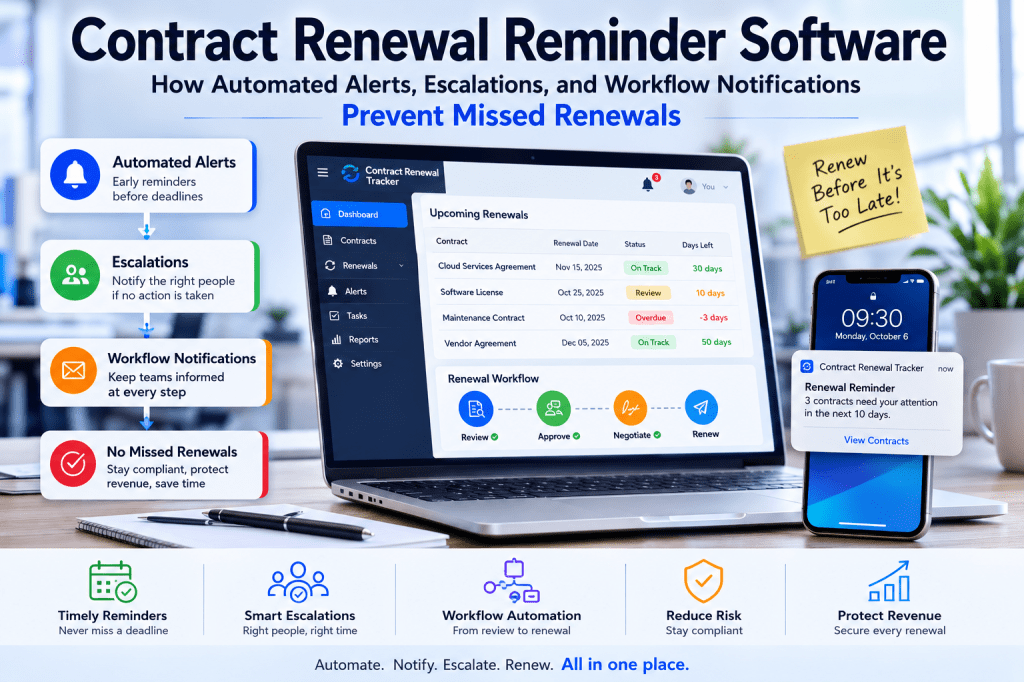
What Is Contract Renewal Reminder Software?
Contract renewal reminder software is a system that monitors upcoming contractual deadlines and automatically alerts the people responsible for taking action.
At a basic level, it may track:
- contract end dates;
- renewal dates;
- notice periods;
- contract owners.
More advanced software can also manage:
- multiple reminder stages;
- escalation;
- workflow status;
- approvals;
- auto-renewal risk;
- termination actions;
- management dashboards.
The goal is not simply:
send an email.
The goal is:
prevent a contract from becoming an unwanted commitment because nobody acted in time.
Still Using Calendar Reminders for Contract Renewals?
Calendar alerts can work for a small portfolio.
But once renewals are distributed across multiple owners, suppliers, departments, and contractual notice periods, reminder management becomes an operational process of its own.
Contract Renewal Tracker is designed to calculate important renewal deadlines, notify responsible owners, track whether action occurs, and progressively escalate unresolved renewals.
Automate your contract renewal reminders →
Why Contract Expiration Reminders Are Often Too Late
Suppose a software agreement expires:
December 31.
The contract requires:
120 days’ notice to terminate.
The commercially important date is therefore approximately:
early September.
A reminder sent:
30 days before December 31
does not protect the organization.
By then, the cancellation window may have been closed for months.
That is why serious renewal software must understand:
Contract End Date
and:
Notice Deadline
as different things.
The Notice Deadline Should Drive the Reminder Engine
A stronger renewal model is:
Contract End Date
↓
minus
Notice Period
↓
equals
Notice Deadline
Then reminders work backward from:
the notice deadline.
For example:
Notice deadline:
September 2.
Reminders:
- 180 days before;
- 120 days;
- 90 days;
- 60 days;
- 30 days.
This gives the organization enough time to make a real decision.
Reminder Software vs Calendar Alerts
Calendar reminders can tell one person:
Contract X is approaching renewal.
Dedicated reminder software can potentially answer much more:
Contract X is entering its notice window, the assigned owner has not completed the business review, the agreement auto-renews for another 12 months, and Procurement should now be escalated.
That is a fundamentally different level of control.
Problem 1: Personal Calendar Dependency
A common renewal process is:
- employee creates Outlook reminder;
- reminder appears months later;
- employee acts.
That sounds reasonable.
Until the employee:
- leaves;
- changes roles;
- loses ownership of the contract.
The reminder remains tied to:
the individual.
The contract remains tied to:
the organization.
This creates key-person risk.
How Dedicated Software Helps
The reminder should belong to:
the contract record
rather than:
someone’s personal calendar.
If ownership changes:
the contract remains monitored.
The new owner inherits:
the workflow.
This creates organizational continuity.
Problem 2: No Response Tracking
An email reminder may be sent successfully.
But that does not tell you:
whether the recipient did anything.
A good renewal system should distinguish:
Notification Sent
from:
Action Completed
That is critical.
Closed-Loop Reminder Management
A stronger workflow is:
Reminder Sent
↓
Owner Receives Task
↓
Owner Completes Review
or:
↓
Task Becomes Overdue
↓
Escalation
This is much more reliable than repeatedly sending generic emails.
Problem 3: Reminders Do Not Escalate
Suppose the owner ignores:
three reminder emails.
In a manual process:
someone in procurement or contract administration has to notice.
Then:
send another message.
Then:
perhaps contact the manager.
This becomes expensive at scale.
Automated Escalation
A renewal platform can define rules such as:
Day 0
Notify owner.
+5 Days
Reminder.
+10 Days
Manager escalation.
+15 Days
Procurement escalation.
This creates a predictable control mechanism.
Example Escalation Rule
IF renewal_review = OVERDUEAND overdue_days >= 7THEN notify_owner_manager
Another:
IF notice_deadline <= 30_daysAND renewal_decision = UNDECIDEDTHEN escalate_to_procurement
This is where software begins replacing manual chasing.
Problem 4: Every Contract Gets the Same Reminder Schedule
A €300 monthly tool
and:
a €10 million outsourcing agreement
should not necessarily follow the same timeline.
Strategic agreements may require:
a year of preparation.
Small subscriptions may need:
60 days.
Reminder software should support:
different policies.
Example Reminder Policies
Low-Value SaaS
60 / 30 / 15 days.
Standard Contract
120 / 90 / 60 / 30.
Strategic Contract
365 / 180 / 120 / 90 / 60 / 30.
This makes the reminder engine proportional to risk.
Contract Tiering
Contracts can be assigned:
Standard
High Value
Strategic
Then the appropriate reminder template is applied automatically.
This is easier than configuring each agreement independently.
Problem 5: Reminder Overload
Automation can create another problem:
too many notifications.
If every contract generates:
six emails,
users may stop paying attention.
That is known as:
alert fatigue.
The best reminder software should minimize noise.
Reminder Relevance
Do not continue sending:
Complete your renewal review.
if the review was already completed.
Workflow state should suppress:
obsolete reminders.
This sounds simple.
But it is an important difference between:
calendar automation
and:
workflow-aware reminder automation.
Routine vs Critical Notifications
Not all alerts need the same delivery model.
Routine actions might appear in:
a weekly digest.
Critical deadlines should trigger:
immediate notification.
For example:
Routine
Three renewals require review this week.
Critical
€800K auto-renewing contract has 12 days remaining and no decision.
The second deserves much greater visibility.
Daily or Weekly Renewal Digest
A digest might say:
Your Renewal Actions
3 business reviews due.
2 supplier negotiations waiting.
1 approval required.
This can reduce inbox clutter.
Critical Alerts Should Bypass the Digest
A contract with:
10 days remaining
should not wait until:
Friday’s weekly summary.
Critical renewal risk should be:
real-time or near real-time.
Problem 6: Missing Contract Owner
A renewal deadline may approach while:
Owner = blank.
A simple reminder engine has nobody to notify.
Dedicated software should identify this as:
a data-quality and governance issue.
Missing Owner Alert
For example:
Owner Missing — High Risk
Contract:
Cybersecurity Agreement.
Value:
€400K.
Notice Deadline:
47 days.
Now Contract Operations can intervene.
Ownership Queues
If a permanent owner is unknown, the system could temporarily assign:
IT Procurement Queue
or:
Contract Operations Queue
This prevents the contract from becoming invisible.
Problem 7: Owner Has Left
A more advanced system can connect with:
identity data.
If an owner becomes inactive:
their contracts can enter:
Reassignment Required
This is a powerful enterprise control.
Example
User:
John Smith.
Status:
Inactive.
Contracts Owned:
System action:
- flag records;
- notify administrator;
- suspend reminders to inactive account;
- require reassignment.
This is much safer than waiting for an email bounce.
Problem 8: Auto-Renewing Contracts Need Stronger Alerts
An ordinary fixed-term expiration may create:
an upcoming decision.
An auto-renewing contract may create:
an automatic financial commitment if nobody acts.
Therefore, it deserves stronger monitoring.
Auto-Renewal Risk Rule
For example:
IF auto_renewal = TRUEAND renewal_decision = UNDECIDEDAND notice_deadline <= 60_daysTHEN renewal_risk = HIGH
Then:
IF notice_deadline <= 30_daysTHEN renewal_risk = CRITICAL
This makes reminder intensity risk-aware.
At-Risk Auto-Renewal Dashboard
A useful dashboard could show:
Auto-Renewing Contracts
Annual Value
€8.2M.
Entering Notice Window
€2.4M.
Undecided
€650K.
That gives management much stronger visibility.
Problem 9: Reminders Are Disconnected from the Renewal Decision
A contract reminder should eventually lead to:
a decision.
A platform should capture:
Renew
Renegotiate
Reduce
Replace
Extend
Terminate
Once a decision exists, notifications should change.
Example
Decision:
Renew.
Next notification:
Procurement negotiation.
Decision:
Terminate.
Next notification:
Legal notice preparation.
This creates workflow-aware communication.
Renewal Status Should Drive Notifications
For example:
Not Started
Notify owner.
In Review
No generic reminder unless overdue.
Negotiating
Notify procurement.
Approval
Notify approver.
Completed
Stop renewal reminders.
This prevents irrelevant notifications.
Problem 10: Approvals Can Become the Bottleneck
Even if the renewal decision is complete:
Finance or management approval may remain outstanding.
The reminder system must therefore monitor:
the whole workflow,
not only:
business-owner action.
Approval Reminder
For example:
Finance approval for the €650K renewal has been pending for seven days. The notice deadline is 24 days away.
This provides real urgency and context.
Approval Escalation
Rules might include:
3 days overdue:
remind approver.
7 days:
manager.
10 days:
workflow owner.
Again, the correct policy depends on the organization.
Problem 11: Legal Review Can Be Time-Critical
For termination or complex renewals:
legal review may need to verify:
- notice clause;
- amendments;
- notice recipient;
- required delivery method.
That work needs its own deadlines.
Legal Reminder Example
Legal verification required for the termination notice. Contractual notice must be delivered within 21 days.
This helps prevent legal review from occurring after the commercial decision is already too late.
Problem 12: Termination Requires More Than a Reminder
Suppose the owner receives:
Contract should be terminated.
The process is not complete.
The organization may still need to:
- prepare notice;
- obtain approval;
- send it;
- prove delivery.
Reminder software becomes much more valuable when it tracks these steps.
Termination Workflow Alerts
For example:
Termination Approved
↓
Notify Legal.
↓
Notice Drafted
↓
Notify Signatory.
↓
Notice Sent
↓
Await Delivery Evidence.
↓
Delivery Confirmed
This creates defensible execution.
Failed Delivery Alert
If delivery fails:
the system should immediately escalate.
For example:
Critical: termination notice returned undelivered. 6 days remain before contractual deadline.
This is much more useful than a static reminder.
Problem 13: Supplier Replacement Creates a Different Reminder Sequence
If the decision is:
Replace,
the main risk may not be:
notice delivery.
It may be:
replacement readiness.
The reminder software should monitor:
transition milestones.
Replacement Reminder Example
Replacement go-live remains unconfirmed. Incumbent contract ends in 45 days.
This signals potential bridge risk.
Transition Buffer
A useful metric is:
Incumbent End Date − Forecast Replacement Readiness
Positive:
buffer.
Negative:
predicted gap.
Example
Incumbent end:
December 31.
Replacement ready:
January 20.
Transition buffer:
−20 days
The system should make this visible before the organization faces disruption.
Problem 14: Financial Context Is Often Missing from Reminder Emails
Compare:
Your contract renews soon.
with:
Your €1.2M annual agreement enters its notice deadline in 30 days and still has no confirmed decision.
The second message is more likely to receive attention.
For material renewals, financial context matters.
Financial Fields in Reminders
Useful fields include:
- annual value;
- proposed renewal value;
- budget variance.
But do not overload:
routine business-owner notifications.
Use financial context when it improves decision-making.
Problem 15: Management Cannot See Which Reminders Are Failing
A manual process may send hundreds of emails without measuring:
which ones work.
Dedicated reminder software can measure:
Response Rate
Escalation Rate
Average Time to Action
This creates an improvement loop.
Reminder Response Rate
Formula:
Renewal Tasks Completed After Initial Reminder ÷ Total Reminder Tasks
For example:
82%.
This shows how often the first reminder works.
Escalation Rate
If:
30%
of all owner tasks require escalation,
you may have:
- poor owner data;
- weak notification timing;
- user-adoption issues.
That becomes actionable information.
Average Response Time
For example:
IT:
2.8 days.
Marketing:
8.7 days.
This may indicate where the process needs attention.
Deadline Protection Rate
A more important outcome metric:
Percentage of material renewals where required decision/action was completed before the contractual deadline.
This is much more meaningful than:
emails sent.
Reminder Software Should Measure Outcomes, Not Activity
Weak KPI:
2,300 emails sent.
Stronger KPI:
98.7% of material renewals reached a decision before the notice deadline.
That is the real business outcome.
Contract Renewal Reminder Software vs Outlook
Outlook is excellent for:
personal scheduling.
It is less suited for:
enterprise renewal governance.
The main limitations are:
- personal ownership;
- limited centralized escalation;
- weak portfolio reporting.
For a small number of contracts:
Outlook may be perfectly sufficient.
Contract Renewal Reminder Software vs Google Calendar
The same principle applies.
Calendar events can provide:
simple alerts.
But the organization still needs:
- workflow;
- ownership;
- completion tracking.
The calendar is a scheduling tool.
Not necessarily a renewal control system.
Contract Renewal Reminder Software vs Excel
Excel can calculate:
deadlines
and:
highlight rows.
But it does not naturally:
- track owner response;
- escalate inactivity;
- maintain role-based workflow.
Again:
excellent for visibility.
Less suited to closed-loop control at scale.
Contract Renewal Reminder Software vs CLM
CLM may already provide renewal alerts.
If those features satisfy your needs:
you may not need dedicated reminder software.
The real evaluation should be:
Can the current system provide the level of renewal control our organization needs without excessive complexity?
If yes:
use it.
If no:
a specialized renewal platform may make sense.
What to Look for in Contract Renewal Reminder Software
At minimum, evaluate:
- Contract end-date tracking.
- Notice-period tracking.
- Notice-deadline calculation.
- Automated reminders.
- Configurable schedules.
- Named ownership.
- Completion tracking.
- Escalation.
- Auto-renewal risk.
- Audit history.
These form the core.
Advanced Capabilities
More sophisticated platforms may also provide:
- workflow-aware notifications;
- owner reassignment;
- financial context;
- approval alerts;
- termination workflows;
- reminder analytics.
These become increasingly useful for larger portfolios.
Enterprise Capabilities
Enterprise customers may additionally require:
- SSO;
- RBAC;
- department-level access;
- identity integration;
- APIs;
- audit exports.
These are not reminder features specifically.
But they determine whether the software can operate safely across the organization.
Reminder Engine Architecture
Conceptually, a reminder engine can work from:
Contract Data
↓
Deadline Calculation
↓
Reminder Policy
↓
Workflow State
↓
Recipient
↓
Notification
↓
Action / Escalation
This is a useful way to think about product design.
Example Contract Data
End Date:
December 31.
Notice:
90 days.
Auto-Renew:
Yes.
Owner:
Sarah.
Annual Value:
€250K.
Deadline Engine
Calculates:
Notice Deadline:
October 2.
Policy Engine
Standard policy:
120 / 90 / 60 / 30.
Workflow Engine
Decision:
Undecided.
Therefore:
owner review remains active.
Notification Engine
At:
60 days:
send:
High-Priority Decision Reminder.
Escalation Engine
Owner fails to act.
After:
7 days.
Notify:
Manager.
That is the complete reminder lifecycle.
Reminder Template Variables
A scalable platform can populate:
{{contract_name}}
{{supplier_name}}
{{notice_deadline}}
{{days_remaining}}
{{annual_value}}
{{owner_name}}
This keeps notification templates reusable.
User-Configurable Templates
Customers may want to customize:
- subject;
- text;
- company terminology.
For example:
one organization uses:
Contract Owner.
Another:
Business Sponsor.
Templates should support this without custom development.
Default Templates Matter
Do not make new customers write:
20 emails
before they can use the product.
Provide sensible defaults.
For example:
90-Day Decision Reminder
30-Day Critical Warning
Manager Escalation
This improves time-to-value.
Reminder Localization
Global customers may eventually need:
- multiple languages;
- local date formats.
This is an enterprise enhancement.
It is not necessary for a first SaaS release.
Contract Renewal Tracker Beta and Reminder Automation
For the first Contract Renewal Tracker beta, the reminder engine should remain focused.
The essential promise should be:
Enter the contract dates and owner, and the system helps make sure the upcoming renewal becomes visible before action is due.
Reliability matters more than elaborate automation in the first release.
Beta MVP Reminder Features
I would prioritize:
1. End Date
Reliable.
2. Notice Period
Structured.
3. Notice Deadline
Calculated.
4. Contract Owner
Assigned.
5. Reminder
Automated.
6. Reminder Status
Visible.
Those six capabilities create real value.
Post-Beta Phase 1
Then add:
- multiple reminder stages;
- configurable schedules;
- escalation.
This turns basic reminders into closed-loop renewal control.
Post-Beta Phase 2
Add:
- workflow-aware notifications;
- approval reminders;
- termination alerts.
This expands beyond owner reminders.
Post-Beta Phase 3
Add:
- Teams/Slack;
- digests;
- identity-based reassignment;
- reminder analytics.
This creates a more mature enterprise notification platform.
AI and Contract Renewal Reminders
AI could eventually improve reminder prioritization.
For example:
17 renewal tasks are due, but these three represent 82% of financial exposure and should be handled first.
That can reduce cognitive overload.
AI-Generated Reminder Summaries
Rather than:
five separate messages,
AI could create:
You have five renewal actions today. Two are routine, two require pricing decisions, and one is Critical because an €800K auto-renewal enters its notice deadline in 12 days.
This could be a useful advanced feature.
AI Should Not Suppress Deterministic Critical Alerts
If a contractual deadline requires:
a mandatory warning,
AI should not decide:
the alert is unimportant.
Critical controls should remain:
deterministic.
AI can:
prioritize or summarize.
It should not undermine contractual deadline rules.
Reminder Rules Need Auditability
If a customer asks:
Why was this user notified?
The system should be able to explain:
- policy;
- date;
- status.
For example:
Reminder generated because contract entered the 60-day notice window and no renewal decision was recorded.
This is useful operational evidence.
Reminder Delivery History
A contract record could show:
August 1:
120-day reminder sent.
August 31:
90-day reminder sent.
September 5:
owner completed business review.
September 6:
future business-review reminders cancelled.
This creates a useful audit trail.
Renewal Reminder Dashboard
A strong dashboard might show:
Due Today
Overdue
Critical
Awaiting Owner
Awaiting Approval
This provides an operational work queue.
Executive Dashboard
An executive probably does not care about:
41 reminder emails.
They care about:
€1.8M at Critical renewal risk.
The platform should translate notification failures into:
financial exposure.
Example
Three critical contracts.
Total annual value:
€2.4M.
Two:
awaiting owner decisions.
One:
awaiting executive approval.
That is much more useful for management.
Reminder Software ROI
The value can come from several sources.
Avoided Unwanted Renewals
Potentially large.
Administrative Time
Less manual chasing.
Earlier Negotiations
Potential commercial benefit.
The strongest ROI often comes from avoiding:
one material mistake.
Example
Annual software cost:
€990.
Unwanted auto-renewal prevented:
€15K.
That one incident would represent:
more than 15× annual software cost.
This makes reminder automation economically easy to understand.
Administrative Example
Manual renewal chasing:
5 hours/week.
Annual:
260 hours.
At:
€50/hour:
€13K of labor capacity.
Even a partial reduction can support the business case.
Do Not Promise That Software Eliminates Missed Renewals
No system can guarantee:
a user will always act correctly.
A more credible promise is:
Reduce the risk of missed renewals by making deadlines, ownership, reminders, and escalation systematic and visible.
This is more defensible.
When Is Dedicated Reminder Software Worth It?
It becomes increasingly attractive when:
- many contracts auto-renew;
- contract values are material;
- ownership is distributed;
- employees change roles;
- administrators spend significant time chasing people.
These conditions indicate that renewal reminders have become:
an organizational process.
When Is a Calendar Still Enough?
If you manage:
10 contracts
and:
one person owns all of them,
a calendar may be entirely sufficient.
There is no need to overengineer.
Dedicated software should be adopted when:
the additional control creates enough value.
The Key Decision
Ask:
Do we merely need to remember dates, or do we need to manage what happens after the reminder?
If the answer is:
manage the response,
you are moving into dedicated renewal software territory.
Contract Renewal Tracker Beta Launch — September 21, 2026
Contract Renewal Tracker is launching its first SaaS beta on September 21, 2026. The beta is designed to help businesses replace fragmented spreadsheet and calendar reminders with a centralized view of contract end dates, notice periods, responsible owners, and upcoming renewal actions. As the platform develops, these foundations can support increasingly automated reminder schedules, escalations, workflows, and renewal intelligence. [Notify Me When the Beta Launches →] (One launch notification only — no newsletter or ongoing marketing messages.)
Lead Magnet Opportunity
This article could support a useful free download:
Contract Renewal Reminder Schedule Template
It could include:
- reminder policies by contract tier;
- escalation schedules;
- email templates;
- responsible roles.
This would appeal to organizations not yet ready for software.
Suggested CTA
Download the Contract Renewal Reminder Schedule
Get a practical 180-day, 120-day, 90-day, 60-day, 30-day, and escalation framework that you can use manually or adapt for automated renewal workflows.
Download the Free Reminder Schedule →
Commercial CTA
Then:
Ready to Automate the Schedule?
Contract Renewal Tracker can turn contract end dates and notice periods into monitored renewal actions so your team does not have to maintain every reminder manually.
Join the Contract Renewal Tracker Beta →
This creates a natural conversion path.
Ready to Automate Contract Renewal Reminders?
A reminder should never be the end of the process.
It should start:
the right action.
The most useful renewal software therefore connects:
Contract Date
↓
Notice Deadline
↓
Reminder
↓
Owner
↓
Task
↓
Escalation
↓
Decision
That is what transforms renewal reminders from:
personal memory aids
into:
organizational controls.
Contract Renewal Tracker is designed to build around that model.
Use it to progressively move from:
- spreadsheet dates;
- calendar alerts;
- manual emails;
toward:
- centralized deadlines;
- accountable ownership;
- automated reminders;
- visible renewal status;
- systematic escalation.
Start Your Contract Renewal Tracker Subscription →
Final Thoughts
Contract renewal reminder software should solve a very specific problem:
Important contractual commitments should not depend on somebody remembering to check a spreadsheet.
The first step is:
automating the reminder.
But the more valuable progression is:
Reminder
↓
Response Tracking
↓
Escalation
↓
Workflow
↓
Outcome
That is where dedicated renewal software becomes materially different from:
Excel;
Outlook;
Google Calendar.
For Contract Renewal Tracker, this is a particularly important commercial topic because reminder automation is likely to be one of the clearest reasons early customers move away from manual renewal management.
It is easy to understand.
Easy to demonstrate.
And directly tied to one of the most expensive recurring contract-management failures:
realizing too late that the deadline to act has already passed.
Next Article in the Contract Renewal Tracker Series
Article 88 — “Contract Expiration Reminder Software vs Contract Renewal Software: What Is the Difference?”
The next article can target another valuable commercial search distinction. It will explain why expiration alerts, notice deadlines, auto-renewals, renewal decisions, escalation, approvals, termination, and spend optimization are different capabilities.
This can help prospects who initially search for a simple contract expiration reminder tool understand when they actually need a broader Contract Renewal Tracker platform.

