Contract renewal management rarely operates in isolation.
The information required to make a good renewal decision may already exist across several systems.
Finance knows what the company actually spent.
Procurement knows the supplier relationship.
The CLM platform contains the contract.
Identity systems know whether the contract owner still works for the company.
Microsoft Teams or Slack is where employees already collaborate.
DocuSign may execute the final amendment.
ERP or AP systems may show whether negotiated savings are actually appearing on invoices.
That creates an important architectural question:
Should Contract Renewal Tracker replace all of these systems?
Usually, no.
A stronger product strategy is to make Contract Renewal Tracker the renewal operations layer connecting the systems organizations already use.
The platform can specialize in:
- renewal dates;
- notice periods;
- renewal workflows;
- ownership;
- risk;
- negotiation;
- approvals;
- alerts;
- savings;
- forecasting.
Other applications remain authoritative for the business domains they already manage.
That approach can make Contract Renewal Tracker easier to adopt because customers do not need to replace their entire technology stack simply to improve renewal management.
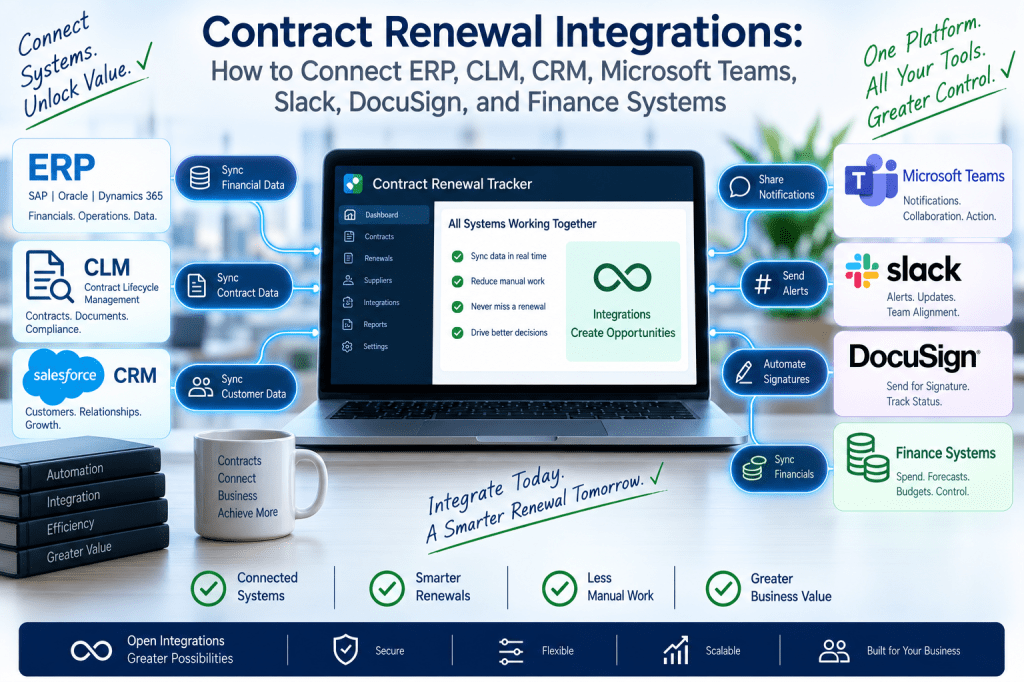
The Integration Problem
Without integrations, a renewal manager may need to manually collect information from:
CLM
Contract document and terms.
ERP
Supplier and spend.
Finance
Budget.
Identity
Contract owner.
Procurement
Supplier information.
Teams / Slack
Stakeholder communication.
E-Signature
Executed renewal.
Then someone copies that information into a spreadsheet.
That is inefficient and error-prone.
A connected Contract Renewal Tracker can automate much of this flow.
Already Have ERP, CLM, and Procurement Software?
You should not necessarily need to replace them.
Contract Renewal Tracker is designed to sit across the existing technology stack and coordinate the specific moment when an active contract approaches renewal.
Connect your existing systems and turn fragmented contract data into one renewal workflow →
Think of Contract Renewal Tracker as an Orchestration Layer
A useful architectural model is:
Systems of Record
↓
Contract Renewal Tracker
↓
Renewal Workflow
↓
Business Action
For example:
CLM supplies:
contract data.
ERP supplies:
actual spend.
Identity supplies:
owner status.
Contract Renewal Tracker combines them and decides:
This €620K contract enters its renewal process today.
That is orchestration.
Define the Source of Truth
One of the most important integration decisions is:
Which system owns each field?
Without a clear answer, synchronization can become chaotic.
For example:
Contract Document
CLM.
Actual Spend
ERP.
Employee Status
Identity Provider / HR.
Renewal Workflow Status
Contract Renewal Tracker.
Final Signature
E-Signature Platform.
The architecture should define these responsibilities explicitly.
Source-of-Truth Matrix
A typical model might look like:
| Data | Primary System |
|---|---|
| Contract document | CLM / Renewal Tracker |
| Supplier master | ERP / Procurement |
| Actual spend | ERP |
| Renewal deadline | Contract Renewal Tracker |
| Business owner | Contract Renewal Tracker / HR |
| Approval status | Contract Renewal Tracker |
| Signature status | E-Signature |
| Renewal risk | Contract Renewal Tracker |
| Savings | Contract Renewal Tracker + Finance validation |
This prevents data ownership disputes.
Do Not Create Two Masters for the Same Field
Suppose:
ERP says supplier name:
Example Technologies BV.
Contract Renewal Tracker says:
Example Tech.
If users can freely edit both and synchronization flows both ways, conflict becomes inevitable.
One system should be authoritative.
The other can maintain:
display aliases
or:
normalized supplier groups.
Integration 1: CLM Systems
Many larger organizations already use Contract Lifecycle Management software.
The CLM may manage:
- contract authoring;
- redlining;
- clause libraries;
- executed documents;
- metadata.
Contract Renewal Tracker does not necessarily need to duplicate those capabilities.
Instead, it can consume the post-signature contract data needed for renewal operations.
CLM → Contract Renewal Tracker
Useful fields include:
- contract ID;
- supplier;
- effective date;
- end date;
- renewal clause;
- notice period;
- auto-renewal;
- document link.
When a contract becomes active:
the CLM sends it to Contract Renewal Tracker.
Renewal Tracker → CLM
After renewal, the platform may send back:
- renewal decision;
- revised dates;
- executed amendment reference;
- next renewal date.
This keeps both systems aligned.
Example CLM Integration
Agreement Signed in CLM
↓
Contract becomes Active.
↓
Webhook/event sent.
↓
Contract Renewal Tracker creates renewal record.
↓
Notice deadline calculated.
↓
180-day workflow scheduled.
This eliminates manual setup.
Avoid Duplicating the Entire Contract Repository
If the CLM is already the authoritative document system, Contract Renewal Tracker may simply store:
document reference
rather than another full copy.
This reduces duplication.
When Contract Renewal Tracker Stores the Contract
For customers without CLM, Contract Renewal Tracker may itself provide:
- document upload;
- extraction;
- renewal metadata.
This supports both:
standalone
and:
integrated
deployment models.
That flexibility can broaden the market.
Integration 2: ERP Systems
ERP data is especially important for financial context.
The contract may say:
Annual Value:
€500K.
But ERP may show:
Actual Spend:
€640K.
That discrepancy should influence the renewal review.
ERP Data Inputs
Useful data includes:
- supplier master;
- purchase orders;
- invoices;
- actual spend;
- cost centers;
- legal entity;
- currency.
This enriches the renewal record.
Contract Value vs Actual Spend
Example:
Contract Value:
€500K.
Actual Trailing-12-Month Spend:
€640K.
Variance:
+€140K
The system can alert:
Actual spend exceeds contracted annual value by 28%. Review scope and usage before renewal.
This is much more useful than relying solely on contract metadata.
Supplier Master Synchronization
ERP may own the official supplier record.
Contract Renewal Tracker can synchronize:
Supplier ID
Legal Name
Payment Entity
Then maintain its own:
Supplier Group
for analytics.
This combines legal precision with procurement intelligence.
Purchase Order Integration
After renewal approval:
Contract Renewal Tracker could initiate or request:
PO creation
in the ERP.
For example:
Renewal Approved
↓
Send approved value.
↓
ERP procurement workflow starts.
↓
PO ID returned.
↓
Renewal record updated.
This creates a complete execution chain.
Integration 3: Accounts Payable
Accounts payable systems can help verify whether negotiated terms are actually being realized.
Suppose:
Final contract:
€40K/month.
Invoices:
€44K/month.
The platform can flag a discrepancy.
Contract-to-Invoice Validation
Conceptually:
Negotiated Contract Price
vs:
Actual Invoice Run Rate
If variance exceeds threshold:
create finance review.
This helps detect:
- incorrect billing;
- savings leakage;
- unexpected fees.
Savings Realization
This is particularly useful after negotiation.
Contracted saving:
€80K/year.
AP data confirms:
new invoice level.
Result:
Savings Realized
This strengthens ROI reporting.
Integration 4: Finance and FP&A Systems
Finance planning data can add:
- budget;
- forecast;
- cost center;
- approved spending limit.
Contract Renewal Tracker can then compare:
Renewal Proposal
with:
Budget
Example Budget Integration
Budget:
€600K.
Supplier proposal:
€680K.
Procurement target:
€580K.
Final:
€590K.
Dashboard:
Budget variance:
−€10K
Now finance sees the renewal in planning context.
Budget Exception Trigger
If final value exceeds budget:
IF renewal_value > available_budgetTHEN finance_exception_required = TRUE
This can happen automatically using connected finance data.
Integration 5: Procurement Platforms
Organizations may already use sourcing or procure-to-pay systems.
These can provide:
- sourcing events;
- supplier data;
- procurement owner;
- negotiated pricing.
Contract Renewal Tracker can trigger sourcing when a renewal needs competitive review.
Renewal → Sourcing Event
For example:
Business decision:
Replace / Competitive Tender
↓
Contract Renewal Tracker creates sourcing request.
↓
Procurement platform runs RFP.
↓
Selected supplier returns.
↓
Renewal workflow continues.
This creates a clean handoff.
Procurement Platform Remains the Sourcing System
Contract Renewal Tracker does not need to become a complete sourcing application.
It only needs to know:
This renewal requires sourcing.
Then integrate with the specialist system.
That keeps product scope disciplined.
Integration 6: Microsoft Teams
Many employees already spend much of their workday inside Teams.
Requiring them to constantly check another application can reduce adoption.
Teams integration can bring renewal tasks directly into their existing workflow.
Example Teams Notification
Renewal Review Required
AnalyticsPro
Annual Value:
€180K.
Notice Deadline:
August 31.
Usage:
61%.
Action:
Review Renewal
The user clicks and opens the relevant workflow.
Teams Action Cards
A richer integration could support actions such as:
Review
Approve
Delegate
Open Contract
Care must be taken around high-risk actions.
Some decisions may require opening the secure application first.
Teams Channel Notifications
Procurement teams may also use dedicated channels.
For example:
#strategic-renewals
The tracker might post:
ExampleCloud negotiation has moved to Critical risk. Notice deadline in 21 days.
This supports collaboration.
Avoid Teams Noise
Do not mirror every in-app notification into Teams.
Instead:
Routine:
in-app/digest.
Action required:
Teams.
Critical:
Teams + escalation.
Integration should improve actionability, not duplicate noise.
Integration 7: Slack
Slack can serve a similar purpose.
Example:
Contract Renewal Action
Supplier: DataPlatform
Value: €240K
Decision due: Friday[Review] [Delegate]
This is particularly useful for technology companies and startups.
Slack Workflows
A Slack command might eventually allow:
/renewals mine
Then return:
- 3 actions required;
- 1 overdue;
- 2 upcoming.
This reduces friction.
Integration 8: DocuSign and E-Signature
Once approvals are complete, the renewal may need signature.
An e-signature integration can automate that transition.
Approval-to-Signature Workflow
All Required Approvals Complete
↓
Final document verified.
↓
Send to DocuSign.
↓
Authorized signatories notified.
↓
Signature completed.
↓
Executed document returned.
↓
Renewal closed.
This creates a clean end-to-end workflow.
Signature Guardrail
The integration should enforce:
IF required_approvals != COMPLETETHEN e_signature_request = BLOCKED
This prevents premature execution.
Signature Status
Useful statuses include:
Not Sent
Sent
Viewed
Partially Signed
Completed
Declined
Contract Renewal Tracker can display them.
Executed Document Retrieval
When signing completes:
the final document can be:
- attached;
- linked;
- versioned.
The system then recalculates:
- term;
- next renewal date;
- notice deadline.
This closes the lifecycle.
Integration 9: Identity Providers
Enterprise customers often use:
- Microsoft Entra ID;
- Okta;
- Google Workspace identity.
These systems can support:
- SSO;
- MFA;
- user lifecycle.
This is important for security and usability.
SSO
Users authenticate with the organization’s existing credentials.
Benefits include:
- fewer passwords;
- centralized authentication policy;
- easier offboarding.
For serious enterprise prospects, this can become a baseline requirement.
SCIM Provisioning
With SCIM:
new user joins procurement group.
↓
Account automatically created.
↓
Role and scope assigned.
Employee leaves.
↓
Access automatically removed.
This reduces administrative overhead.
Identity Group Mapping
For example:
Finance-Approvers-Europe
maps to:
Finance Approver
Region:
Europe.
This supports scalable permissions.
Integration 10: HR Systems
HR data can also solve a major contract-management problem:
inactive owners.
Suppose an employee leaves.
HR integration sends:
User inactive.
Contract Renewal Tracker identifies:
18 contracts owned by that employee.
Then starts reassignment.
Owner Departure Workflow
Employee Terminated
↓
Find Contracts.
↓
Find Open Renewal Tasks.
↓
Route to Manager.
↓
Assign Replacement.
This can prevent missed renewals.
Organizational Hierarchy
HR data can also provide:
- manager;
- department;
- business unit.
This supports escalation automatically.
Example
Contract owner fails to respond.
System knows manager from HR hierarchy.
Escalation does not require manual configuration.
Integration 11: SaaS Usage Systems
Software renewal decisions benefit enormously from actual usage data.
Possible integrations include:
- identity logs;
- SaaS management;
- application APIs.
The tracker can receive:
Purchased Seats
Assigned Seats
Active Users
Last Login
This supports license optimization.
Example
Purchased:
1,000.
Active:
Renewal:
90 days.
The system flags:
360 licenses may be available for review.
Procurement enters negotiation with much better information.
Usage Trend
Monthly usage can also show:
- growth;
- decline.
This helps distinguish:
temporary low usage
from:
structural underutilization.
Integration 12: IT Service Management
For strategic technology suppliers, ITSM systems can provide:
- incidents;
- SLA issues;
- service performance.
This information can influence renewal negotiations.
Supplier Incident Context
Example:
Supplier:
Managed Services Provider.
Critical incidents last year:
SLA breaches:
Renewal:
120 days.
Contract Renewal Tracker adds:
Performance Review Required
This links operational reality to commercial renewal.
Integration 13: Supplier Risk Systems
Third-party risk platforms may provide:
- security risk;
- financial health;
- compliance assessments.
Contract Renewal Tracker can consume these signals.
Risk Trigger Example
Supplier security rating deteriorates.
↓
Renewal risk increases.
↓
Security review added.
This makes risk dynamic.
Integration 14: CRM
For the primary buy-side product, CRM may not be a core requirement.
But some organizations maintain supplier relationships or account metadata in CRM-like systems.
And if Contract Renewal Tracker later supports customer renewals, CRM integration becomes much more important.
Buy-Side CRM Data
Possible fields:
- supplier account;
- relationship owner;
- contacts.
These can enrich the supplier profile.
Sell-Side CRM Extension
If the product eventually supports customer renewals:
CRM may remain authoritative for:
- customer;
- opportunity;
- contacts.
Contract Renewal Tracker could specialize in:
- contract renewal terms;
- notice;
- renewal workflow.
This keeps the architecture modular.
Integration 15: Email
Email integration can support more than notifications.
It could eventually allow users to:
- capture supplier proposals;
- associate relevant renewal correspondence.
For example:
forward supplier renewal quote to:
Contract Renewal Tracker.
The system associates it with the correct contract.
Be Careful with Email Scope
Ingesting entire mailboxes introduces:
- privacy;
- security;
- data volume.
A safer first implementation may use:
explicit forwarding
or:
approved mailboxes.
This keeps scope controlled.
Integration 16: Calendar
Calendar integrations can schedule:
- strategic renewal reviews;
- supplier negotiations;
- notice deadlines.
This is particularly useful for major renewals.
Renewal Meeting Creation
For example:
180-day milestone reached.
System creates:
Strategic Renewal Kickoff
Attendees:
business owner, procurement, vendor manager.
This turns workflow dates into real operational activity.
API-First Architecture
As customers become more sophisticated, they may want integrations the product does not provide natively.
A strong API can support that.
Typical API domains might include:
- contracts;
- suppliers;
- renewals;
- tasks;
- approvals;
- savings;
- risk.
This allows customers to build custom integrations.
Example API Use
Customer’s internal application creates a contract.
Calls:
POST /contracts
Contract Renewal Tracker receives:
- supplier;
- value;
- dates.
Then schedules the renewal automatically.
Webhooks
Webhooks allow Contract Renewal Tracker to tell other systems when something happens.
For example:
Renewal Approved
Renewal Completed
Contract Risk Critical
Owner Changed
These events can trigger external automation.
Example Webhook
event = "renewal.approved"contract_id = "CTR-1842"total_commitment = 1200000
The receiving ERP may then initiate:
purchase order creation.
Event-Driven Architecture
At larger scale, integrations work well when based on business events.
Examples:
ContractActivated
RenewalWindowEntered
RenewalDecisionMade
ApprovalCompleted
ContractExecuted
Different systems subscribe to the events they need.
Why Events Are Better Than Constant Polling
Without events:
System A repeatedly asks:
Has anything changed?
With events:
Contract Renewal Tracker says:
Renewal approved.
This is generally:
- faster;
- more efficient;
- easier to reason about.
Integration Direction
Each integration should define whether it is:
Inbound
External → Renewal Tracker.
Outbound
Renewal Tracker → External.
Bidirectional
Both.
Bidirectional synchronization should be used carefully.
Inbound Example
ERP → Contract Renewal Tracker:
Actual spend.
Outbound Example
Contract Renewal Tracker → Teams:
Action required.
Bidirectional Example
CLM ↔ Contract Renewal Tracker:
Renewal metadata.
Bidirectional sync requires conflict-resolution rules.
Integration Conflicts
Suppose CLM says:
End Date:
December 31.
Contract Renewal Tracker says:
March 31.
Which wins?
The system should not silently choose.
It should create:
Synchronization Conflict
for review.
Conflict Policy
For example:
CLM owns:
Executed contract end date.
Therefore:
CLM wins.
But:
Contract Renewal Tracker may store:
Internal Target Date
separately.
This avoids unnecessary conflict.
Reconciliation
Integrations will occasionally fail or drift.
The platform needs reconciliation processes.
For example:
ERP supplier count:
2,420.
Renewal Tracker:
2,416.
Mismatch:
The system should identify discrepancies.
Integration Health Dashboard
A useful admin dashboard might show:
CLM
Healthy.
Last Sync:
5 min ago.
ERP
Healthy.
HR
Warning — 12 failed records.
DocuSign
Healthy.
Teams
Healthy.
This makes integrations operationally manageable.
Failed Record Queue
Do not hide errors in technical logs.
For example:
Failed Sync
Contract CTR-521.
Reason:
Unknown supplier ID.
Action:
Resolve Mapping.
This allows administrators to fix issues.
Retry Strategy
Transient failures can retry automatically.
For example:
API timeout.
Retry:
1 minute.
Then:
5 minutes.
Then:
30 minutes.
After threshold:
administrator alert.
This creates resilient integrations.
Dead-Letter Queue
For event-driven architectures, messages that repeatedly fail can move into:
dead-letter queue
for investigation.
This prevents one bad record from stopping the entire integration pipeline.
Idempotency
Integration endpoints should avoid duplicate processing.
Suppose the same:
renewal.completed
event is delivered twice.
The receiving system should not create:
two purchase orders.
Idempotency is essential.
Integration Audit Trail
Every synchronization action should be traceable.
For example:
August 12 09:14.
ERP updated actual spend:
€520K → €548K.
Integration:
SAP Connector.
This helps troubleshooting.
Manual vs Integrated Data
The UI should indicate:
Source
For example:
Actual Spend:
€548K.
Source:
ERP.
Last Updated:
8 minutes ago.
This builds user trust.
Stale Data
If the ERP has not synchronized for:
3 days,
the system should not display the information as though it were current.
Show:
Last Sync
and potentially:
Data Stale
This is especially important for financial and usage data.
Integration Monitoring
Useful metrics include:
- success rate;
- failure rate;
- latency;
- records processed;
- stale connections.
This supports enterprise operations.
Security of Integrations
Integrations create access paths to sensitive systems.
Security controls should include:
- least privilege;
- secret management;
- encryption;
- rotation;
- audit logs.
Do not give the integration more access than necessary.
OAuth
For SaaS integrations such as:
Teams
or:
Slack,
OAuth can provide controlled authorization.
Users should know:
- what permissions are requested;
- why.
This helps build trust.
Service Accounts
ERP integrations may use dedicated service identities.
These should have only the permissions required.
For example:
read supplier spend
without:
administrative ERP access.
Secret Rotation
API keys and credentials should support rotation without major downtime.
This is an important enterprise operational requirement.
Integration Data Minimization
Do not pull more information than Contract Renewal Tracker actually needs.
For example:
If the platform needs:
supplier spend,
it may not need:
every invoice attachment.
This reduces:
- privacy risk;
- storage;
- complexity.
Tenant Isolation
In a multi-tenant SaaS, integration credentials and data must remain tenant-specific.
Company A’s ERP connection can never be used for Company B.
This is a fundamental security requirement.
Regional Integration Constraints
Global organizations may have:
European ERP.
US ERP.
APAC ERP.
The platform may need separate connectors per:
- region;
- entity.
This supports federated architectures.
Integration Configuration by Tenant
Each customer may decide:
which systems are connected
and:
which system owns which data.
The product should not assume one universal architecture.
Integration Templates
To make setup easier, Contract Renewal Tracker could offer templates.
For example:
Microsoft-Centric
Entra ID + Teams + SharePoint + Dynamics/ERP.
Google-Centric
Google Identity + Drive + Gmail/Chat.
Enterprise CLM
CLM + ERP + DocuSign.
This accelerates onboarding.
Standalone Deployment
Smaller customers may not need integrations initially.
They can use:
- CSV import;
- email reminders;
- document upload.
Then add integrations later.
This keeps the entry barrier low.
Integration Maturity Model
A useful progression is:
Level 1 — Manual
CSV + uploads.
Level 2 — Productivity
Teams / Slack + SSO.
Level 3 — Financial
ERP + finance.
Level 4 — Contract Ecosystem
CLM + e-signature.
Level 5 — Intelligent
Usage + supplier risk + event-driven automation.
This allows the product to grow with the customer.
Integration Onboarding
A sensible implementation process is:
Step 1
Define source systems.
Step 2
Define data ownership.
Step 3
Map fields.
Step 4
Test synchronization.
Step 5
Reconcile data.
Step 6
Activate workflow triggers.
Do not start with every integration simultaneously.
Start with the Highest-Value Integrations
For many customers, the first three might be:
Identity
for ownership.
ERP
for spend.
Teams / Slack
for user adoption.
Then add:
CLM.
DocuSign.
Usage.
This delivers value incrementally.
Integration ROI
Suppose administrators spend:
20 hours/month
manually reconciling:
contract values, owners, and supplier information.
Automation reduces that to:
5 hours.
Time saved:
15 hours/month.
At €60/hour:
Annual administrative value:
€10,800
That is before considering better renewal decisions.
Financial Integration ROI
An ERP connection might expose:
€300K of actual spend that is missing from contract estimates.
That can materially change renewal strategy.
The value is not just administrative.
It improves decision quality.
Identity Integration ROI
If HR/identity integration catches:
one €80K contract assigned to a departed employee
before its cancellation window closes,
the benefit may be substantial.
This is an excellent example of integrations reducing renewal risk.
E-Signature Integration ROI
Approval-to-signature automation reduces:
- delays;
- document confusion;
- manual status checking.
For high renewal volumes, this can create significant operational efficiency.
Integration Analytics
Contract Renewal Tracker could report:
Contracts with ERP Spend Data
92%.
Contracts with Active Identity Owner
98%.
Contracts Linked to CLM
87%.
Renewals Executed via E-Signature
74%.
This gives administrators a view of integration coverage.
Data Enrichment Coverage
A useful KPI might be:
Percentage of strategic renewals enriched with actual spend, owner status, and supplier performance.
For example:
96%.
This shows how complete the renewal decision context is.
AI Becomes Stronger with Integrated Data
AI recommendations are only as useful as the data available.
Without integrations:
Contract renews in 90 days.
With integrations:
Contract renews in 90 days, actual spend is 18% above the contracted baseline, license utilization is 64%, supplier performance declined, and the business owner is changing roles.
That creates far richer intelligence.
AI Renewal Brief
A connected platform could automatically produce:
Contract
AnalyticsPro.
Contract Value
€500K.
Actual ERP Spend
€565K.
Utilization
62%.
Supplier Proposal
€610K.
Business Owner
Active.
Supplier Performance
72/100.
Recommended Focus
Validate scope and usage before entering price negotiation.
This is far more powerful than document extraction alone.
Ask AI Across Systems
A procurement user could ask:
Which software renewals over €100K have utilization below 70%?
The system combines:
Contract Renewal Tracker
usage integration
ERP.
That becomes a high-value commercial query.
Another Example
Which contracts renew next quarter where actual spend exceeds contracted value by more than 10%?
This combines:
renewal dates
and:
finance data.
These are exactly the insights integrations unlock.
AI Must Respect Source Provenance
The assistant should explain:
Actual Spend: ERP.
Contract Terms: CLM.
Utilization: SaaS Usage Connector.
This allows users to trust and verify the answer.
AI Must Respect Permissions Across Systems
A user without access to:
finance information
should not obtain it simply by asking the AI.
Authorization must be enforced before integrated data is retrieved or summarized.
This is fundamental.
Integration-Driven Automation
Connected systems can trigger renewal actions automatically.
For example:
Usage falls below 50%.
↓
Create license optimization review.
Supplier performance drops below threshold.
↓
Add vendor-management review.
Owner leaves.
↓
Create reassignment workflow.
This makes the system much more intelligent.
Closed-Loop Integrations
The strongest integrations are not just:
import data.
They create a loop.
For example:
ERP sends spend.
↓
Renewal Tracker identifies opportunity.
↓
Procurement negotiates.
↓
Approved renewal sent to ERP.
↓
ERP invoices confirm savings.
↓
Renewal Tracker validates outcome.
That is closed-loop renewal operations.
Contract Renewal Tracker as the Renewal Control Plane
A useful product positioning is:
Your existing systems contain pieces of the renewal story. Contract Renewal Tracker connects those pieces and coordinates the decision.
That is stronger than trying to become another monolithic enterprise suite.
The Architectural Position
Conceptually:
CLM
Contract truth.
ERP
Spend truth.
Identity
User truth.
Usage Systems
Consumption truth.
Risk Systems
Supplier-risk truth.
↓
Contract Renewal Tracker
Renewal truth + orchestration
↓
Teams / Slack / E-Signature / ERP Actions
This gives the product a clear role.
Why This Matters Commercially
Integration concerns often arise later in the buying process.
A prospect may like the product but ask:
We already have SAP.
We already use Ironclad.
We already have DocuSign.
The right response is not:
Replace them.
It is:
Great. Contract Renewal Tracker can use those systems as inputs and coordinate the renewal process around them.
That dramatically lowers adoption resistance.
Standalone Today, Integrated Tomorrow
This is also important for smaller prospects.
A customer can begin with:
CSV + Contract Upload
Then later add:
Teams
then:
ERP
then:
CLM
The architecture should support incremental maturity.
Ready to Connect Contract Renewals to the Systems You Already Use?
Organizations should not have to maintain another isolated contract spreadsheet just because renewal information is scattered across ERP, CLM, finance, identity, collaboration, and signing tools.
Contract Renewal Tracker is designed to bring those systems together around one specific operational process: the renewal decision.
Use Contract Renewal Tracker to:
- synchronize contract data from CLM;
- import actual spend from ERP;
- connect supplier master data;
- compare contracted and invoiced spend;
- integrate budget information;
- initiate procurement sourcing workflows;
- deliver tasks through Teams and Slack;
- send approved agreements to e-signature;
- use SSO and SCIM;
- detect inactive contract owners;
- integrate software-usage data;
- incorporate supplier-risk signals;
- expose APIs and webhooks;
- monitor integration health;
- reconcile failed records;
- use AI across connected data sources to produce richer renewal intelligence.
The objective is not to replace every system.
It is to make them work together when a contract reaches the point where the organization needs to decide:
Renew, renegotiate, reduce, replace, or terminate?
Start Your Contract Renewal Tracker Subscription →
Final Thoughts
The best Contract Renewal Tracker architecture is likely not:
another isolated system.
It is:
a specialized renewal operations layer inside the customer’s existing ecosystem.
The architecture becomes:
Contracts from CLM
Spend from ERP
Owners from Identity
Usage from Applications
Supplier Risk
↓
Contract Renewal Tracker
↓
Workflow
↓
Decision
↓
Approval
↓
Signature
↓
Financial Outcome
That model is attractive because it lets Contract Renewal Tracker remain focused.
It does not need to become:
ERP.
CLM.
Procurement suite.
Identity platform.
E-signature system.
Instead, it can become the system that understands one critical lifecycle moment better than any of them:
What needs to happen before this contract renews?
That is a strong and defensible SaaS position.
Next Article in the Contract Renewal Tracker Series
Article 56 — “Contract Renewal Data Quality: How to Find Missing Dates, Incorrect Owners, Conflicting Clauses, Duplicate Suppliers, and Unreliable Renewal Records”
The next article will focus on a problem that directly determines whether every reminder, workflow, risk score, forecast, and AI recommendation can be trusted: data quality.
It will cover missing notice periods, inaccurate renewal dates, duplicate contracts, stale owners, supplier normalization, conflicting amendments, currency errors, confidence levels, verification workflows, automated validation rules, data-quality scores, remediation queues, integration reconciliation, and AI-assisted anomaly detection.
This should be another strong prospect-focused article because it addresses one of the most important questions a serious buyer will eventually ask:
“What happens if the contract data going into the renewal system is wrong?”

