Moving from spreadsheets to a dedicated contract renewal system does not need to become a major transformation program.
In most organizations, the problem is not that contract data does not exist.
It is that the information is scattered across:
- Excel files;
- Google Sheets;
- shared drives;
- email;
- Outlook calendars;
- individual employee reminders.
The objective of implementation should therefore be practical:
Centralize the most important renewal data first, verify the critical dates, assign ownership, activate reminders, and gradually replace the old manual process.
A dedicated Contract Renewal Tracker can support that transition without requiring every historical contract record to be perfect before the organization starts.
The key question is:
How do you move from a spreadsheet-based renewal process to a controlled system without disrupting ongoing contract management?
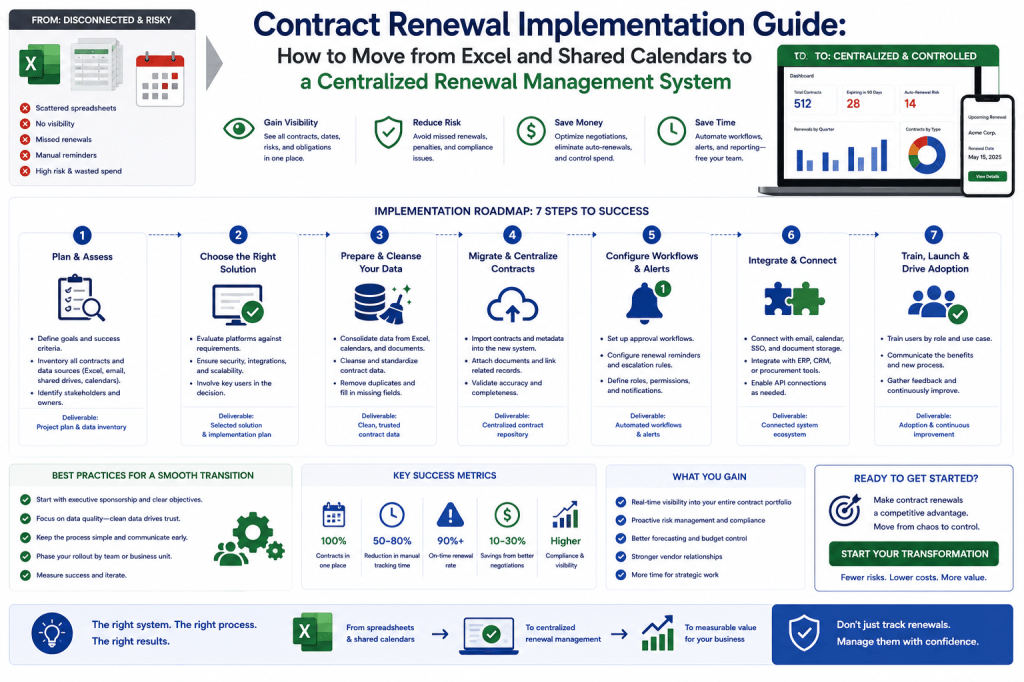
Why Organizations Delay Moving Away from Spreadsheets
Most teams already know that spreadsheets have limitations.
But they hesitate because implementation sounds difficult.
Common concerns include:
- We have thousands of contract records.
- Our spreadsheets are messy.
- Some contracts are missing documents.
- Owners may be outdated.
- We do not know every notice period.
- Users will resist another system.
These are valid concerns.
But they do not mean implementation should wait.
A better approach is:
start with the contracts that matter most.
Still Running Contract Renewals from Excel?
You do not need perfect data or a six-month transformation project to start improving renewal control.
Contract Renewal Tracker is designed to let organizations import existing contract records, identify missing critical data, assign owners, and activate automated renewal workflows progressively.
Move your renewal spreadsheet into a controlled SaaS workflow →
Step 1: Find the Existing Contract Sources
Begin by identifying where renewal information currently lives.
Possible sources include:
- procurement spreadsheets;
- legal contract registers;
- finance supplier lists;
- department trackers;
- shared calendars;
- CLM systems.
Do not assume one file is complete.
The first objective is to understand the landscape.
Build a Source Inventory
For example:
Procurement
Supplier Contracts.xlsx
420 records.
IT
SaaS Renewals.xlsx
180 records.
Legal
CLM repository.
Finance
Supplier master / spend file.
This gives the implementation team a clear starting point.
Step 2: Define the Minimum Required Data
Do not begin by designing 100 contract fields.
For renewal management, the essential data set can be relatively small.
For example:
Contract Name
Supplier
Contract Owner
Start Date
End Date
Notice Period
Auto-Renewal
Annual Value
Status
That may be enough to create immediate value.
Critical vs Optional Fields
Separate:
Critical for Renewal Control
- end date;
- notice period;
- owner.
Useful for Analysis
- category;
- cost center;
- supplier group.
Optional
- internal notes.
This keeps implementation focused.
Step 3: Prioritize Contracts
If the organization has:
5,000 contracts,
do not necessarily clean all 5,000 first.
Prioritize:
- high-value;
- auto-renewing;
- renewing soon;
- strategic suppliers.
This creates faster risk reduction.
Example Prioritization
Tier 1
€500K.
Tier 2
Renewing within 180 days.
Tier 3
All remaining active contracts.
The first implementation wave might cover:
only 300 contracts.
That can still deliver substantial value.
Risk-Based Migration
A useful priority score can combine:
Contract Value
Deadline Proximity
Auto-Renewal
For example:
€2M auto-renewing contract
with notice deadline in 45 days
=
Immediate Migration Priority
Step 4: Export the Existing Spreadsheet Data
Most Contract Renewal Tracker implementations will start with:
CSV
or:
Excel.
Typical columns might be:
Supplier
Contract
Expiration
Value
Owner
Do not edit the source file destructively.
Keep the original as:
migration evidence / backup.
Step 5: Standardize Column Names
Spreadsheets often use inconsistent headings.
For example:
Expiry
Expiration
End
Renewal Date
These may mean different things.
The import process should map each source column explicitly.
Avoid a Dangerous Mapping Error
A column named:
Renewal Date
might mean:
- contract end date;
- internal review date;
- next auto-renewal date.
Do not assume.
This should be verified during mapping.
AI-Assisted Column Mapping
Contract Renewal Tracker could suggest:
“Contract Expiry” likely maps to Contract End Date.
The administrator confirms.
This can make imports easier while preserving human control.
Step 6: Standardize Date Formats
Spreadsheets may contain:
31/12/2027
12/31/2027
2027-12-31
Mixing date formats can create serious errors.
Normalize to one internal format.
For example:
YYYY-MM-DD
The user interface can still display local formats.
Validate Impossible Dates
The import process should flag:
Start Date:
End Date:
This should not enter production silently.
Step 7: Normalize Supplier Names
Supplier data often includes:
Microsoft.
Microsoft Corp.
Microsoft Ireland Operations Ltd.
Some are aliases.
Some are distinct legal entities.
Do not merge them blindly.
Supplier Normalization Structure
Use:
Supplier Group
and:
Legal Counterparty
This supports both:
- reporting;
- legal accuracy.
Step 8: Remove or Flag Duplicate Contracts
Duplicates may appear because:
- several departments maintain separate trackers;
- files were copied.
Potential duplicates can be identified using:
- supplier;
- value;
- dates;
- contract number.
Duplicate Review
For example:
Contract A:
ExampleCloud.
€500K.
Dec 31.
Contract B:
Example Cloud.
€500K.
Dec 31.
Potential Duplicate:
94%.
Administrator reviews.
Do not auto-delete.
Step 9: Validate Contract Status
Old spreadsheets may contain:
expired agreements.
These should be classified.
Possible statuses:
Active
Expired
Terminated
Superseded
Only active contracts should normally enter renewal workflows.
Step 10: Identify Missing Critical Fields
After initial import:
calculate data completeness.
For example:
Active Contracts
1,200.
Missing End Date
Missing Notice Period
Missing Owner
Now the implementation team knows what needs remediation.
Do Not Delay Go-Live for Every Missing Field
This is important.
If:
1,020 contracts
are sufficiently complete,
the system can begin managing them.
The remaining:
180
can enter a remediation queue.
Progress is better than waiting for perfect data.
Step 11: Verify the Highest-Risk Dates First
Do not spend equal effort on every contract.
Verify:
- contracts renewing soon;
- high-value contracts;
- auto-renewing agreements.
This provides immediate protection.
Verification Queue
For example:
Critical
High
Medium
This helps legal and contract operations prioritize.
Step 12: Upload or Link Contract Documents
Where available:
associate the governing document with each contract.
Possible sources:
- SharePoint;
- Drive;
- CLM;
- uploaded PDF.
This makes future verification easier.
Document Storage Strategy
If the customer already has:
CLM,
Contract Renewal Tracker may only need:
document links.
If not:
it can store documents directly.
Both models can work.
Step 13: Extract Renewal Clauses
For uploaded contracts, AI can help identify:
- end date;
- notice period;
- auto-renewal.
This can reduce manual review.
But critical fields should show:
extraction confidence
and:
verification status.
Example
Notice Period:
90 days.
Source:
MSA §12.3.
Status:
AI Extracted — Needs Verification.
This is safer than treating extraction as final truth.
Step 14: Assign Contract Owners
Each active renewal should have an accountable owner.
Possible owner types:
Business Owner
Procurement Owner
Contract Manager
This creates responsibility.
How to Handle Unknown Owners
Do not leave the record silently blank.
Use:
Owner Missing
and assign:
remediation task.
This makes the issue visible.
Department-Based Temporary Ownership
During migration:
unknown contracts could temporarily route to:
department procurement lead.
Then permanent ownership can be established later.
This keeps deadlines protected.
Step 15: Check Owner Activity
If identity integration is available:
verify that owners are:
active employees.
This can immediately expose stale records.
Example
Imported owner:
Sarah Jones.
Identity:
Inactive.
Result:
Reassignment Required
This is a common migration discovery.
Step 16: Configure Renewal Horizons
Different contracts may need different workflow start times.
For example:
Strategic
365 days.
High Value
180 days.
Standard
90 days.
Low Value
60 days.
This prevents one-size-fits-all workflows.
Step 17: Configure Reminder Policies
A standard sequence might include:
30 days.
But reminders should align with:
notice deadline,
not simply:
contract end date.
That distinction is essential.
Example
End Date:
December 31.
Notice Deadline:
September 30.
Reminders should build toward:
September.
Not December.
This is one of the core reasons to leave spreadsheet-only management.
Step 18: Configure Escalation
What happens if the owner does not respond?
For example:
Day 0:
Owner reminder.
Day 5:
Second reminder.
Day 10:
Manager.
Day 15:
Procurement escalation.
This creates closed-loop control.
Step 19: Build the First Workflow Template
Do not build 20 workflows initially.
Start with one:
Standard Renewal Workflow
For example:
- Business Review.
- Decision.
- Procurement.
- Approval.
- Execution.
This gives teams consistency.
Step 20: Add a Strategic Workflow
For high-value agreements:
add:
- earlier start;
- supplier scorecard;
- legal;
- executive approval.
Now there are:
two workflows.
That may cover most use cases.
Step 21: Define Renewal Decision Options
Use a controlled list:
Renew
Renegotiate
Reduce
Replace
Extend
Terminate
This is much stronger than:
Yes / No.
Step 22: Configure Approval Thresholds
For example:
<€50K
Business approval.
€50K–€500K
Business + Finance.
>€500K
Business + Finance + Procurement.
>€2M
Executive approval.
These should follow company policy.
Step 23: Configure Roles and Permissions
Typical roles:
Administrator
Contract Operations
Business Owner
Procurement
Legal
Finance
Users should see only what they need.
Avoid Giving Everyone Administrator Access
This is common during fast implementations.
It creates:
- security risk;
- data-quality risk.
Implement role-based access from the beginning.
Step 24: Configure SSO Where Required
For enterprise customers:
Microsoft Entra ID
or:
Okta
SSO can reduce adoption friction.
Users access:
Contract Renewal Tracker
with their existing identity.
Step 25: Configure Email Notifications
Email is usually the fastest adoption channel.
Users should receive:
- assigned reviews;
- approvals;
- critical reminders.
Keep routine notifications controlled.
Do Not Create Notification Overload
If users receive:
20 emails per contract,
they will ignore them.
Focus on:
- action required;
- escalation;
- critical deadlines.
This improves adoption.
Step 26: Add Teams or Slack Later
Once the core workflow is stable:
integrate collaboration tools.
This keeps the initial implementation simpler.
Step 27: Create the First Dashboard
A useful first dashboard might show:
Renewing Next 90 Days
Notice Deadlines <60 Days
Missing Owners
High-Risk Contracts
That is enough to create immediate visibility.
Step 28: Establish Baseline KPIs
Before go-live, capture:
- number of renewals;
- missed deadline rate;
- decision coverage.
This creates a baseline for measuring improvement.
Example Baseline
Late Renewal Decisions:
28%.
Missed Deadlines:
1.2%.
Business Owner Coverage:
78%.
Six months later:
compare.
This helps demonstrate ROI.
Step 29: Select a Pilot Group
Do not necessarily roll out to:
5,000 users.
Start with:
one department
or:
one contract category.
For example:
IT SaaS.
This provides a manageable pilot.
Why SaaS Can Be a Good Pilot
It often has:
- frequent renewals;
- measurable usage;
- visible cost.
That makes value easy to demonstrate.
Pilot Size
A reasonable pilot might include:
50–200 contracts
depending on complexity.
Enough to test the process.
Not so many that issues become difficult to manage.
Step 30: Run Parallel Tracking Briefly
For an initial pilot:
keep the old spreadsheet available as:
read-only reference.
Do not create two active masters for long.
The objective is verification, not permanent duplication.
Dual-Master Risk
If users continue editing:
Excel
and:
Contract Renewal Tracker,
the two will diverge.
Set a clear:
system-of-record date.
Step 31: Define the Cutover Date
For example:
From October 1, Contract Renewal Tracker becomes the authoritative renewal register.
After that:
spreadsheet becomes:
archive.
This creates clarity.
Step 32: Communicate the Change
Users need to understand:
why the process is changing.
The message should focus on benefits:
- earlier reminders;
- fewer surprises;
- clearer ownership.
Not:
We have introduced another system.
Example User Message
From October 1, upcoming contract renewals will be managed through Contract Renewal Tracker. Business owners will receive renewal-review requests automatically and can see the key dates, supplier information, and required action in one place.
This sets expectations clearly.
Step 33: Train Users by Role
Do not give everyone:
two-hour product training.
Business owners mainly need to know:
- where to find the renewal;
- how to complete the business review;
- how to choose a decision.
That may take 15 minutes.
Procurement Training
Procurement may need:
- negotiation workflow;
- savings tracking.
Legal:
- clause verification;
- termination notices.
Training should be role-specific.
Step 34: Provide Simple In-App Guidance
For example:
This contract auto-renews unless notice is sent by September 30.
This is often more valuable than long documentation.
Good UX reduces training needs.
Step 35: Run the Pilot
During the first weeks:
monitor:
- missing records;
- notification problems;
- workflow confusion.
Fix the process while scope is manageable.
Implementation Success Metric 1: Critical Date Coverage
Question:
What percentage of active material contracts have verified renewal and notice dates?
For example:
Pilot start:
72%.
After 60 days:
96%.
This is a strong success measure.
Implementation Success Metric 2: Owner Coverage
Before:
78%.
After:
99%.
This demonstrates better accountability.
Implementation Success Metric 3: Decision Coverage
Before:
renewal decisions often made late.
After:
90% made before internal deadline.
This is a stronger outcome than:
“users logged in.”
Implementation Success Metric 4: Missed Deadlines
Target:
0 material missed deadlines
during pilot.
This is one of the clearest success criteria.
Implementation Success Metric 5: Time Saved
Measure:
hours spent compiling renewal reports.
If:
10 hours/week → 2,
that demonstrates administrative value.
Implementation Success Metric 6: Financial Opportunity Found
For example:
Pilot identifies:
€80K unused SaaS spend.
That immediately improves the business case for expansion.
Step 36: Collect User Feedback
Ask:
- Were reminders timely?
- Was the business review clear?
- What was confusing?
Use that feedback to improve workflow.
Do Not Customize Everything
A pilot user may request:
many special fields.
Ask:
Is this broadly useful or only relevant to one contract?
Avoid turning implementation into endless customization.
Step 37: Refine the Workflow
Based on pilot:
perhaps:
180-day reminder too early
for low-value SaaS.
Adjust:
90 days.
This is normal process tuning.
Step 38: Expand to More Categories
After pilot success:
add:
- professional services;
- telecom;
- facilities.
Each may need slightly different workflows.
Category Templates
For example:
SaaS
Usage review.
Consulting
Capacity review.
Telecom
Location/line review.
This keeps business reviews relevant.
Step 39: Expand to More Departments
After one department:
add:
Finance.
Marketing.
Operations.
This creates broader portfolio visibility.
Step 40: Add ERP Integration
Once the core process is working:
connect actual spend.
This improves:
- forecasting;
- savings validation.
Do not necessarily make this a prerequisite for basic go-live.
Step 41: Add Identity Integration
Automated owner validation can remove a major administrative burden.
This is a logical early integration.
Step 42: Add E-Signature
Later:
connect renewal execution.
Now the full workflow becomes more automated.
Step 43: Add Usage Integrations
For SaaS/cloud:
usage integration strengthens:
business review.
This can unlock spend optimization.
Step 44: Introduce Savings Tracking
Once renewals are flowing reliably:
start capturing:
- demand reduction;
- hard savings;
- cost avoidance.
This broadens the business case.
Step 45: Introduce Supplier Scorecards
For strategic suppliers:
add:
- performance;
- pricing.
This improves renewal decisions.
Step 46: Introduce Forecasting
Finance can then use:
structured renewal decisions
to forecast future spend.
This is a later maturity step.
Step 47: Introduce Portfolio Intelligence
Once data quality and history are strong:
identify:
- supplier consolidation;
- duplicate services.
Now the platform produces strategic procurement value.
Step 48: Introduce AI
AI becomes useful after:
data;
workflow;
permissions
are reliable.
Then users can ask:
What needs my attention?
This is far more valuable than adding AI on day one to messy contract data.
Implementation Principle: Crawl, Walk, Run
A practical rollout is:
Crawl
Import and protect deadlines.
Walk
Add workflows and ownership.
Run
Add integrations, intelligence, and AI.
This keeps implementation achievable.
Avoid the “Perfect Data” Trap
A common failure pattern is:
We cannot launch until all 10,000 contracts are perfect.
That can delay implementation indefinitely.
Instead:
Know What Is Incomplete
and:
Prioritize Risk
This is a much more practical operating model.
Data Quality Score at Go-Live
For example:
Overall:
88%.
Strategic:
99%.
This may be perfectly acceptable.
The important thing is:
critical contracts are reliable.
Avoid Migrating Dead Data
If a contract:
expired five years ago
and:
has no current relevance,
it may not need full migration.
Keep it archived where appropriate.
This reduces unnecessary work.
Active + Relevant First
Prioritize:
active.
Then:
recent historical records
needed for benchmarking.
This reduces migration scope.
Historical Data Strategy
Historical renewal outcomes can be valuable.
But they are not required to prevent tomorrow’s missed deadline.
Therefore:
historical data can migrate later.
Implementation Principle: Do Not Rebuild the Entire CLM
If the customer already has:
a contract repository,
use it.
Contract Renewal Tracker should focus on:
renewal operations.
This keeps implementation smaller.
Implementation Principle: Define Sources of Truth
For example:
Contract Document
CLM.
Actual Spend
ERP.
Renewal Workflow
Contract Renewal Tracker.
This prevents future synchronization confusion.
Implementation Principle: Keep Customization Controlled
Every organization has unique processes.
But excessive customization increases:
- cost;
- support burden.
Use configurable:
- workflows;
- fields;
- thresholds.
Avoid building a unique product for every customer.
This is particularly important for SaaS economics.
Implementation Principle: Start with Default Best Practices
Provide templates such as:
Standard Renewal
Strategic Renewal
Termination
Customers can modify them.
This reduces implementation effort significantly.
Implementation Principle: Show Value in the First Week
After the first import, the customer should immediately see:
- renewals next 90 days;
- contracts missing owners;
- high-risk auto-renewals.
This creates a fast:
Aha Moment
First-Day Value
Even before workflow rollout:
the system may identify:
14 contracts worth €1.8M have notice deadlines within 90 days.
That alone can validate the project.
First-30-Day Value
Possible:
- ownership cleaned;
- reminders activated;
- priority renewals under control.
This creates implementation momentum.
First-90-Day Value
Possible:
- no missed material deadlines;
- savings opportunities identified;
- reporting automated.
This creates a clear expansion business case.
Implementation Timeline Does Not Need to Be Identical for Every Customer
A small business with:
100 contracts
may have a straightforward rollout.
An enterprise with:
20,000 contracts;
multiple CLMs
will require more governance.
The architecture should support both.
Small-Business Implementation
A simple version may be:
- Upload spreadsheet.
- Validate dates.
- Assign owners.
- Activate reminders.
That is enough.
Mid-Market Implementation
Add:
- workflow templates;
- finance;
- identity integrations.
Enterprise Implementation
Add:
- SSO;
- SCIM;
- integrations;
- legal governance;
- regional rollout.
Same product, greater depth.
Phased Enterprise Rollout
Possible:
Phase 1
Europe IT.
Phase 2
Global Software.
Phase 3
All Indirect Procurement.
This reduces implementation risk.
Regional Rollout
For global organizations:
one region may serve as:
pilot.
Lessons can then inform:
other regions.
Implementation Governance
Larger deployments should have:
Executive Sponsor
Business Owner
Implementation Lead
Data Owner
This creates clear responsibility.
Executive Sponsor
Provides:
- authority;
- priority.
Often:
Head of Procurement
or:
CFO.
Product Owner
Owns:
renewal process design.
This should be a business role.
Not purely IT.
IT Role
IT supports:
- identity;
- security;
- integrations.
But renewal process ownership belongs to the business.
Legal Role
Legal validates:
- critical term workflows.
They should not necessarily own all implementation.
Finance Role
Finance defines:
- savings;
- allocation.
This ensures reporting is credible.
Implementation Risks
Common risks include:
Poor Data Quality
Mitigation:
risk-based verification.
Low Adoption
Mitigation:
simple role-specific workflows.
Excessive Customization
Mitigation:
templates/configuration.
Notification Fatigue
Mitigation:
action-based alerts.
Dual Systems
Mitigation:
clear cutover date.
These are manageable.
Risk: Users Keep Using Excel
This is probably one of the biggest risks.
If Contract Renewal Tracker is optional:
teams may continue their old process.
The organization needs a clear policy:
This is the authoritative renewal system.
Do Not Remove Export Capability
Users may still want:
Excel exports
for analysis.
That is fine.
The problem is not Excel.
The problem is Excel becoming:
the uncontrolled system of record.
Migration Audit Trail
Record:
source file.
import date.
records.
This makes migration traceable.
Data Correction Audit
If dates are corrected after import:
preserve:
- original;
- corrected;
- source.
This increases trust.
Post-Go-Live Data Quality
Data quality should remain:
continuous.
Owners leave.
Amendments arrive.
Spend changes.
Implementation is not:
a one-time cleanup.
Monthly Data-Quality Review
A simple dashboard might show:
- missing notice periods;
- inactive owners.
This keeps the system healthy.
Post-Go-Live KPI Review
After 90 days:
compare against baseline.
For example:
Decision Coverage
68% → 92%.
Missed Deadlines
1.2% → 0%.
Owner Coverage
78% → 99%.
This demonstrates success.
Financial Results
Perhaps:
unused licenses identified:
€120K.
This makes the value even more compelling.
Contract Renewal Tracker Implementation ROI
Consider:
Implementation identifies:
one €100K auto-renewing contract
that business no longer needs.
Notice is sent.
Potential spend avoided:
€100K.
That can justify much of the implementation effort immediately.
Administrative ROI
Before:
15 hours/month maintaining spreadsheet.
After:
Time saved:
120 hours/year.
At €60/hour:
€7,200
This is additional value.
Reporting ROI
Monthly management report:
8 hours.
Automated:
Annual saved:
84 hours.
Again:
administrative savings can accumulate.
The Bigger ROI Is Better Renewal Decisions
If the system helps:
reduce recurring spend
or:
avoid one material auto-renewal,
the financial impact can be significantly larger than administrative savings.
That is the stronger business case.
Implementation Does Not Need to Be the Barrier to Buying
This is an important prospect message.
A potential customer may think:
The software looks useful, but moving everything will be too difficult.
The implementation model should communicate:
Start with your existing spreadsheet, prioritize critical contracts, and improve the data progressively.
That lowers sales resistance.
Commercial Positioning
Contract Renewal Tracker can position implementation as:
Spreadsheet-to-SaaS migration
rather than:
enterprise transformation project.
That is likely much more attractive to mid-market prospects.
Free Spreadsheet Import as a Sales Lever
A compelling acquisition offer could be:
Upload your existing renewal spreadsheet and receive a free renewal-risk assessment.
The system could identify:
- missing notice periods;
- near-term deadlines;
- missing owners.
This would create immediate value before subscription.
Example Lead Magnet
Free Contract Renewal Spreadsheet Health Check
Upload:
Excel / CSV.
Receive:
- data completeness score;
- upcoming deadline risk;
- duplicate suppliers;
- auto-renewal exposure.
This could be a very strong product-led sales funnel.
This Article Should Have a Strong CTA
Because the reader is likely already considering:
how to leave spreadsheets.
A good mid-article CTA is:
Already have your renewals in Excel? Import your existing contract register into Contract Renewal Tracker and start with the data you already have.
And the strongest closing CTA:
Start Your Contract Renewal Tracker Subscription and Turn Your Existing Spreadsheet into an Automated Renewal Workflow →
This is highly aligned with search intent.
Implementation Checklist
A practical implementation sequence is:
- Identify sources.
- Define minimum fields.
- Prioritize active/high-risk contracts.
- Import spreadsheet.
- Validate dates.
- Normalize suppliers.
- Remove duplicates.
- Identify missing data.
- Verify critical notice periods.
- Assign owners.
- Configure renewal horizons.
- Configure reminders.
- Configure escalation.
- Create workflow templates.
- Configure approvals.
- Configure permissions.
- Create dashboard.
- Run pilot.
- Define cutover.
- Measure results.
- Expand progressively.
This could also be turned into a downloadable checklist.
Ready to Move Beyond Excel Without Turning It into a Huge IT Project?
A dedicated renewal-management system should make the transition easier, not harder.
Contract Renewal Tracker is designed to let organizations start with the information they already have and improve the process progressively.
Use Contract Renewal Tracker to:
- import Excel or CSV contract registers;
- identify missing critical fields;
- detect potential duplicates;
- normalize suppliers;
- calculate notice deadlines;
- assign contract owners;
- configure automated reminders;
- escalate overdue actions;
- create standard renewal workflows;
- enforce approval thresholds;
- monitor high-risk renewals;
- measure implementation KPIs;
- add integrations progressively;
- use AI to accelerate data mapping and contract-term extraction.
The objective is to move from:
Spreadsheet
↓
Centralized Data
↓
Automated Deadlines
↓
Structured Workflow
↓
Integrated Renewal Operations
without requiring the organization to redesign everything at once.
Start Your Contract Renewal Tracker Subscription →
Final Thoughts
The biggest implementation mistake is trying to solve everything before going live.
A better approach is:
Protect the most important renewals first.
Then:
improve the process progressively.
The migration path is:
Find
↓
Import
↓
Validate
↓
Assign
↓
Automate
↓
Expand
This makes implementation practical.
For Contract Renewal Tracker, that is an important commercial message because many prospects are not asking whether renewal management software is useful.
They already know the spreadsheet has limitations.
Their real concern is:
“How difficult will it be to move?”
The answer should be:
Start with the spreadsheet you already have, protect the deadlines that matter most, and let the system help you improve the data and process from there.
That dramatically lowers the barrier to adopting a dedicated Contract Renewal Tracker SaaS platform.
Next Article in the Contract Renewal Tracker Series
Article 75 — “Contract Renewal Spreadsheet Template vs Contract Renewal Software: When Excel Is Enough—and When It Starts Creating Risk”
The next article should be especially strong for commercial search intent. It can target prospects actively comparing free/manual approaches with dedicated software and cover spreadsheet advantages, practical limits, reminder reliability, ownership, audit trails, multi-user collaboration, notice periods, auto-renewal risk, reporting, security, cost, migration, and a clear framework for deciding when to upgrade.
This is likely to be one of the stronger bottom-of-funnel articles in the series because the reader is already asking the buying question:
“Do we actually need Contract Renewal Tracker software, or can we keep doing this in Excel?”

