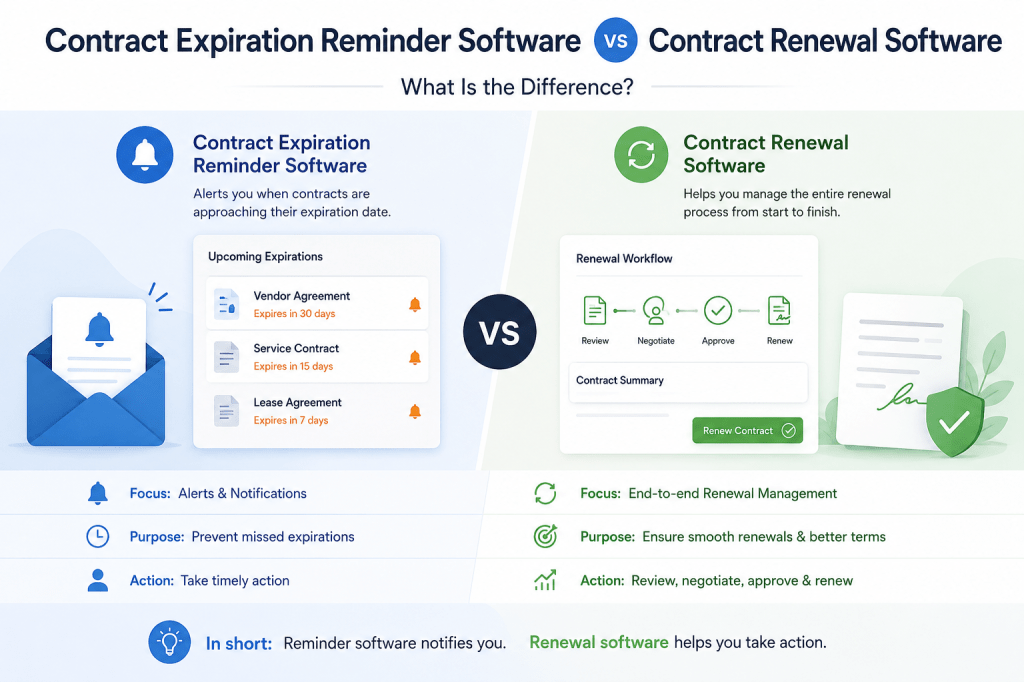
Contract expiration reminder software and contract renewal software sound almost identical.
They are not.
A contract expiration reminder tool primarily answers:
Which contracts are approaching their end dates?
A contract renewal management platform addresses a broader question:
What does the organization need to do before, during, and after each renewal to achieve the right commercial and operational outcome?
That distinction becomes important as a contract portfolio grows.
A simple reminder may be perfectly adequate for a small business managing 20 straightforward agreements. But an organization managing hundreds of contracts, automatic renewals, notice periods, distributed business owners, approvals, negotiations, and termination requirements usually needs more than expiration alerts.
This guide explains the difference between contract expiration reminder software and contract renewal software, when each approach makes sense, and what capabilities you should evaluate before choosing a platform.
What Is Contract Expiration Reminder Software?
Contract expiration reminder software tracks contract dates and alerts users when agreements approach expiration.
The basic workflow is:
Contract Added
↓
Expiration Date Recorded
↓
Reminder Scheduled
↓
Notification Sent
For many organizations, that alone represents a significant improvement over:
- spreadsheets;
- calendar entries;
- sticky notes;
- personal task lists.
Expiration reminder software solves an important problem:
remembering that a contract is approaching its end date.
What Is Contract Renewal Software?
Contract renewal software goes further.
Instead of treating expiration as a single event, it manages:
the renewal lifecycle.
That can include:
Contract Data
↓
Notice Deadline
↓
Business Review
↓
Renewal Decision
↓
Negotiation
↓
Approval
↓
Renewal / Termination
↓
Next Renewal Cycle
The focus moves from:
remembering a date
to:
managing an outcome.
The Difference in One Sentence
A useful distinction is:
Contract expiration software tells you that a contract is ending; contract renewal software helps you decide and execute what should happen next.
That is the core difference.
Need More Than an Expiration Alert?
If your current process consists of an Excel expiration date plus an Outlook reminder, you may already have basic expiration management.
Contract Renewal Tracker is designed for the next stage: connecting contract dates with notice periods, owners, renewal decisions, reminders, and eventually increasingly automated workflows.
Move from expiration alerts to renewal management →
Side-by-Side Comparison
| Capability | Expiration Reminder Software | Contract Renewal Software |
|---|---|---|
| Contract end dates | ✓ | ✓ |
| Expiration alerts | ✓ | ✓ |
| Notice periods | Sometimes | ✓ |
| Notice deadline calculation | Sometimes | ✓ |
| Auto-renewal tracking | Sometimes | ✓ |
| Named renewal owner | Basic | ✓ |
| Multiple reminder stages | Sometimes | ✓ |
| Escalation | Limited | ✓ |
| Renewal decisions | Limited | ✓ |
| Procurement workflow | — | ✓ |
| Approvals | — | ✓ |
| Termination workflow | — | ✓ |
| Renewal financial analysis | — | ✓ |
| Savings tracking | — | Advanced |
| Audit history | Varies | ✓ |
| Renewal analytics | Limited | ✓ |
Individual products differ, of course.
The table describes the conceptual difference between the two categories rather than every product on the market.
Expiration Date vs Notice Deadline
This is arguably the most important distinction.
Suppose a contract expires:
December 31, 2026.
The agreement requires:
120 days’ notice to prevent automatic renewal.
The important operational deadline is not:
December 31.
It is approximately:
early September.
If your software alerts you:
30 days before expiration,
the notification may arrive almost:
three months too late.
Why Expiration Alerts Can Create False Confidence
A dashboard might show:
73 days until expiration.
That sounds safe.
But if:
Notice Deadline = yesterday,
the organization may already have lost its contractual ability to prevent renewal.
Therefore:
Days Until Expiration
and:
Days Until Notice Deadline
are fundamentally different metrics.
Better Renewal Metric
Instead of:
Contract expires in 120 days.
show:
Notice deadline in 30 days.
That immediately changes the perceived urgency.
Example
Contract End:
December 31.
Notice Period:
90 days.
Today:
September 1.
Expiration View
121 days remaining.
Looks comfortable.
Renewal View
31 days remaining before notice deadline.
Requires action.
This demonstrates why renewal management needs more than expiration monitoring.
Automatic Renewal Makes the Difference Even More Important
Many agreements automatically renew unless one party provides notice.
Common examples include:
- SaaS subscriptions;
- maintenance agreements;
- telecom contracts;
- managed services;
- facilities contracts.
In these cases:
missing the notice deadline can create:
a new contractual commitment.
Example
Annual SaaS agreement:
€120,000.
Auto-renewal:
12 months.
Notice:
90 days.
No decision is made before the notice deadline.
Potential consequence:
another €120,000 commitment.
An expiration reminder sent afterward cannot undo the problem.
Expiration Reminder Software Is Still Valuable
This does not mean expiration software is bad.
For some organizations, it is exactly what they need.
For example:
20 contracts.
One administrator.
Few automatic renewals.
Simple terms.
Low financial exposure.
In that environment:
a lightweight reminder system may be sufficient.
When Does Expiration Reminder Software Make Sense?
It can work well when:
- the portfolio is small;
- contracts are straightforward;
- one person owns most renewals;
- notice periods are simple;
- approvals are minimal;
- financial exposure is limited.
Do not buy unnecessary complexity.
When Does Contract Renewal Software Make More Sense?
Consider a broader platform when:
- contracts have different notice periods;
- auto-renewal exposure is significant;
- many people own contracts;
- decisions must begin months in advance;
- procurement negotiates renewals;
- finance approves expenditure;
- termination requires controlled execution.
At that point:
expiration is only one part of the process.
Difference 1: Reminder vs Workflow
Expiration software:
Your contract expires in 90 days.
Renewal software:
Your contract’s notice deadline is in 90 days. Please complete the business review by Friday.
The second message contains:
an action.
Difference 2: Date vs Decision
Expiration software focuses on:
when.
Renewal software also focuses on:
what.
For example:
Renew
Renegotiate
Reduce
Replace
Extend
Terminate
Capturing the decision is central to renewal management.
Why Renewal Decisions Matter
Suppose management asks:
What percentage of next quarter’s renewals are expected to terminate?
Expiration data alone cannot answer.
Decision data can.
Example Portfolio
Next 90 days:
80 contracts.
Renew:
Renegotiate:
Reduce:
Replace:
Terminate:
Undecided:
That is renewal intelligence.
Difference 3: Reminder vs Escalation
Expiration software may send:
an alert.
Renewal software should also ask:
What happens if nobody responds?
This is crucial.
Example
90 days:
Owner reminder.
75 days:
Owner reminder.
60 days:
Manager escalation.
45 days:
Procurement escalation.
30 days:
Critical.
This creates:
closed-loop control.
Difference 4: Owner vs Accountability
A spreadsheet may contain:
Owner = John.
But what happens when:
John leaves?
Dedicated renewal management should help identify:
unowned contracts
and:
ownership gaps.
Ownership Coverage
A useful KPI is:
Percentage of active contracts with a named accountable owner.
For example:
98.7%.
This is a governance metric.
Difference 5: Expiration vs Auto-Renewal Risk
A contract may be:
180 days from expiration
but:
60 days from its notice deadline.
Renewal software should prioritize:
the second number.
It should also recognize:
automatic renewal.
Auto-Renewal Exposure
A useful dashboard might show:
Total Auto-Renewing Spend:
€8.5M.
Entering Notice Window:
€2.1M.
Undecided:
€750K.
Critical:
€300K.
That is substantially more actionable than:
12 contracts expire this quarter.
Difference 6: Notification vs Business Review
A renewal process should ask:
Do we still need this contract?
This is particularly important for:
software subscriptions.
The organization may discover:
- unused licenses;
- redundant products;
- reduced demand.
Expiration software does not necessarily manage this review.
Example
Current licenses:
1,000.
Active users:
Renewal requirement:
The renewal process identifies:
300 licenses that do not need to be renewed.
That creates financial value.
Difference 7: Reminder vs Procurement
Once the business decides:
Renegotiate,
someone must:
negotiate.
Renewal software can route:
the contract to Procurement.
Procurement Workflow
Business Decision
↓
Supplier Proposal
↓
Negotiation
↓
Final Commercial Position
↓
Approval
This is much more than an expiration alert.
Difference 8: Expiration vs Financial Management
A contract renewal platform may track:
Current Annual Value.
Supplier Proposal.
Final Renewal Value.
This allows calculation of:
commercial outcomes.
Example
Current:
€500K.
Supplier proposal:
€575K.
Final:
€520K.
Negotiated avoidance:
€55K.
Increase vs current:
€20K.
This gives management useful financial information.
Difference 9: Alert vs Approval
Material renewals often require:
formal approval.
For example:
€25K:
manager.
€250K:
finance director.
€2M:
executive committee.
Renewal software can route approvals according to:
policy.
Approval History
The system should preserve:
who approved.
When.
At what value.
That creates governance evidence.
Difference 10: Expiration vs Termination
This is another major distinction.
Selecting:
Do Not Renew
does not necessarily terminate:
the contract.
Formal action may still be required.
Termination Workflow
Decision: Terminate
↓
Verify Clause
↓
Prepare Notice
↓
Approve
↓
Deliver
↓
Capture Evidence
↓
Confirm
This is far more important than changing:
Status = Cancelled.
Contractual Notice Requirements
Some agreements specify:
- recipient;
- postal address;
- delivery method;
- timing requirements.
Organizations should verify the governing contract before sending formal notice.
Renewal software can help manage:
the process and evidence.
Difference 11: Static Status vs Audit Trail
Suppose:
Notice Period changes:
90 → 120 days.
A mature system should record:
- previous value;
- new value;
- user;
- timestamp.
This is important when:
deadlines depend on that information.
Difference 12: Contract List vs Operational Dashboard
Expiration software might show:
Contracts Expiring Soon
Renewal software should show:
Renewals Requiring Action
That distinction is subtle but important.
Example Renewal Dashboard
Critical
High Risk
Awaiting Business Decision
Awaiting Procurement
Awaiting Approval
Termination in Progress
This is an operational management view.
Difference 13: Expiration Report vs Financial Forecast
Management may want to know:
How much supplier spend is entering renewal next quarter?
Renewal software can aggregate:
annual contract value
by:
decision window.
Example
Q4 Renewal Spend:
€7.2M.
Expected Renew:
€4.6M.
Renegotiate:
€1.4M.
Reduce:
€500K.
Terminate:
€300K.
Undecided:
€400K.
This is much more useful for:
budgeting and procurement.
Difference 14: Generic Alert vs Risk Prioritization
Suppose:
Contract A:
€500.
15 days remaining.
Contract B:
€2M.
20 days remaining.
Both may be:
urgent.
But the second may deserve:
much greater organizational attention.
Renewal software can combine:
deadline proximity
with:
materiality.
Simple Risk Model
For example:
Deadline Risk
Financial Exposure
Auto-Renewal
Business Criticality
=
Renewal Priority
This helps teams focus.
Difference 15: Individual Productivity vs Organizational Control
Expiration reminder software is often:
a productivity tool.
Contract renewal software increasingly becomes:
a governance system.
That is perhaps the broader distinction.
Maturity Level 1 — Spreadsheet
Track:
end dates.
Maturity Level 2 — Expiration Reminder
Automate:
alerts.
Maturity Level 3 — Renewal Tracker
Track:
notice deadlines;
owners;
decisions.
Maturity Level 4 — Renewal Workflow
Add:
tasks;
escalation;
approvals;
termination.
Maturity Level 5 — Renewal Intelligence
Add:
financial optimization;
risk scoring;
AI;
analytics.
This is a useful way to think about the market.
Where Should Contract Renewal Tracker Position Itself?
This distinction is strategically important for Contract Renewal Tracker.
The product should not position itself merely as:
contract expiration reminder software.
That category is:
too narrow.
A stronger positioning is:
Contract Renewal Tracker helps businesses manage the complete renewal process—from upcoming deadlines and notice periods to ownership, decisions, reminders, and renewal outcomes.
That gives the product room to grow.
But Expiration Reminders Are a Great Entry Point
Although the broader positioning should be:
renewal management,
expiration reminders are an excellent:
customer acquisition feature.
Why?
Because users immediately understand the problem.
Product-Led Entry Point
Customer starts with:
I need reminders.
Then discovers:
I need notice periods.
Then:
I need ownership.
Then:
I need decisions.
Then:
I need escalation.
Then:
I need reporting.
That creates a natural SaaS expansion path.
Contract Renewal Tracker Product Ladder
A logical product progression could be:
Starter
Dates + reminders.
Professional
Notice periods + decisions + escalation.
Business
Workflow + approvals + financial tracking.
Enterprise
SSO + RBAC + integrations + advanced governance.
This aligns product complexity with customer maturity.
Beta Should Focus on the First Critical Problem
For the September beta:
do not try to prove:
the entire future platform.
Prove:
Contract Renewal Tracker can give customers materially better visibility over upcoming renewal obligations than their current spreadsheet/calendar process.
That is a strong MVP objective.
Beta Success Question
Ask users:
Did Contract Renewal Tracker identify a renewal or required action that would otherwise have been harder to see?
If users consistently answer:
Yes,
you are creating real value.
Beta Activation Event
A strong activation metric might be:
User adds/imports contracts and sees at least one upcoming renewal deadline.
This is more meaningful than:
account created.
Second Activation Event
Even stronger:
User creates or receives their first renewal reminder.
Now the software has:
performed work.
Third Activation Event
Later:
User records first renewal decision.
Now the platform becomes:
part of the operational process.
This Creates a Product Engagement Ladder
Account Created
↓
Contracts Added
↓
Deadline Identified
↓
Reminder Triggered
↓
Decision Recorded
↓
Renewal Completed
This could become a very useful SaaS analytics funnel.
Contract Expiration Reminder Software Buying Checklist
If you only need reminders, evaluate:
- multiple date fields;
- configurable reminder timing;
- email notifications;
- recurring reminders;
- import/export;
- basic ownership.
Do not buy unnecessary complexity.
Contract Renewal Software Buying Checklist
If you need broader renewal management, evaluate:
- notice periods;
- deadline calculation;
- auto-renewal tracking;
- owner assignment;
- renewal decisions;
- escalation;
- approvals;
- audit history;
- financial reporting;
- termination controls.
These capabilities represent a different category of solution.
Questions to Ask Vendors
Ask:
Are reminders based on expiration date or notice deadline?
This one question can reveal:
a lot.
Then ask:
What happens if the owner does not respond?
And:
What happens if the owner leaves?
And:
Can we distinguish Renew, Reduce, Replace, and Terminate?
And:
Can management see the financial value of undecided renewals?
These are excellent evaluation questions.
Beware of Feature Labels
A product may advertise:
Renewal Management
but actually provide:
expiration alerts.
Another may advertise:
Contract Alerts
but contain:
substantial workflow capability.
Evaluate:
the actual process.
Not:
the marketing terminology.
Start with Your Business Requirement
Ask:
What failure are we trying to prevent?
If the answer is:
We forget expiration dates.
Then:
expiration reminder software may solve it.
If the answer is:
We make renewal decisions too late, auto-renew unwanted contracts, and spend too much time chasing owners.
Then:
you probably need broader renewal management.
Calculate the Cost of the Problem
Suppose:
300 contracts.
Annual supplier spend:
€12M.
Auto-renewing spend:
€4M.
One unwanted renewal:
€40K.
Manual administration:
10 hours/week.
The business case for:
a broader renewal platform
may be significant.
For a Very Small Business
Suppose:
15 contracts.
Annual spend:
€50K.
One owner.
Simple terms.
Then:
a spreadsheet plus calendar reminders
may be perfectly reasonable.
Software should solve:
a real problem.
Not create:
unnecessary administration.
The Threshold Is Complexity, Not Contract Count
100 straightforward contracts
may be easier than:
30 complex strategic agreements.
Look at:
- notice requirements;
- values;
- ownership;
- approvals;
- business criticality.
These determine:
renewal complexity.
The Best System Should Grow with You
Ideally:
start simple.
Use:
dates and reminders.
Then add:
- notice periods;
- decisions;
- workflow.
This avoids forcing small customers into:
enterprise complexity.
Contract Renewal Tracker Beta Launch — September 21, 2026
Contract Renewal Tracker is launching its first SaaS beta on September 21, 2026. The beta is designed for businesses that need more control over upcoming contract renewals than a spreadsheet or calendar reminder can provide, bringing contract dates, notice periods, ownership, and renewal activity into one dedicated environment. The initial SaaS version establishes the foundation for increasingly automated reminders, workflows, escalation, financial analysis, and renewal intelligence as the platform develops. [Notify Me When the Beta Launches →] (One launch notification only — no ongoing newsletter or marketing sequence.)
SEO Opportunity: Target Both Search Intents
This article can capture visitors searching for:
contract expiration reminder software
as well as:
contract renewal software.
That is strategically useful.
The visitor may initially believe they only need:
an expiration alert.
The article educates them about:
notice deadlines and workflow.
This can move them toward:
higher-intent product consideration.
Suggested Internal Links
This article should link to your existing content on:
Contract Renewal Reminder Software
for readers focused on alerts.
Link to:
Contract Renewal Excel Template
for readers who do not yet need software.
Link to:
Contract Renewal Software Demo Checklist
for visitors actively evaluating vendors.
And link directly to:
the Contract Renewal Tracker beta/signup page
for high-intent readers.
This creates a useful intent ladder.
Free Lead Magnet Opportunity
A useful downloadable asset could be:
Contract Renewal Software Requirements Checklist
It could help visitors determine whether they need:
Level 1
Spreadsheet.
Level 2
Expiration reminders.
Level 3
Renewal management.
Level 4
Full workflow and governance.
That naturally leads into product evaluation.
Suggested CTA
Not Sure What Level of Contract Renewal Software You Need?
Download the Contract Renewal Software Requirements Checklist and identify whether your organization needs basic expiration reminders, renewal tracking, automated workflows, or enterprise renewal governance.
Download the Free Checklist →
Ready to Move Beyond Expiration Reminders?
Expiration alerts are useful.
But they answer only:
When does the contract end?
Renewal management answers:
When must we act?
Then:
Who needs to act?
Then:
What should we do?
And finally:
Did it actually happen?
That progression is:
Expiration Date
↓
Notice Deadline
↓
Owner
↓
Decision
↓
Workflow
↓
Outcome
For a small portfolio:
you may only need the first two.
As complexity grows:
the rest becomes increasingly important.
That is where dedicated contract renewal software becomes materially different from a simple contract expiration reminder tool.
Start Your Contract Renewal Tracker Subscription →
Final Thoughts
The distinction between expiration reminder software and renewal software is not primarily about:
the number of features.
It is about:
the problem being solved.
Expiration software solves:
Don’t let me forget the date.
Renewal software solves:
Help the organization reach and execute the right decision before the contractual window closes.
That broader objective requires:
- accurate deadlines;
- accountable ownership;
- reminders;
- decisions;
- escalation;
- execution;
- reporting.
For Contract Renewal Tracker, this distinction provides an important positioning opportunity.
The product can remain easy enough for someone who initially wants:
“a better way to track expiration dates”
while progressively becoming:
the operational system for managing contract renewals.
Next Article in the Contract Renewal Tracker Series
Article 89 — “Best Contract Renewal Software for Small Businesses: What to Look for Without Buying an Enterprise CLM Platform”
This is a particularly important commercial-intent article for Contract Renewal Tracker because it can address the gap between Excel/calendar reminders and expensive enterprise CLM platforms.
The central positioning can be:
Small businesses often do not need a complete contract lifecycle management transformation. They need a simple, affordable system that reliably tracks renewals, notice deadlines, owners, reminders, and decisions.
That aligns very closely with the initial SaaS product and could become one of the stronger conversion-focused pages in the content cluster.

