Contract renewal management becomes much more reliable when the process is repeatable.
Without workflow automation, every renewal can turn into a small project.
Someone checks the contract.
Someone emails the business owner.
Procurement gets involved.
Legal reviews changes.
Finance approves spend.
Someone signs the amendment.
Someone updates the spreadsheet.
If any of those steps are delayed or forgotten, the renewal can drift toward its contractual deadline.
A dedicated Contract Renewal Tracker can replace that ad hoc coordination with reusable renewal playbooks.
The goal is simple:
Every contract should automatically enter the right renewal process at the right time, with the right owners, approvals, deadlines, and escalation rules.
That is what turns renewal tracking into renewal operations.
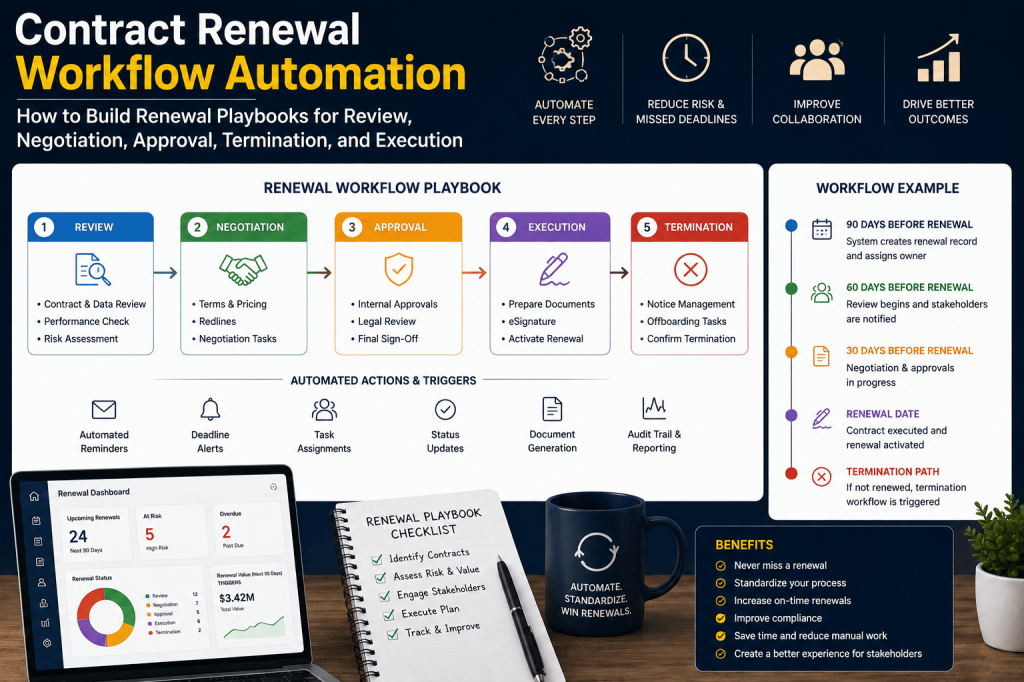
What Is Contract Renewal Workflow Automation?
Contract renewal workflow automation is the use of rules, tasks, deadlines, approvals, and triggers to coordinate the activities required before a contract is renewed, renegotiated, extended, or terminated.
Instead of asking people to remember the process, the system runs it.
A typical workflow might look like:
Renewal Window Opens
↓
Business Review
↓
Usage / Spend Review
↓
Procurement Strategy
↓
Negotiation
↓
Legal Review
↓
Finance Approval
↓
Execution
↓
Renewal Closed
The exact workflow can vary by contract type, value, risk, and supplier.
Still Coordinating Renewals Through Email and Spreadsheets?
A reminder tells someone a contract is approaching renewal.
A workflow tells every stakeholder what needs to happen next.
Contract Renewal Tracker is designed to automate renewal playbooks across business owners, procurement, finance, legal, and contract operations—so important steps are not dependent on manual follow-up.
Turn recurring renewal tasks into controlled workflows →
Why Renewal Workflows Matter
A contract renewal is rarely one action.
Consider a €500,000 software agreement.
The organization may need to:
- confirm the product is still required;
- review license utilization;
- inspect supplier performance;
- define a negotiation strategy;
- obtain a renewal quote;
- review legal changes;
- approve budget;
- sign the agreement;
- update the next renewal date.
Without workflow management, these steps may happen through:
- email;
- meetings;
- spreadsheets;
- chat messages.
The process becomes difficult to monitor.
Workflow Automation Creates Accountability
A workflow converts:
Someone should review this.
into:
Sarah owns the business review, due August 15.
That distinction matters.
Every task has:
Owner
Due Date
Status
Dependencies
Escalation
This creates measurable responsibility.
Build Reusable Renewal Playbooks
The organization should not design every renewal from scratch.
Instead, define reusable templates.
Examples:
Low-Value Renewal Playbook
Simple review and approval.
SaaS Renewal Playbook
Usage analysis + procurement review.
Strategic Supplier Playbook
Performance, sourcing, negotiation, legal, finance.
Termination Playbook
Legal notice + execution evidence.
The tracker applies the appropriate template automatically.
Playbook 1: Low-Value Renewal
A simple subscription might use:
60 Days Before Notice Deadline
Owner review.
30 Days
Decision required.
14 Days
Escalation if unresolved.
7 Days
Execution.
That may be enough.
Avoid Overengineering Small Contracts
A €500 software subscription should not require:
- legal counsel;
- CFO approval;
- executive review.
Workflow automation should reduce bureaucracy, not create it.
The system should scale complexity according to materiality.
Playbook 2: Standard Commercial Renewal
A mid-value supplier agreement might use:
120 Days
Business review.
90 Days
Procurement review.
60 Days
Negotiation.
30 Days
Approval.
14 Days
Execution.
This gives procurement sufficient runway.
Playbook 3: SaaS Renewal
SaaS renewals may require additional steps.
For example:
Usage Review
↓
License Optimization
↓
Business Need
↓
Supplier Proposal
↓
Negotiation
↓
Approval
↓
Renewal
This ensures the company does not simply renew last year’s quantity.
SaaS Renewal Workflow Example
180 Days
Extract renewal terms.
150 Days
Pull usage data.
120 Days
Business owner reviews need.
90 Days
Procurement prepares negotiation.
60 Days
Supplier negotiation.
30 Days
Finance approval.
15 Days
Execution.
This turns SaaS renewal into recurring spend optimization.
Playbook 4: Strategic Supplier Renewal
Large or business-critical contracts need more preparation.
For example:
365 Days
Strategic supplier review.
270 Days
Performance assessment.
240 Days
Market and alternative analysis.
180 Days
Commercial strategy.
150 Days
Negotiation begins.
90 Days
Legal review.
60 Days
Finance and executive approval.
30 Days
Execution.
This creates enough runway for complex decisions.
Playbook 5: Termination
Termination needs a different process.
A typical termination workflow might include:
- confirm business decision;
- verify termination rights;
- confirm governing contract;
- draft notice;
- legal review;
- authorized signature;
- send notice;
- capture delivery evidence;
- capture supplier acknowledgment;
- close contract.
This is materially different from a renewal workflow.
Termination Is Not Just Another Status
Selecting:
Terminate
should trigger a new workflow.
For example:
IF renewal_decision = TERMINATETHEN start_termination_playbook
The system should not simply mark the contract “cancelled.”
The required legal action still needs to happen.
Playbook 6: Renegotiation
A renegotiation workflow might include:
Current Baseline
↓
Supplier Proposal
↓
Benchmark
↓
Target Position
↓
Negotiation
↓
Final Terms
↓
Savings Calculation
↓
Approval
This gives procurement a structured workspace.
Negotiation Tasks
Possible tasks include:
- collect current pricing;
- validate quantities;
- review supplier performance;
- identify alternatives;
- define target price;
- determine walk-away position.
These can be generated automatically.
Playbook 7: Replacement
Replacing a supplier often requires more than contract termination.
The workflow may include:
Business Decision
↓
Alternative Supplier Selection
↓
Migration Plan
↓
Transition Readiness
↓
Termination
↓
New Supplier Go-Live
This may take months.
The renewal tracker can coordinate the contractual timing with the migration plan.
Replacement Readiness Gate
The system could require:
IF renewal_decision = REPLACEAND replacement_ready = FALSETHEN require_transition_plan
This reduces operational risk.
Temporary Extension Playbook
Sometimes the business wants to replace the supplier but cannot complete migration before expiration.
A short extension may be the best option.
The workflow can route:
Replacement Decision
↓
Extension Required
↓
Negotiate Bridge Term
↓
Approve Temporary Commitment
↓
Set New Exit Deadline
This avoids accidental full-term renewal.
Contract Segmentation Drives Workflow Selection
The system can determine the correct playbook using attributes such as:
- annual value;
- category;
- supplier criticality;
- auto-renewal;
- legal complexity.
For example:
IF annual_value < €10,000AND risk = LOWTHEN playbook = FAST_TRACK
Another Example
IF annual_value > €500,000OR supplier_classification = STRATEGICTHEN playbook = STRATEGIC_RENEWAL
This makes workflow assignment consistent.
Category-Specific Playbooks
Different categories require different review logic.
Software
License utilization.
Cloud
Consumption commitment.
Telecom
Lines and locations.
Professional Services
Scope and rate.
Facilities
Location requirements.
Insurance
Coverage and premium.
The workflow should reflect the contract’s economic drivers.
Workflow Triggers
A workflow can start when:
- a date threshold is reached;
- a contract is uploaded;
- a supplier proposal arrives;
- risk changes;
- a decision is recorded.
These are called triggers.
Date-Based Trigger
Example:
IF days_to_notice_deadline = 180THEN start_renewal_workflow
This is the most common trigger.
Event-Based Trigger
Example:
IF supplier_proposal_increase > 10%THEN create_procurement_review
The workflow reacts to new information.
Risk-Based Trigger
IF renewal_risk = CRITICALTHEN create_management_escalation
Risk becomes operational.
Owner Change Trigger
IF contract_owner_status = INACTIVETHEN create_reassignment_task
This reduces key-person dependency.
Contract Amendment Trigger
If a new amendment changes:
- term;
- notice;
- price;
the system can:
- re-extract renewal terms;
- recalculate deadlines;
- restart relevant reviews.
This prevents stale workflows.
Task Dependencies
Renewal tasks often depend on earlier tasks.
For example:
Procurement cannot negotiate until:
Business Need Review
is complete.
Finance may not approve until:
Final Commercial Terms
are available.
The workflow should enforce these dependencies.
Sequential Workflow
Example:
Business Review
↓
Procurement Strategy
↓
Negotiation
↓
Finance Approval
This is a simple sequential process.
Parallel Workflow
Some tasks can happen simultaneously.
For example:
After business review:
Security Review
and:
Legal Review
can run in parallel.
When both complete:
Finance approval begins.
Parallel execution can reduce cycle time.
Parallel Approval Example
BUSINESS_APPROVAL ↓ ┌──────────┬──────────┐ LEGAL SECURITY └──────────┴──────────┘ ↓ FINANCE
This is useful for complex technology contracts.
Approval Quorum
Some renewals may require:
3 of 4 regional business owners
rather than unanimous approval.
The workflow engine should eventually support rules such as:
Quorum
or:
All Required
depending on policy.
Conditional Routing
Not every contract needs the same reviewers.
For example:
IF data_processing = TRUETHEN add_privacy_review
Another:
IF price_increase > 8%THEN add_procurement_director
Conditional routing reduces unnecessary work.
Legal Review Rules
For example:
IF legal_terms_changed = TRUEOR termination_decision = TRUETHEN legal_review = REQUIRED
Otherwise:
legal step is skipped.
This can significantly reduce legal workload.
Finance Review Rules
IF total_commitment > €250,000THEN finance_approval = REQUIRED
Another:
IF renewal_value > budgetTHEN finance_exception = REQUIRED
The routing reflects financial control.
Security Review Rules
For example:
IF supplier_access = PRODUCTIONAND security_review_age > 12_monthsTHEN security_review = REQUIRED
Renewal becomes a security-governance checkpoint.
Data Privacy Review
Similarly:
IF personal_data_processing = TRUEAND DPA_changed = TRUETHEN privacy_review = REQUIRED
This keeps review proportional.
Task SLAs
Each workflow task can have its own service level.
For example:
Business review:
5 business days.
Legal:
Finance:
These become measurable.
SLA Timers
When the task starts:
SLA Clock Starts
If:
80% of allowed time passes:
warning.
If:
deadline passes:
escalation.
This creates active workflow control.
Workflow Due Dates Should Respect the Contract Deadline
Task deadlines should work backward from the contractual notice date.
For example:
Notice deadline:
October 1.
Finance approval:
September 15.
Legal review:
September 5.
Procurement negotiation:
August 20.
Business review:
July 30.
The entire workflow remains anchored to the legal deadline.
Deadline Recalculation
If an amendment changes the notice period:
all dependent workflow dates may need recalculation.
The system should do this automatically.
Workflow Drift
The tracker should compare:
Expected Stage
against:
Actual Stage
For example:
Expected:
Negotiation.
Actual:
Business Review.
Result:
Workflow Behind Schedule
This increases renewal risk.
Schedule Variance
For example:
Expected negotiation start:
July 1.
Actual:
July 18.
Variance:
17 days late
This can become a KPI.
Workflow Health
A renewal can be classified:
On Track
At Risk
Delayed
Blocked
This gives users quick visibility.
Blocked Workflows
A task may be blocked because:
- business decision missing;
- legal document missing;
- approval pending;
- owner inactive.
The tracker should explicitly show the blocker.
Example
Contract
ExampleCloud.
Stage
Negotiation.
Blocked By
Business owner has not confirmed required license quantity.
This is immediately actionable.
Blocker Escalation
If a blocker remains unresolved:
owner.
↓
manager.
↓
functional lead.
The system coordinates escalation automatically.
Workflow Automation Should Stop Manual Chasing
One of the biggest sources of administrative work is:
Just checking whether you completed the renewal review.
A properly automated workflow handles this.
Humans spend time on:
- decisions;
- negotiations;
- exceptions.
Not reminders.
Fast-Track Renewals
Low-value, low-risk contracts should move quickly.
For example:
IF annual_value < €5,000AND price_increase <= 3%AND business_owner_approves = TRUEAND risk = LOWTHEN fast_track = TRUE
The contract can bypass unnecessary review.
Straight-Through Renewal Processing
A mature system could support nearly automated processing when:
- contract is low value;
- terms unchanged;
- price within policy;
- owner approves;
- no risk flags.
The system may still preserve human approval where required.
Guardrails Matter
Automation should never mean:
Renew everything automatically.
Guardrails determine when automation is allowed.
For example:
No automated completion if:
- legal terms changed;
- price exceeds threshold;
- total commitment exceeds threshold;
- owner missing.
This makes automation safer.
Exception Handling
Real contracts do not always follow the standard playbook.
Users may need to:
- add a reviewer;
- extend a task;
- skip a step;
- change owner.
These changes should require appropriate permissions and remain auditable.
Workflow Override
For example:
Standard process requires legal review.
Authorized legal operations manager decides:
Review not required because amendment is administrative only.
The system records:
- override;
- user;
- reason.
This preserves governance.
Exception Approval
Certain overrides may themselves require approval.
For example:
Skip CFO approval on €2M renewal.
That should not be possible without a formal policy exception.
Workflow Versioning
Playbooks evolve.
For example:
Renewal Playbook v1.
Later:
v2 adds security review.
A renewal already in progress should generally retain its original workflow version unless explicitly migrated.
This improves auditability.
Template Version History
Administrators should be able to see:
- previous workflow;
- new workflow;
- change date;
- changed by.
This matters for enterprise governance.
Workflow Simulation
Before activating a playbook, administrators could test:
What would happen to a €750K auto-renewing software contract?
The system shows:
Business Owner
↓
Procurement
↓
Security
↓
Legal
↓
Finance
This reduces configuration errors.
Workflow Preview
When a contract enters renewal, users can see:
Upcoming Steps
and:
Responsible Owners
This sets expectations.
Example Renewal Timeline
July 1
Business Review.
July 15
Usage Review.
August 1
Procurement Strategy.
August 15
Negotiation.
September 1
Finance Approval.
September 15
Execution.
This creates clarity for everyone.
Workflow Dashboard
Contract operations may see:
Active Renewals
420
On Track
310
At Risk
62
Delayed
31
Blocked
17
This gives a portfolio-wide operational view.
Workflow Stage Dashboard
For example:
Business Review:
Procurement:
Negotiation:
Legal:
Finance:
Execution:
This makes bottlenecks visible.
Workflow Aging
How long has each renewal remained in its current stage?
For example:
Negotiation:
Average 26 days.
Legal:
8 days.
Finance:
4 days.
A sudden increase may indicate a bottleneck.
Stage SLA Compliance
For example:
Business Review:
82%.
Procurement:
91%.
Legal:
94%.
Finance:
97%.
This helps improve process performance.
Workflow Completion Rate
Measure:
Completed On Time ÷ Completed Renewals
For example:
92%.
The goal should improve over time.
Straight-Through Processing Rate
For low-value contracts:
What percentage completed without manual escalation?
For example:
78%.
This measures automation effectiveness.
Escalation Rate
If:
45% of renewals require escalation,
the workflow may be:
- starting too late;
- assigning wrong owners;
- too complex.
This is an important diagnostic.
Rework Rate
How often does the process return to an earlier stage?
For example:
Finance rejects.
↓
Back to procurement.
A high rework rate may indicate poor preparation.
Approval Rejection Rate
For example:
Finance rejects:
12%.
Legal rejects:
8%.
Management can investigate recurring reasons.
Bottleneck Analysis
Suppose:
Average renewal time:
84 days.
Legal stage:
34 days.
That stage is clearly the bottleneck.
The organization can:
- add capacity;
- improve rules;
- start legal earlier.
Workflow Optimization
Renewal processes should evolve based on measured performance.
For example:
If low-value contracts almost never require legal changes, remove mandatory legal review.
If supplier negotiations routinely exceed 45 days, start them earlier.
Workflow analytics supports continuous improvement.
Different Playbooks by Business Unit
IT may require:
Security Review.
Marketing may not.
Facilities may require:
Operations Review.
The workflow should reflect context.
Different Playbooks by Region
International organizations may add:
local legal review
or:
specific approval steps.
Global standards remain intact while local requirements are supported.
Multi-Entity Approval Routing
The correct approver may depend on:
- legal entity;
- value;
- currency.
The workflow engine can calculate the route automatically.
Contract Renewal Tracker as a Workflow Platform
This is another important evolution in positioning.
The product begins as:
Track renewal dates.
Then becomes:
Automate everything that needs to happen around those dates.
That is a much stronger value proposition.
From Deadline to Process
The product progression becomes:
Renewal Date
↓
Trigger
↓
Playbook
↓
Tasks
↓
Approvals
↓
Escalations
↓
Outcome
This is the core operating engine.
AI-Assisted Workflow Orchestration
AI can help determine:
What should happen next?
For example:
Contract is:
€800K.
Auto-renewal.
Supplier proposes +12%.
Usage down 20%.
AI may suggest:
Renegotiation Playbook
with:
- usage review;
- supplier benchmark;
- procurement escalation.
The user or configured policy remains in control.
AI Can Recommend a Playbook
For example:
Based on contract value, supplier criticality, and the proposed price increase, use the Strategic Renewal playbook rather than the Standard Renewal playbook.
This helps administrators and users.
AI Can Explain Workflow Routing
User asks:
Why do I need finance approval?
Answer:
The final two-year commitment is €1.4M, which exceeds the €1M finance approval threshold defined by policy.
This improves trust.
AI Can Summarize Blockers
A manager asks:
Why is this renewal delayed?
The assistant could answer:
Negotiation cannot start because the business owner has not confirmed next-year license requirements. The review is nine days overdue.
This turns workflow data into operational insight.
AI Can Suggest Next-Best Action
For example:
Escalate the usage review to the IT director today because only 27 days remain before the notice deadline.
This connects workflow and risk.
AI Can Generate Daily Work Queues
For procurement:
Today’s Renewal Priorities
- Start negotiation — ExampleCloud.
- Review supplier proposal — DataWorks.
- Escalate overdue business review — CyberSecure.
This can reduce dashboard navigation.
AI Should Respect Workflow Guardrails
AI may suggest actions.
But it should not bypass:
- approval requirements;
- legal controls;
- permissions.
The deterministic workflow rules remain authoritative.
Human-in-the-Loop Automation
A strong renewal system combines:
Automated Coordination
with:
Human Decision-Making
The system automates:
- triggers;
- tasks;
- reminders;
- routing.
Humans make:
- business;
- legal;
- financial;
- commercial decisions.
That is the correct balance.
Workflow APIs and Integrations
A renewal workflow may need external actions.
For example:
Create task in Teams.
Open sourcing project.
Request DocuSign signature.
Create PO in ERP.
Integration allows the renewal process to extend beyond the SaaS itself.
Event-Driven Integrations
For example:
Renewal Approved
↓
Send event.
↓
ERP purchase-order workflow starts.
This makes Contract Renewal Tracker part of a broader enterprise architecture.
Workflow Audit Trail
Every step should be recorded.
For example:
June 1:
Workflow started.
June 3:
Business owner notified.
June 8:
Business review completed.
July 1:
Procurement negotiation started.
August 4:
Finance approved.
This creates complete process history.
Workflow Evidence
The audit trail should capture:
- tasks;
- approvals;
- comments;
- overrides;
- escalations;
- documents.
This is valuable for governance and post-mortem analysis.
Workflow Analytics by Category
For example:
SaaS:
Average cycle 64 days.
Professional Services:
82 days.
Strategic IT:
174 days.
This helps improve planning.
Workflow Analytics by Region
Europe:
On-time completion 94%.
APAC:
82%.
Management can investigate the difference.
Workflow Analytics by Value Tier
Low Value:
96% on time.
High Value:
84%.
Strategic:
76%.
This may indicate strategic contracts need longer lead times.
Workflow Analytics by Playbook
If one playbook consistently generates:
- more delays;
- more escalations;
it may need redesign.
This makes automation measurable.
Workflow Health KPI
A portfolio KPI might calculate:
On-Track Renewals ÷ Active Renewals
For example:
310 / 420
=
73.8%
Management can monitor improvement.
Contract Renewal Automation ROI
Workflow automation creates value through:
- fewer missed deadlines;
- less administrative chasing;
- earlier procurement engagement;
- faster approvals;
- fewer emergency extensions.
This value can be measured.
Administrative Savings Example
Suppose:
1,000 annual renewals.
Manual coordination:
60 minutes each.
With automation:
20 minutes.
Time saved:
667 hours.
At €50/hour:
€33,350 productivity value
That is before commercial savings.
One Prevented Workflow Failure Can Be Worth More
Suppose automation prevents one:
€120K unwanted auto-renewal.
That alone may exceed the administrative efficiency benefit.
This is why workflow automation has a strong ROI case.
Implementation Strategy
Do not automate every process immediately.
Start with the most common playbook.
For example:
Standard Renewal
Then add:
- SaaS;
- Strategic;
- Termination.
This keeps implementation manageable.
Phase 1 — Basic Workflow
Business review.
↓
Decision.
↓
Approval.
↓
Execution.
Simple.
Phase 2 — Conditional Routing
Add:
- procurement;
- legal;
- finance.
based on rules.
Phase 3 — Specialized Playbooks
Add:
- SaaS;
- strategic supplier;
- termination.
Phase 4 — Integrations
Connect:
- Teams;
- ERP;
- e-signature;
- procurement.
Phase 5 — AI Orchestration
Add:
- suggested playbooks;
- blocker analysis;
- next-best action.
The workflow engine becomes increasingly intelligent.
Ready to Move Beyond Renewal Reminders?
A reminder tells someone that a contract is approaching renewal.
A workflow coordinates everything the organization needs to do about it.
Contract Renewal Tracker is designed to transform renewal dates into reusable, automated processes across business owners, procurement, legal, finance, and contract operations.
Use Contract Renewal Tracker to:
- create reusable renewal playbooks;
- automatically trigger workflows;
- segment contracts by value and risk;
- route tasks conditionally;
- manage task dependencies;
- run parallel reviews;
- enforce approval thresholds;
- start termination workflows;
- manage negotiation processes;
- automate reminders and escalations;
- support fast-track renewals;
- control workflow exceptions;
- measure SLA performance;
- identify bottlenecks;
- preserve audit history;
- use AI to recommend playbooks and next-best actions.
The objective is to move from:
“Someone needs to handle this renewal.”
to:
“The system already knows what needs to happen, who needs to do it, and when.”
Start Your Contract Renewal Tracker Subscription →
Final Thoughts
The real value of renewal automation is not removing humans from the decision.
It is removing unnecessary coordination around the decision.
Without automation:
↓
Follow-Up
↓
Spreadsheet Update
↓
More Follow-Up
With Contract Renewal Tracker:
Trigger
↓
Task
↓
Decision
↓
Route
↓
Approve
↓
Execute
The system manages the process.
People provide judgment.
That is the foundation of scalable renewal operations.
And it moves Contract Renewal Tracker another step beyond basic reminder software toward a much more defensible SaaS category:
a dedicated renewal workflow and decision-management platform.
Next Article in the Contract Renewal Tracker Series
Article 51 — “Contract Renewal Approval Workflows: How to Build Financial, Legal, Procurement, and Executive Approval Controls”
The next article will go deeper into one of the most commercially important workflow components: approval governance. It will cover approval matrices, annual value versus total commitment, budget exceptions, price-increase thresholds, legal approvals, delegated authority, parallel versus sequential approvals, reapproval after material changes, segregation of duties, approval SLAs, emergency approvals, audit evidence, and AI-generated approval briefs.
This will strengthen the product’s positioning for finance, procurement, legal, and enterprise governance buyers by showing how Contract Renewal Tracker can prevent large commitments from being renewed without the appropriate authorization.

