Managing one contract renewal manually is relatively straightforward.
Managing 20 is harder.
Managing hundreds or thousands of contracts with different notice periods, owners, values, suppliers, risk levels, approval requirements, and renewal strategies becomes an operational problem.
Someone needs to remember when each renewal process should begin.
Someone needs to assign the business review.
Procurement may need to start a negotiation.
Finance may need to approve the commercial commitment.
Legal may need to review amended terms.
Security may need to reassess the supplier.
Executives may need to approve high-value agreements.
And all of those activities must happen before the contractual notice deadline removes the organization’s options.
This is where contract renewal workflow automation becomes one of the most important capabilities of a Contract Renewal Tracker.
Instead of merely reminding users that a contract expires, the system can automatically create and coordinate the work required to reach a renewal decision.
The goal is to transform:
“This contract renews in 120 days.”
into:
“Here is everything that needs to happen during those 120 days, who owns each action, when it must be completed, what happens if it is late, and who needs to approve the final decision.”
That is the difference between a renewal calendar and a true renewal operations platform.
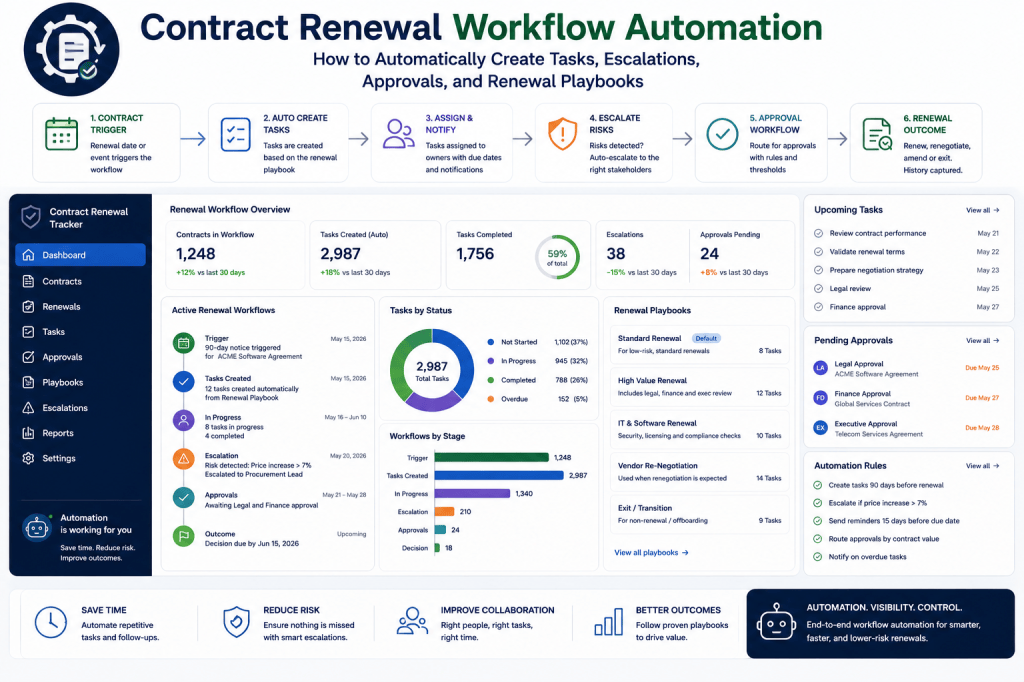
What Is Contract Renewal Workflow Automation?
Contract renewal workflow automation uses predefined rules, deadlines, contract attributes, and business processes to automatically coordinate renewal activities.
A simplified workflow might look like:
Renewal Approaching
↓
Workflow Automatically Starts
↓
Business Owner Reviews Requirement
↓
Usage and Performance Reviewed
↓
Renewal Decision Recorded
↓
Procurement Negotiation Started
↓
Legal Review
↓
Finance Approval
↓
Executive Approval
↓
Contract Executed
↓
Renewal Completed
The Contract Renewal Tracker manages the movement between these stages.
Why Reminders Alone Are Not Enough
A reminder might say:
Contract expires in 90 days.
That tells someone something is happening.
It does not tell them:
- what needs to happen next;
- who is responsible;
- what information is required;
- whether procurement should be involved;
- whether legal review is mandatory;
- what approvals are needed;
- whether tasks are overdue;
- what happens if nobody responds.
Workflow automation addresses those questions.
From Reminder to Action
Consider a €750,000 software contract.
A simple system sends:
Reminder: Contract renews in 120 days.
A workflow-driven system could automatically do much more.
180 Days Before Notice Deadline
Create renewal case.
Assign business owner.
Request usage analysis.
150 Days
Request supplier performance review.
120 Days
Require preliminary renewal decision.
100 Days
If decision = Renegotiate:
Create procurement negotiation.
90 Days
Request supplier proposal.
60 Days
Require commercial recommendation.
45 Days
Start legal review if contract terms changed.
30 Days
Start finance approval.
14 Days
Escalate incomplete approvals.
7 Days
Executive escalation if unresolved.
Now the organization has a process rather than a reminder.
Managing Renewals Manually?
Spreadsheets and calendar reminders can identify dates, but they do not reliably coordinate the work surrounding those dates.
Contract Renewal Tracker is designed to turn upcoming renewals into structured workflows—automatically creating tasks, assigning owners, triggering approvals, escalating delays, and tracking the process through completion.
Automate your contract renewal workflow →
Renewal Workflows Should Start from the Notice Deadline
One of the most important design principles is:
Build the workflow backward from the contractual notice deadline, not merely from the expiration date.
Suppose:
Contract expiration:
December 31
Notice period:
90 days
Notice deadline:
October 2
The workflow might need to begin:
180 days before October 2
rather than 180 days before December 31.
This creates much more realistic renewal planning.
Internal Deadlines
The system should also create internal deadlines.
For example:
Contractual notice deadline:
October 2.
Internal decision deadline:
September 15.
Target negotiation completion:
August 31.
Target approval completion:
September 10.
The organization deliberately creates buffers before the legal deadline.
Renewal Playbooks
Different contracts require different processes.
A €2,000 software subscription should not require the same workflow as a €5 million infrastructure agreement.
This is where renewal playbooks become useful.
A renewal playbook defines:
- when the process begins;
- which tasks are created;
- who owns them;
- which reviews are required;
- which approvals are required;
- what escalation rules apply;
- which documents must be collected.
Example: Low-Value SaaS Renewal Playbook
For contracts below €10,000:
60 Days Before Notice Deadline
Create renewal review.
Task
Confirm whether software is still required.
Task
Check utilization.
Decision
Renew / Cancel.
Approval
Business owner.
Completion Target
14 days before notice deadline.
This keeps the workflow lightweight.
Example: Standard Contract Playbook
For contracts between €10,000 and €250,000:
120 Days Before Notice Deadline
Start renewal workflow.
Business Review
Confirm continued requirement.
Commercial Review
Review pricing and supplier proposal.
Procurement
Required if increase exceeds threshold.
Finance
Required above €100,000.
Legal
Required if terms changed.
Completion
30 days before notice deadline.
Example: Strategic Contract Playbook
For contracts above €1 million or classified as strategic:
365 Days
Begin strategic review.
270 Days
Review alternatives and switching feasibility.
240 Days
Review supplier performance.
210 Days
Develop renewal strategy.
180 Days
Begin negotiation.
120 Days
Commercial checkpoint.
90 Days
Legal review.
60 Days
Finance approval.
45 Days
Executive approval.
30 Days
Execution target.
The workflow is much more extensive because the exposure is greater.
Dynamic Playbook Selection
The system should automatically select the correct playbook based on contract attributes.
For example:
IF contract_value < €10,000THEN use "Low-Value SaaS Renewal"IF contract_value >= €10,000AND contract_value < €250,000THEN use "Standard Renewal"IF contract_value >= €1,000,000OR supplier_classification = "Strategic"THEN use "Strategic Renewal"
This eliminates manual workflow setup.
Other Playbook Selection Criteria
Playbooks could also depend on:
- contract category;
- supplier classification;
- auto-renewal status;
- risk level;
- country;
- business unit;
- regulatory requirements;
- data sensitivity;
- switching complexity.
For example:
A cybersecurity supplier may automatically trigger a security review.
A data-processing agreement may trigger privacy review.
Automatic Task Creation
Once a workflow starts, the Contract Renewal Tracker can automatically create tasks.
For example:
Task: Confirm business requirement
Owner: Contract owner
Due: 10 days
Task: Review usage
Owner: Application owner
Due: 14 days
Task: Review supplier performance
Owner: Vendor manager
Due: 14 days
Task: Prepare negotiation strategy
Owner: Procurement
Due: 21 days
Users no longer need to create the renewal checklist manually.
Dynamic Task Assignment
Tasks should be assigned using contract data.
For example:
Business review:
→ Business Owner
Pricing review:
→ Procurement Owner
Budget approval:
→ Finance Approver
Legal terms:
→ Legal Reviewer
Security assessment:
→ Security Owner
The workflow engine determines ownership automatically.
What If No Owner Exists?
This is an important exception.
Suppose the workflow starts but:
Business Owner = Missing
The system should not silently create an unassigned task.
Instead:
Exception Created
↓
Contract Administrator Alerted
↓
Owner Assignment Required
This prevents workflows from failing invisibly.
Conditional Tasks
Not every task needs to exist for every renewal.
For example:
IF supplier_price_increase > 5%THEN create procurement negotiation task
Another example:
IF contract_terms_changed = TRUETHEN create legal review
Or:
IF supplier_handles_personal_data = TRUETHEN create privacy review
This makes workflows adaptive.
Conditional Branching
The workflow may change based on the renewal decision.
For example:
Renew
↓
Commercial Review
↓
Approval
↓
Execution
Renegotiate
↓
Negotiation Workflow
↓
Commercial Agreement
↓
Approval
↓
Execution
Terminate
↓
Termination Review
↓
Notice Preparation
↓
Legal Approval
↓
Notice Submission
Replace
↓
Sourcing / Migration Plan
↓
Termination Workflow
↓
Replacement Implementation
One renewal engine can therefore support several outcomes.
The Renewal Decision Gateway
A useful workflow stage is:
Renewal Decision Required
Possible outcomes:
- Renew;
- Renegotiate;
- Reduce;
- Consolidate;
- Replace;
- Terminate;
- Extend temporarily;
- Undecided.
The decision determines which workflow branch activates next.
Automatically Start Negotiation Workflows
Suppose:
Decision:
Renegotiate
The Contract Renewal Tracker can automatically:
- Create negotiation workspace.
- Assign procurement owner.
- Retrieve previous pricing.
- Request supplier proposal.
- Create target-setting task.
- Calculate deadline buffer.
- Schedule negotiation checkpoints.
- Start negotiation-risk monitoring.
The user does not need to configure the process manually.
Automatically Start Termination Workflows
If:
Decision = Terminate
the system might create:
Verify Termination Rights
↓
Prepare Notice
↓
Legal Review
↓
Authorized Signatory Approval
↓
Submit Notice
↓
Record Delivery Evidence
↓
Confirm Supplier Receipt
↓
Close Contract
This is especially valuable because termination mistakes can have significant consequences.
Termination Notice Evidence
The workflow should preserve:
- notice document;
- date sent;
- method of delivery;
- recipient;
- delivery confirmation;
- supplier acknowledgment.
This creates evidence that contractual requirements were satisfied.
Automatically Start Replacement Workflows
If:
Decision = Replace
the renewal process becomes more complex.
The system may create:
- alternative supplier review;
- migration plan;
- data export;
- transition timeline;
- implementation tasks;
- termination workflow.
Replacement should start early because migration may take months.
Approval Automation
Approvals can also be triggered automatically.
For example:
IF commitment_value <= €50,000THEN business_owner_approval
IF commitment_value > €50,000THEN business_owner + procurement
IF commitment_value > €250,000THEN add finance
IF commitment_value > €1,000,000THEN add executive_approval
This eliminates uncertainty about who needs to approve what.
Parallel Approvals
Some approvals can occur simultaneously.
For example:
Legal
and
Security
and
Finance
may review the renewal in parallel.
Once all three approve:
↓
Executive Approval
This can reduce cycle time.
Sequential Approvals
Other processes may require a specific order.
For example:
Business Owner
↓
Procurement
↓
Finance
↓
Executive
The workflow should support both parallel and sequential approval patterns.
Conditional Approval Routing
Suppose:
Contract value:
€180K.
Normally:
Finance approval not required.
But:
Supplier increase:
12%.
A rule could state:
IF supplier_increase > 10%THEN finance_approval = REQUIRED
This creates intelligent routing.
Approval Rejection
A rejection should not necessarily end the workflow.
For example:
Finance rejects.
Reason:
Proposed increase exceeds budget.
The system could return the renewal to:
Negotiation
with a new task:
Renegotiate price below €540K.
This creates a controlled loop.
Approval Expiration
Approvals may also need deadlines.
For example:
Finance approval due:
5 business days.
If overdue:
↓
Reminder.
After 2 additional days:
↓
Escalation.
After 5 additional days:
↓
Manager escalation.
The workflow engine keeps the renewal moving.
Escalation Rules
Escalations are essential because tasks will sometimes be ignored.
A basic rule might be:
3 Days Before Due Date
Reminder to owner.
Due Date
Task marked due.
2 Days Overdue
Reminder + manager notification.
5 Days Overdue
Workflow escalation.
Critical Deadline Approaching
Executive escalation.
This is much stronger than repeated generic reminders.
Deadline-Aware Escalations
The severity should also depend on the contract deadline.
An overdue task on a contract with:
180 days remaining
is different from one with:
7 days remaining.
The escalation engine can combine:
Task Overdue Duration
Days Until Notice Deadline
Contract Value
Risk Score
to determine urgency.
Example Escalation
Suppose:
Contract value:
€1.8M.
Notice deadline:
11 days.
Renewal decision:
Undecided.
Business review:
7 days overdue.
The system could generate:
Critical Renewal Escalation
The €1.8M ExampleCloud agreement reaches its notice deadline in 11 days. The required business renewal decision is seven days overdue. Failure to decide may result in automatic renewal.
This is far more actionable than:
Task overdue.
Risk-Based Workflow Acceleration
The workflow engine can respond to increasing risk.
Suppose a contract moves from:
Medium Risk
to:
Critical Risk
because the deadline is approaching.
The system might automatically:
- shorten task deadlines;
- increase reminder frequency;
- notify management;
- add procurement;
- create contingency tasks.
The workflow adapts to risk.
Automatically Create Contingency Actions
For high-risk negotiations, the system might create:
Prepare non-renewal notice as contingency.
This does not mean the organization intends to terminate.
It preserves optionality if negotiations fail.
Event-Driven Automation
Not all workflows should depend on dates.
They can also react to events.
For example:
Supplier Proposal Uploaded
↓
Create commercial review.
Supplier Increase >10%
↓
Create escalation.
Contract Amendment Uploaded
↓
Create legal review.
Renewal Decision Changed to Terminate
↓
Start termination workflow.
Approval Rejected
↓
Return to negotiation.
This creates a responsive system.
Data-Driven Automation
Workflow triggers can also use contract data.
For example:
IF utilization < 60%AND annual_value > €50,000THEN create optimization_review
Or:
IF supplier_performance < 70THEN create supplier_performance_review
The renewal process becomes smarter because it responds to evidence.
Workflow Templates
Organizations should be able to create reusable templates.
Examples:
Standard SaaS Renewal
Enterprise Software Renewal
Professional Services Renewal
Cloud Infrastructure Renewal
Strategic Supplier Renewal
Contract Termination
Supplier Replacement
Temporary Extension
Each template defines the process once.
The system then applies it repeatedly.
No-Code Workflow Configuration
Ideally, administrators should not need developers to change renewal processes.
A no-code builder could allow:
Trigger
Contract reaches 180 days before notice deadline.
↓
Condition
Value > €250K.
↓
Action
Create procurement review.
↓
Condition
Supplier increase >5%.
↓
Action
Create negotiation.
↓
Approval
Finance.
↓
Approval
Executive if value >€1M.
This makes the SaaS adaptable to different organizations.
Workflow Versioning
Processes change.
Suppose:
Workflow v1:
Finance approval above €250K.
Later:
Workflow v2:
Finance approval above €100K.
Existing renewal cases may need to continue under v1 while new ones use v2.
Therefore, workflow definitions should be versioned.
Workflow Audit Trail
Every automated action should be recorded.
For example:
09:00
Renewal workflow automatically started.
09:00
Business review assigned to James Anderson.
09:01
Usage review assigned to IT Operations.
09:01
Procurement review scheduled for September 12.
September 14
Business review overdue.
September 16
Escalation sent to department manager.
This creates operational transparency.
Manual Overrides
Automation should not remove human control.
Authorized users should be able to:
- reassign tasks;
- change deadlines;
- skip tasks;
- add reviews;
- pause workflow;
- restart workflow.
But overrides should be recorded.
For example:
Legal review skipped by Procurement Director because existing contract terms remain unchanged.
That explanation becomes part of the audit history.
Exception Management
Real-world renewals rarely follow the ideal process perfectly.
Examples include:
- supplier refuses proposed terms;
- owner leaves organization;
- contract document missing;
- dispute occurs;
- budget frozen;
- merger changes requirement;
- emergency extension needed.
The workflow system should allow exceptions without losing governance.
Temporary Extensions
Sometimes a renewal cannot be completed before expiration.
The organization may negotiate:
30-day extension
or:
90-day bridge agreement
The tracker should record:
- extension start;
- extension end;
- temporary pricing;
- new deadline;
- approvals;
- reason.
Then automatically create a new completion workflow.
Workflow Health
Managers need visibility across all active renewal processes.
A dashboard might show:
Active Renewal Workflows
284
On Track
218
At Risk
41
Critical
12
Blocked
13
This creates an operational command center.
Workflow Bottlenecks
The system can identify where renewals become stuck.
For example:
Average stage duration:
Business Review:
4.2 days.
Procurement:
8.7 days.
Legal:
14.3 days.
Finance:
5.1 days.
Executive:
6.4 days.
Legal is clearly the largest bottleneck.
Automate the Process, Not Just the Reminder
When renewal coordination depends on individuals remembering what happens next, missed tasks and delayed approvals become inevitable as the portfolio grows.
Contract Renewal Tracker can use reusable renewal playbooks to automatically coordinate business owners, procurement, finance, legal, security, and executives around the same contractual deadline.
Turn your renewal process into an automated workflow →
SLA for Internal Renewal Tasks
Organizations can define internal service levels.
For example:
Business review:
5 business days.
Legal review:
7 business days.
Finance approval:
3 business days.
Executive approval:
5 business days.
The system measures whether these targets are being met.
Workflow Performance Analytics
Useful metrics include:
Average Renewal Cycle Time
Percentage Completed On Time
Average Approval Duration
Overdue Task Rate
Escalation Rate
Workflow Restart Rate
Missed Notice Deadline Rate
These metrics help organizations continuously improve renewal operations.
Workflow by Business Unit
For example:
| Business Unit | On-Time Completion | Avg. Cycle |
|---|---|---|
| IT | 96% | 48 days |
| Finance | 94% | 42 days |
| Marketing | 81% | 67 days |
| Operations | 91% | 54 days |
Marketing may require additional process improvement.
Workflow by Contract Type
The organization may discover:
Software renewals:
52 days.
Professional services:
39 days.
Cloud contracts:
84 days.
Strategic contracts:
142 days.
This data helps determine better workflow start dates.
Predictive Workflow Timing
Historical workflow data can eventually be used to predict how long a renewal is likely to take.
Suppose:
Strategic supplier.
€2.4M value.
Legal changes expected.
Previous similar renewals:
145-day average.
The system might recommend:
Start this renewal 210 days before the notice deadline.
This is more intelligent than applying one standard timeline to every contract.
AI Workflow Assistant
The AI Contract Renewal Assistant can sit above the workflow engine.
Users might ask:
What do I need to do today?
The assistant could answer:
You have five renewal tasks requiring attention. Two are associated with high-risk contracts. The most urgent is the ExampleCloud business decision, which is three days overdue and has 19 days remaining before the notice deadline.
This makes workflow management conversational.
AI Can Explain Workflow Decisions
A user might ask:
Why was legal review added?
The assistant could answer:
Legal review was automatically added because the supplier uploaded revised contract terms. The Strategic Software Renewal playbook requires legal review whenever contractual language changes.
This makes automation explainable.
AI Can Suggest Workflow Actions
For example:
The supplier negotiation remains unresolved with 12 days remaining before the notice deadline. Consider creating a termination-notice contingency task while commercial discussions continue.
Again, AI recommends.
The workflow engine executes only according to authorized actions.
AI Should Not Bypass Governance
An AI assistant should not be able to silently:
- approve a contract;
- remove required legal review;
- execute a renewal;
- send termination notice;
- change approval authority.
AI can assist users and prepare actions.
Governance remains deterministic.
Workflow Rules Should Be Deterministic
This distinction is important.
Use AI for:
- summaries;
- recommendations;
- exception analysis;
- workflow explanations;
- identifying likely risks.
Use deterministic logic for:
- deadlines;
- approval thresholds;
- permissions;
- escalation rules;
- contractual calculations;
- mandatory controls.
This creates a safer architecture.
Workflow Engine Architecture
A simplified architecture could be:
Contract Database
↓
Renewal Event
↓
Workflow Engine
↓
Playbook Selection
↓
Rule Evaluation
↓
Task Creation
↓
Assignments
↓
Approvals
↓
Escalations
↓
Completion
Supporting services include:
Notification Service
Risk Engine
Audit Log
AI Assistant
Analytics
This becomes a central part of the Contract Renewal Tracker platform.
Event Model
The workflow engine can respond to events such as:
RENEWAL_WINDOW_ENTERED
NOTICE_DEADLINE_APPROACHING
DECISION_RECORDED
SUPPLIER_PROPOSAL_RECEIVED
NEGOTIATION_STARTED
CONTRACT_TERMS_CHANGED
APPROVAL_REQUESTED
APPROVAL_REJECTED
TASK_OVERDUE
CONTRACT_EXECUTED
Events make the system modular and extensible.
Notifications
Workflow automation should connect to multiple notification channels.
Possible channels include:
- in-app notifications;
- email;
- Microsoft Teams;
- Slack;
- daily digest;
- executive briefing.
Users should not need to monitor the application continuously.
Notification Fatigue
Too many alerts create another problem.
If users receive 50 renewal notifications every day, they may ignore all of them.
The system should prioritize notifications.
For example:
Critical
Immediate notification.
High
Daily digest.
Medium
Dashboard.
Low
Weekly summary.
Risk-based notification policies reduce noise.
Personal Renewal Inbox
Each user could have a personalized workspace:
My Renewal Work
Due Today
3
Overdue
2
Awaiting My Approval
4
Upcoming This Week
7
Critical
1
This creates a clear operational queue.
Manager View
Managers could see:
Team Tasks
Overdue Work
Critical Renewals
Escalations
Approval Backlog
This allows intervention before deadlines are missed.
Executive View
Executives generally do not need individual tasks.
They need exceptions.
For example:
Three renewals above €1M are currently at risk.
€4.2M of commitment remains pending executive approval.
Two strategic negotiations may miss their internal completion deadlines.
Automation should surface only what requires executive attention.
Workflow Automation as a SaaS Differentiator
Many organizations already have:
- spreadsheets;
- calendars;
- generic task systems;
- procurement software;
- contract repositories.
The value of a dedicated Contract Renewal Tracker is that the workflow understands contract-renewal semantics.
It understands:
Expiration Date
Notice Period
Auto-Renewal
Renewal Decision
Supplier Proposal
Negotiation
Approval
Termination
Renewal Risk
A generic task system usually does not.
From Static Tracking to Active Renewal Operations
The difference can be summarized simply.
Spreadsheet
Stores renewal date.
Calendar
Reminds someone.
Task Manager
Tracks manually created tasks.
Contract Renewal Tracker
Understands the renewal event and automatically orchestrates the process around it.
That is a significantly stronger SaaS proposition.
Example End-to-End Automated Renewal
Consider:
ExampleCloud Enterprise Agreement
Annual value:
€620K.
Notice period:
90 days.
Auto-renewal:
Yes.
Supplier classification:
Strategic.
The system automatically selects:
Strategic Software Renewal Playbook
Day −210
Workflow starts.
Day −190
Business requirement confirmed.
Day −180
Usage review identifies 30% unused licenses.
Day −170
Supplier performance review completed.
Day −160
Decision:
Renegotiate.
Day −150
Negotiation workspace automatically created.
Day −130
Supplier proposal:
+10%.
Day −120
Risk increases.
Day −100
Counteroffer submitted.
Day −75
Commercial agreement reached.
Day −60
Legal and finance approval begin.
Day −45
Approvals complete.
Day −30
Executive approval.
Day −25
Contract signed.
Day −24
Savings recorded.
Day −23
Workflow completed.
The entire process remains visible from one renewal record.
Measuring Automation Value
Organizations can measure the value of workflow automation.
Possible metrics include:
Administrative Time Saved
Manual coordination reduced.
Earlier Workflow Start
Average number of additional preparation days.
Missed Deadline Reduction
Before vs after implementation.
Approval Cycle Improvement
Average approval duration.
Negotiation Lead Time
Additional days available for procurement.
Savings Improvement
Financial outcomes from earlier negotiation.
This helps demonstrate SaaS ROI.
Example ROI
Suppose an organization manages:
1,500 active contracts.
600 renewals annually.
Manual renewal coordination:
45 minutes per renewal.
That represents:
450 administrative hours annually.
If automation reduces that by 60%:
270 hours saved.
But administrative savings may be small compared with preventing even one unwanted €500,000 auto-renewal.
The largest value often comes from risk reduction and better commercial timing.
Ready to Automate Your Contract Renewal Process?
Contract renewals should not depend on someone remembering which task comes next.
Contract Renewal Tracker is designed to automatically transform upcoming renewal events into structured workflows—assigning tasks, coordinating stakeholders, routing approvals, escalating delays, and preserving a complete audit trail.
Instead of managing renewals across spreadsheets, inboxes, calendars, and task applications, teams can work from one renewal operations platform.
Use Contract Renewal Tracker to:
- automatically start renewal workflows;
- apply reusable renewal playbooks;
- create and assign tasks;
- trigger conditional reviews;
- route approvals;
- escalate overdue work;
- coordinate negotiations;
- manage termination processes;
- track workflow performance;
- preserve every decision and action.
See what is coming. Know what happens next. Keep every renewal moving.
Start Your Contract Renewal Tracker Subscription →
Final Thoughts
Contract renewal automation should not mean sending more reminders.
The real objective is to automate the operational structure surrounding the renewal decision.
A mature workflow connects:
Contract Terms
↓
Notice Deadline
↓
Renewal Playbook
↓
Tasks
↓
Business Decision
↓
Negotiation
↓
Reviews
↓
Approvals
↓
Execution
↓
Audit Trail
And it continuously asks:
Is the renewal progressing quickly enough to preserve the organization’s options?
That is what turns Contract Renewal Tracker from a passive database into an active operational system.
The organization no longer needs to rely on individuals remembering every step.
The system knows:
when the process should start,
what should happen,
who should do it,
when it becomes overdue,
when it should escalate,
and:
what must happen before the contractual deadline arrives.
That is the foundation of scalable contract renewal operations.
Next Article in the Contract Renewal Tracker Series
Article 18 — “Contract Renewal Approval Workflows: How to Build Multi-Level Approvals for Finance, Legal, Procurement, and Executives”
The next article will go deeper into one of the most important parts of renewal governance: approval orchestration.
It will cover approval matrices, monetary thresholds, parallel versus sequential approvals, conditional approvals, delegation, approval SLAs, rejected renewals, re-approval after commercial changes, separation of duties, approval evidence, executive approval queues, auditability, AI-generated approval briefs, and how Contract Renewal Tracker can turn fragmented email approvals into a controlled SaaS approval process.

