One of the biggest concerns when adopting new contract software is not whether the product can manage renewals.
It is:
How much work will it take to get started?
A company may already have hundreds or thousands of contracts spread across:
- Excel spreadsheets;
- shared drives;
- SharePoint;
- Google Drive;
- procurement systems;
- local folders;
- email;
- legacy contract databases.
Moving all of that into a new SaaS platform can sound like a major project.
That is why onboarding and implementation should be designed as part of the Contract Renewal Tracker product experience—not treated as an afterthought.
The objective should be:
Get the organization to reliable renewal visibility as quickly as possible, then improve data and automation in stages.
A company should not need a perfect contract database before it can start benefiting from renewal tracking.
The Real Goal of Implementation
The goal is not:
Import every possible piece of historical contract information before launch.
The goal is:
Get the contracts that matter into the system, verify the renewal-critical information, assign ownership, activate reminders and workflows, and begin managing renewals.
That creates value quickly.
Everything else can follow.
Start with Renewal-Critical Data
For most organizations, the first implementation should focus on fields such as:
- contract name;
- supplier;
- contract owner;
- start date;
- end date;
- auto-renewal status;
- notice period;
- annual value;
- contract document;
- business unit.
These fields are enough to establish an initial renewal portfolio.
Worried That Moving Off Spreadsheets Will Take Months?
A contract-renewal implementation does not need to begin with a massive data-cleanup project.
Contract Renewal Tracker is designed to help organizations import existing contract lists, upload documents, identify missing renewal data, assign owners, and progressively activate workflows without waiting for every record to become perfect.
Move from spreadsheet tracking to structured renewal management faster →
Implementation Should Happen in Phases
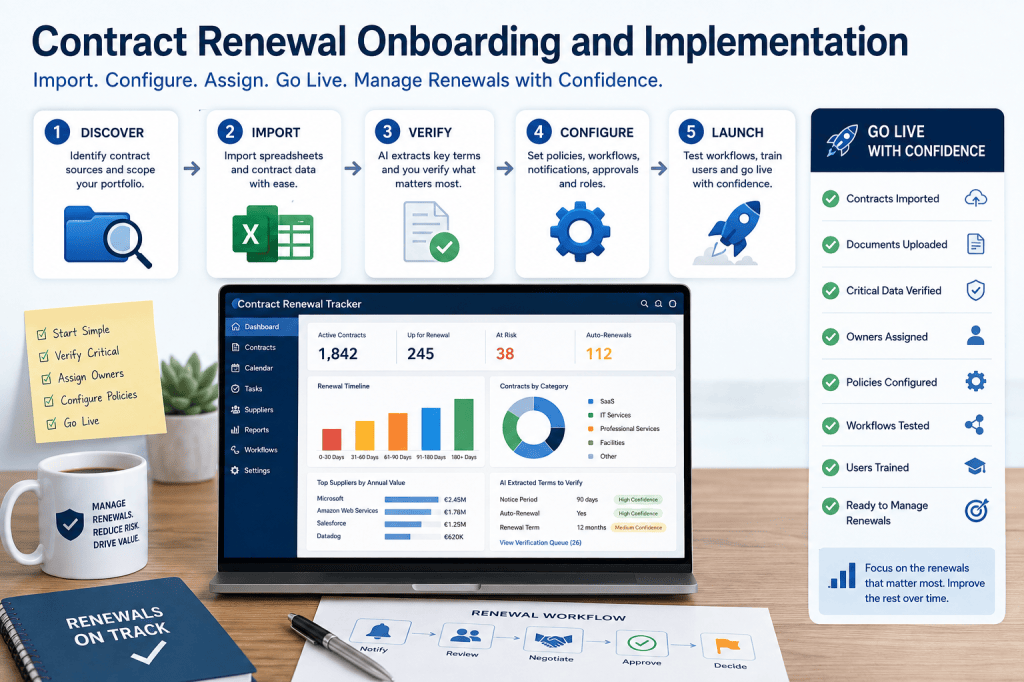
A practical rollout might contain five stages:
1. Discover
↓
2. Import
↓
3. Verify
↓
4. Configure
↓
5. Launch
This keeps the implementation understandable and controlled.
Phase 1: Discover the Existing Renewal Environment
Before importing anything, identify where contract information currently lives.
Typical sources include:
- Excel;
- Google Sheets;
- contract repositories;
- procurement applications;
- ERP systems;
- SharePoint;
- local departmental files.
The implementation team should answer:
How many contracts do we have?
Which contracts matter most?
Where are the documents?
Who owns them?
What renewal information already exists?
This creates the migration plan.
Do Not Wait for a Perfect Inventory
Many organizations do not know exactly how many contracts they have.
That should not prevent implementation.
Start with a defined portfolio.
For example:
Phase 1 Scope
IT software contracts above €10,000.
Or:
Strategic supplier contracts.
Or:
Contracts renewing within the next 12 months.
This creates a manageable first deployment.
Pilot Portfolio
A pilot might contain:
50–200 contracts
with a mix of:
- low-value renewals;
- strategic contracts;
- auto-renewals;
- several business owners.
This is enough to validate:
- imports;
- workflows;
- notifications;
- ownership;
- reporting.
The broader portfolio can follow.
Prioritize Upcoming Renewals
One of the best migration strategies is to prioritize by renewal urgency.
For example:
Priority 1
Contracts with notice deadlines within 90 days.
Priority 2
Contracts renewing within 180 days.
Priority 3
Contracts renewing within 12 months.
Priority 4
Long-term future contracts.
This directs implementation effort toward contracts where delay creates immediate risk.
Phase 2: Import Existing Contract Data
Many organizations already maintain some form of contract spreadsheet.
A typical file may contain:
| Contract | Supplier | End Date | Owner | Value |
|---|---|---|---|---|
| Cloud | ExampleCloud | Dec 31 | John | €620K |
| Analytics | DataWorks | Mar 30 | Sarah | €180K |
The Contract Renewal Tracker should support straightforward spreadsheet import.
Import Wizard
A guided import process might include:
Step 1
Upload Excel or CSV.
Step 2
Map columns.
Step 3
Validate data.
Step 4
Resolve errors.
Step 5
Preview.
Step 6
Import.
This makes migration accessible even to non-technical users.
Column Mapping
Existing spreadsheets rarely use standardized names.
One file may use:
Expiry
Another:
End Date
Another:
Termination Date
The import tool can map these to:
Contract End Date
Similarly:
Vendor
can map to:
Supplier
AI may suggest mappings, while the user confirms them.
Import Validation
Before accepting the data, the system should detect problems.
Examples:
- missing end date;
- invalid date;
- duplicate contract number;
- unknown currency;
- missing supplier;
- inactive owner.
The user receives an issue list before the import is finalized.
Example Import Result
Rows:
1,200.
Ready:
1,034.
Warnings:
Errors:
The customer can import clean records immediately while resolving the others separately.
This avoids an all-or-nothing migration.
Keep Warnings Separate from Blocking Errors
Not every issue should prevent import.
For example:
Missing contract category:
Warning.
Invalid end date:
Error.
Missing annual value:
Warning.
End date before start date:
Error.
This keeps the migration practical.
Phase 3: Upload Contract Documents
Structured spreadsheet data is useful, but the contract document remains the evidence source.
Customers should be able to upload:
- agreements;
- amendments;
- order forms;
- renewal letters;
- pricing schedules.
These documents can then support clause extraction and verification.
Bulk Document Upload
Large customers may need to upload hundreds of contracts.
A bulk upload should allow the system to:
- ingest files;
- identify likely supplier;
- identify document type;
- link to existing contract where possible;
- flag uncertain matches.
This reduces manual processing.
AI-Assisted Contract Extraction
When a document is uploaded, AI can attempt to identify:
- supplier;
- start date;
- end date;
- renewal term;
- auto-renewal;
- notice period;
- price increase clause.
For example:
Extracted Renewal Terms
End Date:
December 31, 2028.
Auto-Renewal:
Yes.
Notice Period:
90 days.
Renewal Term:
12 months.
Confidence:
94%.
This dramatically accelerates onboarding.
AI Should Assist, Not Silently Decide
Critical fields should remain verifiable.
For example:
AI Extracted
Notice Period:
90 days.
Status
Awaiting Verification.
A contract administrator can inspect the source clause and approve it.
Once verified, it becomes trusted operational data.
Verification Queue
Instead of asking users to review every extracted field immediately, the platform can create a prioritized queue.
For example:
Verification Needed
Critical within 90 days:
High-value:
Low-confidence clauses:
Future low-risk contracts:
This directs human attention efficiently.
Verify the Most Important Contracts First
The system can prioritize verification using:
Renewal Urgency
Contract Value
Auto-Renewal Risk
AI Confidence
This is more efficient than checking records alphabetically.
Phase 4: Normalize Suppliers
Supplier names are often inconsistent.
Examples:
- Microsoft
- Microsoft Corp.
- Microsoft Ireland Operations Ltd.
- MSFT
The implementation process should normalize supplier relationships.
This improves:
- supplier spend;
- supplier concentration;
- renewal clustering;
- negotiation intelligence.
Supplier Consolidation Review
The system may suggest:
These four supplier records may belong to the same supplier group.
The customer can:
Merge
or:
Keep Separate but Related
This preserves legal detail while improving analytics.
Phase 5: Assign Contract Owners
Every active renewal should have a responsible owner.
During implementation, the platform can map owner fields from:
- spreadsheet emails;
- HR directory;
- identity system;
- business unit.
If an imported owner cannot be found, the contract enters:
Owner Verification Queue
Ownership Mapping
For example:
Spreadsheet:
John Smith
Directory finds:
john.smith@company.com
User confirms.
Now the system can:
- assign workflows;
- send reminders;
- route escalations.
Bulk Ownership Assignment
For contracts missing owners, administrators may assign by:
- department;
- supplier;
- category;
- business unit.
For example:
All Microsoft contracts:
Owner = IT Procurement.
This can speed up migration.
Default Ownership Rules
The organization could configure:
IF category = "SaaS"AND business_unit = "IT"THEN default_owner = IT_PROCUREMENT
The user can override where needed.
Phase 6: Configure Renewal Policies
Once contract data is present, the organization needs to define how renewals should operate.
Policies can include:
- reminder schedules;
- workflow start dates;
- approval thresholds;
- escalation rules;
- risk thresholds;
- notification channels.
These settings turn data into operations.
Start Simple
Do not begin with 100 workflow rules.
A better MVP implementation might use:
Low-Value Contract
60-day workflow.
Standard Contract
120-day workflow.
Strategic Contract
180-day workflow.
The system can become more sophisticated after users gain experience.
Configure Auto-Renewal Rules
For example:
IF auto_renewal = TRUETHEN minimum_review_start = 120 days before notice deadline
Strategic contracts might start earlier.
Configure Approval Thresholds
Example:
Under €50K:
Business owner.
€50K–€250K:
Business + procurement.
Above €250K:
Add finance.
Above €1M:
Add executive.
These policies should reflect the customer’s actual governance model.
Configure Notifications
The organization can decide:
Routine
Email digest.
High Risk
Email + in-app.
Critical
Email + Teams + manager escalation.
This prevents over-notification from day one.
Phase 7: Configure Integrations
Not every integration needs to be enabled before launch.
Prioritize those that create immediate value.
Possible first integrations include:
- SSO;
- email;
- calendar;
- Teams or Slack.
Financial and procurement integrations can follow later.
MVP Integration Set
A practical early rollout might use:
Microsoft 365
for authentication, email, calendar, and Teams.
Or:
Google Workspace
for identity, email, calendar, and Drive.
This can provide substantial value without a complex enterprise integration project.
Phase 8: Configure Security
Before launch, define:
- roles;
- contract access;
- administrator permissions;
- negotiation confidentiality;
- approval authority.
Typical roles include:
Contract Owner
Procurement
Legal
Finance
Executive
Administrator
Users should not automatically receive access to the entire portfolio.
Start with Least Privilege
For example:
Contract owners:
See assigned contracts.
Procurement:
See commercial portfolio.
Executives:
See strategic renewals.
Administrators:
Manage configuration.
This creates a safer default.
Phase 9: Test the Renewal Workflow
Before company-wide launch, test several complete scenarios.
For example:
Scenario 1
Standard renewal.
Scenario 2
Auto-renewal.
Scenario 3
Renegotiation.
Scenario 4
Termination.
Scenario 5
High-value approval.
This ensures the configured rules behave as expected.
Test Deadline Calculations
Choose several contracts and manually confirm:
- end date;
- notice period;
- calculated deadline;
- internal deadline.
Deadline accuracy should be verified before depending on automation.
Test Notifications
Confirm:
- correct recipient;
- correct channel;
- correct timing;
- appropriate content.
Also test failed delivery and owner escalation.
Test Permissions
Verify:
Contract Owner A cannot access:
Contract Owner B’s restricted contracts.
Finance can access:
financial approval information.
Procurement can access:
negotiation fields.
Permission testing should be part of implementation.
Test Approval Routing
For example:
€20K contract.
Expected:
Business approval.
€300K contract.
Expected:
Business + Procurement + Finance.
€2M contract.
Expected:
Executive approval.
This ensures governance is functioning.
Go-Live Readiness Checklist
Before launch, confirm:
- critical contracts imported;
- notice dates verified;
- active owners assigned;
- workflows configured;
- approval policies tested;
- notifications tested;
- permissions verified;
- users trained;
- escalation owners identified;
- support contact defined.
The launch should focus on operational readiness rather than perfect historical completeness.
Do Not Block Go-Live on Low-Risk Data Cleanup
Suppose:
2,000 contracts imported.
1,750 are reliable.
250 have lower-priority data issues.
The organization may still be ready to launch if the risky contracts are verified and uncertain data is clearly flagged.
Waiting for 100% perfection can delay value unnecessarily.
Readiness Score
The system could calculate:
Go-Live Readiness
Critical contracts verified:
100%.
Active owners:
98%.
Notice-period verification:
94%.
Workflow testing:
100%.
User access configured:
100%.
Overall:
97% — Ready
This gives implementation teams a clear status.
User Training
Training should be role-based.
A contract owner does not need to learn system administration.
Training could include:
Contract Owners
How to:
- review renewal;
- record decision;
- complete tasks.
Procurement
How to:
- manage negotiations;
- record supplier offers;
- calculate savings.
Legal
How to:
- verify clauses;
- approve terms.
Administrators
How to:
- manage policies;
- imports;
- users;
- reporting.
This keeps onboarding focused.
In-App Guidance
The product itself should help new users.
Examples:
Complete your first contract.
Verify your first renewal deadline.
Assign your first owner.
Configure your first reminder policy.
This reduces dependency on external training.
Implementation Dashboard
Administrators can monitor onboarding progress.
For example:
Contracts Imported
1,842 / 2,000
Documents Linked
1,621
Critical Fields Verified
92%
Owners Assigned
97%
Workflows Configured
100%
Users Activated
86%
This makes implementation transparent.
Migration Exceptions
The onboarding team needs a queue for unresolved issues.
For example:
Missing documents:
Unknown owners:
Duplicate contracts:
Conflicting renewal terms:
These can be resolved progressively.
Cutover Strategy
Some organizations may need a clear cutover date.
For example:
Before September 1:
Existing spreadsheet remains active.
From September 1:
Contract Renewal Tracker becomes source of truth.
Users should understand which system governs the process.
Avoid Two Sources of Truth
Running both systems indefinitely creates problems.
Spreadsheet says:
Deadline October 1.
SaaS says:
September 1.
Eventually the organization must establish:
Contract Renewal Tracker = authoritative renewal system.
Exports can still be used for analysis, but they should not become competing operational databases.
Phased Rollout
Large organizations may roll out by:
Department
IT first.
Then Finance.
Then Marketing.
Or:
Region
Europe.
Then North America.
Then APAC.
Or:
Contract Type
Software first.
Then services.
Then facilities.
This reduces implementation risk.
Example Rollout
Month 1
IT SaaS portfolio.
300 contracts.
Month 2
Cloud + cybersecurity.
180 contracts.
Month 3
Professional services.
420 contracts.
Month 4
Remaining supplier portfolio.
The implementation grows progressively.
Time-to-Value
A key SaaS implementation metric is:
Time to First Value
For Contract Renewal Tracker, that might mean:
How quickly did the customer identify its first at-risk renewal?
or:
How quickly did the first automated workflow start?
or:
How quickly did the customer prevent its first unwanted auto-renewal?
These are more meaningful than simply measuring how quickly the account was created.
First Value Example
Customer imports:
250 contracts.
Within first day:
System identifies:
6 unverified auto-renewals.
One contract worth:
€180K
has a notice deadline in 21 days.
That is immediate value.
Implementation ROI
The customer may save effort during implementation as well.
Suppose:
1,000 contracts.
Manual metadata extraction:
15 minutes each.
Total:
250 hours.
AI-assisted extraction may substantially reduce that workload by identifying the likely terms for human verification.
The point is not to eliminate review entirely.
It is to make the review process much faster.
Implementation Success Metrics
Useful metrics include:
Contracts Imported
Critical Data Verified
Owner Coverage
Workflow Activation Rate
User Activation
Time to First Value
Renewals Managed
First Savings Identified
Missed Deadline Reduction
These demonstrate adoption.
Customer Adoption
Implementation does not end at technical launch.
Users need to use the system.
Adoption indicators include:
- active users;
- renewal decisions completed;
- tasks completed;
- negotiations tracked;
- approvals performed;
- reports viewed.
This shows whether the SaaS has become operational.
Adoption Problems
Suppose contracts are imported but users continue managing renewals through Excel.
The implementation has not really succeeded.
The platform should help administrators identify:
70% of renewals are being updated regularly.
30% remain inactive.
This allows targeted training or process changes.
Renewal Champions
Larger organizations may benefit from local champions.
For example:
One champion per department.
They help:
- validate owners;
- promote adoption;
- resolve data issues;
- answer workflow questions.
This supports decentralized deployment.
Implementation Support
The SaaS business could eventually offer different onboarding levels.
For example:
Self-Service
Guided import and setup.
Assisted Onboarding
Migration support and configuration.
Enterprise Implementation
Custom migration, integrations, SSO, governance design.
This can support multiple customer segments and pricing tiers.
Self-Service Onboarding
For smaller customers, onboarding should be simple enough to complete without consultants.
A possible sequence:
- Create account.
- Import spreadsheet.
- Upload contracts.
- Invite users.
- Configure reminders.
- Start tracking.
The product should deliver value quickly.
Enterprise Implementation
Larger customers may require:
- security review;
- SSO;
- SCIM;
- data migration;
- custom workflows;
- integrations;
- training;
- governance design.
The core SaaS should remain the same, but implementation support becomes deeper.
Migration from Another CLM System
Some prospects may already use contract-management software but want a more focused renewal solution.
Migration can include:
- contract metadata;
- documents;
- renewal fields;
- suppliers;
- users;
- historical renewal events where available.
The customer does not necessarily need to migrate every historical object.
Focus on what supports future renewal operations.
Historical Data Strategy
Options include:
Full History
Import all historical renewal data.
Current State + Key History
Import active contracts plus recent renewal results.
Forward-Looking Only
Import active contracts and future deadlines.
For many customers, the second approach may provide the best balance.
Archive Old Contracts
Expired contracts that no longer matter operationally can remain in an archive.
They do not need the same migration attention as active contracts.
This reduces implementation scope.
AI-Assisted Migration Review
Users could ask:
Which imported contracts need attention before launch?
The AI assistant could respond:
19 contracts require immediate review. Seven have notice deadlines within 60 days, five have inactive owners, and seven have conflicting renewal terms.
This makes onboarding more manageable.
Onboarding Assistant
The AI assistant could also guide implementation.
For example:
What should I configure next?
Response:
Contract import is complete, but 14 high-value contracts still lack verified notice periods. Resolve those before activating automatic escalation policies.
This creates a guided SaaS experience.
Implementation Risk Scoring
The system could calculate risk at the onboarding level.
For example:
Migration Risk
Critical:
5 contracts.
High:
Medium:
Low:
This helps teams focus implementation effort.
Common Implementation Mistake: Import Everything First
Organizations often attempt to migrate every historical contract before doing anything else.
This can create months of delay.
A better approach is:
Active + Upcoming + High-Risk First
Then expand.
This delivers value earlier.
Common Mistake: Automating Before Verifying
If notice dates are unreliable, do not immediately enable aggressive automated workflows.
First:
- validate critical fields;
- establish confidence;
- then automate.
Automation should follow trust.
Common Mistake: Too Many Workflow Rules
An implementation can become unnecessarily complex.
Start with a small number of understandable policies.
For example:
Low.
Standard.
Strategic.
Refine them after the organization sees how the process works.
Common Mistake: No Clear Ownership
Technology cannot solve renewal management if nobody owns the decisions.
Before go-live, define:
- who owns contracts;
- who coordinates renewal;
- who handles escalation.
The platform then enforces that operating model.
Common Mistake: No Source-of-Truth Decision
If teams continue using uncontrolled spreadsheets after launch, renewal data will diverge.
The organization should explicitly communicate:
Contract Renewal Tracker is the source of truth for renewal status and deadlines.
This is a process decision, not merely a technical one.
Reduce Implementation Anxiety for Prospects
Implementation complexity can be a major reason prospects delay buying new SaaS software.
The solution is not to pretend migration requires no work.
It is to make the process controlled, incremental, and visible.
Contract Renewal Tracker can be positioned around a practical onboarding model:
Import → Validate → Verify → Assign → Configure → Launch → Improve
Customers can start with the contracts that matter most and expand the portfolio over time.
Start with your next renewals instead of waiting for perfect contract data →
Implementation as a Product Feature
The strongest SaaS onboarding experiences are not simply documentation.
The product actively assists.
For example:
Import Wizard
Verification Queue
Owner Mapping
Supplier Normalization
Readiness Dashboard
Configuration Wizard
Onboarding Assistant
These capabilities reduce friction and improve conversion.
Why This Matters for Contract Renewal Tracker Sales
A prospect may already understand the value of renewal software.
But they may hesitate because they imagine:
- months of migration;
- expensive consultants;
- data cleanup;
- employee training;
- system integration.
An onboarding-focused product story answers those objections.
The message becomes:
You do not need to reorganize your entire contract estate before you start managing renewals better.
That is commercially powerful.
Ready to Move Your Renewals into Contract Renewal Tracker?
Getting started should not require a perfect contract database or a months-long transformation project.
Contract Renewal Tracker is designed to help organizations move gradually from spreadsheets, shared folders, and disconnected systems into a structured renewal platform.
Use Contract Renewal Tracker to:
- import existing spreadsheets;
- upload contract documents;
- extract renewal terms with AI assistance;
- validate missing and conflicting data;
- normalize suppliers;
- assign contract owners;
- configure renewal playbooks;
- define approval rules;
- set notification policies;
- connect collaboration and identity systems;
- test workflows;
- monitor go-live readiness;
- expand the portfolio in phases.
Start with the renewals that matter most.
Improve the rest over time.
Import. Verify. Automate. Go live.
Start Your Contract Renewal Tracker Subscription →
Final Thoughts
Successful implementation should optimize for time-to-value, not migration perfection.
The most important questions are:
Have the critical contracts been imported?
Are the deadlines reliable?
Do those contracts have owners?
Will the right people receive alerts?
Will the correct workflow start?
Can the organization act before the deadline?
If those answers are yes, the system is already creating value.
The implementation journey can then continue:
Priority Contracts
↓
Reliable Renewal Data
↓
Automated Workflows
↓
Expanded Portfolio
↓
Integrations
↓
Optimization
↓
Renewal Intelligence
That is a much more practical path than trying to solve every contract-management problem before launch.
For prospects considering Contract Renewal Tracker, this is an important part of the SaaS proposition:
The value does not begin after a six-month implementation.
It can begin with the first important contracts imported into the platform.
Next Article in the Contract Renewal Tracker Series
Article 27 — “Contract Renewal ROI: How to Calculate the Financial Value of Avoiding Missed Renewals, Reducing Spend, and Saving Administrative Time”
The next article will focus directly on the business case for buying the SaaS. It will cover the cost of missed auto-renewals, avoided spend, negotiated savings, SaaS license optimization, administrative hours saved, approval efficiency, risk reduction, ROI calculations, payback periods, cost-of-inaction models, CFO business cases, ROI dashboards, and how prospects can estimate whether a Contract Renewal Tracker subscription pays for itself.
This will be one of the most commercially important articles in the series because it connects the operational benefits of Contract Renewal Tracker directly to subscription value and purchasing justification.

