A renewal negotiation may produce an excellent commercial outcome.
The supplier may reduce its proposed price increase.
Unused licenses may be removed.
Better payment terms may be negotiated.
Service-level commitments may improve.
Procurement may recommend renewal.
But none of that necessarily means the organization is authorized to sign the contract.
Before a renewal creates another financial or legal commitment, the right people may need to approve it.
That could include:
- the business owner;
- procurement;
- finance;
- legal;
- information security;
- privacy;
- compliance;
- department leadership;
- an executive;
- an authorized signatory.
The challenge becomes much greater when approval requirements depend on the contract’s value, duration, risk, supplier, category, commercial changes, or contractual deviations.
This is why approval management should be a core capability of a Contract Renewal Tracker SaaS platform rather than an email chain added at the end of the renewal process.
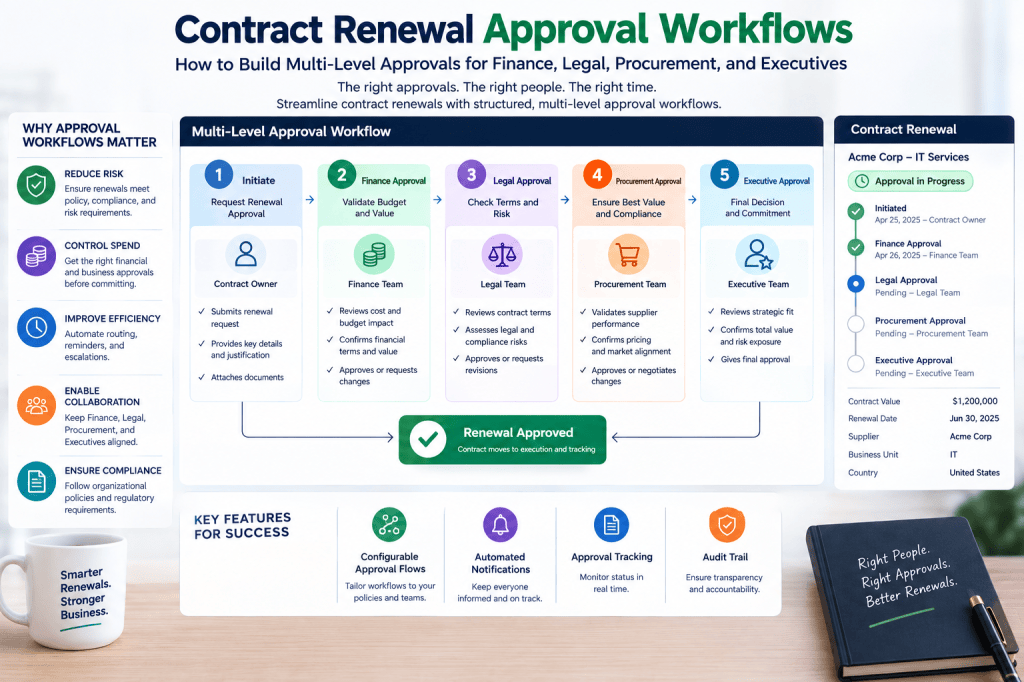
A strong approval workflow answers five questions:
What exactly is being approved?
Who must approve it?
Why are those approvals required?
What happens if someone rejects or delays it?
Can the organization prove afterward that the correct approvals occurred?
Modern contract workflow guidance similarly emphasizes risk- and value-based routing, explicit ownership, conditional approvals, and auditable approval histories rather than sending every agreement through the same path. (Legislate.ai)
Why Renewal Approval Is Different from Renewal Decision
These concepts should be separated.
A renewal decision answers:
What do we want to do?
For example:
Renegotiate.
An approval answers:
Are we authorized to proceed with the resulting commitment?
For example:
Business decision:
Renew.
Negotiated result:
€680,000 for three years.
Finance approval:
Approved.
Legal approval:
Approved.
Executive approval:
Approved.
Only then should the agreement move toward execution.
The Renewal Approval Lifecycle
A typical process might look like:
Renewal Identified
↓
Business Review
↓
Renewal Decision
↓
Negotiation
↓
Commercial Agreement
↓
Approval Requirements Calculated
↓
Approvals Requested
↓
Approved / Rejected / Changes Required
↓
Execution
↓
Renewal Completed
The Contract Renewal Tracker should maintain the complete relationship between these stages.
Why Email Approval Becomes a Problem
A common approval process looks like this:
Procurement sends:
Can you approve the ExampleCloud renewal?
Finance replies:
Approved.
Legal sends another message:
Which version are we approving?
Procurement attaches a revised contract.
The CFO approves the earlier commercial proposal.
Meanwhile, the supplier changes the payment terms.
Now the organization has several problems.
Which version did finance approve?
Did legal approve the final wording?
Was the CFO aware that the commitment changed?
Was the approval within the person’s authority?
Can the organization reconstruct this six months later?
Email alone is poorly suited to answering these questions.
Replace Email Approvals with Controlled Renewal Governance
A renewal should not depend on forwarding the right attachment to the right executive and hoping everyone is approving the same commercial package.
Contract Renewal Tracker can connect the renewal decision, negotiated price, contract version, approval requirements, approvers, comments, timestamps, and final outcome in one controlled workflow.
Route every renewal through the right approvals →
Approval Should Be Policy-Driven
Not every renewal should require every department.
A €2,000 software renewal should not necessarily require:
Legal → Procurement → Finance → CFO → CEO.
That would create unnecessary friction.
Instead, approval requirements should reflect exposure.
Typical factors include:
Contract Value
Total Commitment
Contract Duration
Supplier Risk
Contractual Changes
Price Increase
Data Sensitivity
Business Criticality
Renewal Decision
Policy Exceptions
Current contract-workflow guidance generally recommends this kind of conditional routing rather than one universal approval path. (ZiaSign)
Build an Approval Matrix
The foundation is an approval matrix.
For example:
| Commitment | Business | Procurement | Finance | Executive |
|---|---|---|---|---|
| < €10K | ✓ | — | — | — |
| €10K–€50K | ✓ | ✓ | — | — |
| €50K–€250K | ✓ | ✓ | ✓ | — |
| €250K–€1M | ✓ | ✓ | ✓ | Director |
| €1M–€5M | ✓ | ✓ | ✓ | CFO |
| > €5M | ✓ | ✓ | ✓ | CFO + CEO |
These are illustrative thresholds; each organization should configure its own delegation-of-authority policy.
Annual Value Is Not Enough
Approval should often use total commitment, not annual contract value.
Suppose:
Annual value:
€800,000
Term:
5 years
Total commitment:
€4 million
If the approval matrix only evaluates annual value, the contract may receive insufficient scrutiny.
The Contract Renewal Tracker should therefore calculate:
Annual Contract Value
and:
Total Contract Commitment
Calculate Total Commitment
A simplified calculation might be:
Annual Value × Contract Term
For example:
€800,000 × 5
=
€4,000,000
More sophisticated calculations may include:
- implementation fees;
- committed consumption;
- one-time charges;
- scheduled price increases;
- minimum purchases;
- termination charges.
Approval Rule Example
A rule might state:
IF total_commitment > €1,000,000THEN CFO_APPROVAL = REQUIRED
Another:
IF total_commitment > €5,000,000THEN CEO_APPROVAL = REQUIRED
The system calculates the route automatically.
Procurement Approval
Procurement approval should focus on commercial and sourcing questions.
For example:
- Is pricing acceptable?
- Was the negotiation completed?
- Were benchmarks considered?
- Are quantities appropriate?
- Were alternatives evaluated?
- Does the supplier meet procurement policy?
- Are savings calculations valid?
Procurement is effectively confirming:
This is an acceptable commercial outcome.
Finance Approval
Finance looks at a different dimension.
Typical questions include:
- Is budget available?
- Is the commitment affordable?
- Is the cost allocated correctly?
- What is the multi-year exposure?
- Are payment terms acceptable?
- Does the renewal affect forecast assumptions?
- Does the contract exceed financial authority thresholds?
Finance is effectively confirming:
The organization can accept this financial commitment.
Legal Approval
Legal should focus on contractual risk.
For example:
- Did contractual language change?
- Are liability provisions acceptable?
- Are termination rights acceptable?
- Are indemnities within policy?
- Are governing-law provisions acceptable?
- Are data-processing provisions correct?
- Were non-standard clauses introduced?
Legal is not necessarily approving whether the software is needed.
It is confirming whether the legal position is acceptable.
Avoid Sending Every Renewal to Legal
A useful workflow should allow low-risk renewals on unchanged, previously approved terms to bypass unnecessary legal review where organizational policy permits.
For example:
IF contract_terms_changed = FALSEAND legal_risk = LOWAND approved_template = TRUETHEN legal_review = NOT_REQUIRED
This keeps legal focused on exceptions and genuine risk.
Risk-tiered legal review is a common principle in scalable approval design. (Plexus)
Security Approval
Technology contracts may require security review.
Possible triggers include:
- supplier handles confidential information;
- new integration;
- access to production systems;
- sensitive customer data;
- significant architecture change.
For example:
IF security_classification = HIGHTHEN SECURITY_APPROVAL = REQUIRED
Privacy Approval
Privacy review may be required when:
- personal data is processed;
- processing scope changes;
- data locations change;
- subprocessors change;
- cross-border data arrangements change.
The renewal process can automatically trigger privacy review only when relevant.
Business Owner Approval
The business owner confirms something different again:
We still need this product or service.
That matters.
A perfectly negotiated contract can still be unnecessary.
The business owner may confirm:
Requirement: Yes
Usage: Appropriate
Performance: Acceptable
Budget: Expected
Recommendation: Renew
This becomes part of the approval package.
Executive Approval
Executives should generally receive only renewals that justify executive attention.
Possible triggers include:
- high financial commitment;
- strategic supplier;
- major risk;
- long-term lock-in;
- significant policy exception;
- material budget impact.
The executive should not need to reconstruct the entire renewal history.
They need a concise decision package.
The Approval Brief
When approval is requested, Contract Renewal Tracker can automatically assemble a summary.
For example:
ExampleCloud Renewal
Current Annual Spend: €620K
Supplier Initial Proposal: €682K
Final Negotiated Spend: €555K
Term: 24 months
Total Commitment: €1.11M
Hard Savings: €65K/year
Cost Avoidance: €127K/year
Price Cap: 3%
Business Owner: Approved
Procurement: Approved
Legal: Approved
Security: Approved
Risk: Medium
Notice Deadline: 31 days
Decision Requested
Approve €1.11M renewal commitment.
An executive can understand what they are approving in seconds.
AI-Generated Approval Briefs
The AI Contract Renewal Assistant can help create the approval summary.
It might combine:
- contract data;
- supplier proposal;
- negotiation history;
- final commercial terms;
- risk;
- supplier performance;
- approval history;
- supporting documents.
The AI can summarize.
The human still approves.
Explain Why Approval Is Required
Users should be able to ask:
Why does the CFO need to approve this?
The system could answer:
CFO approval is required because the proposed 36-month renewal creates a total commitment of €2.4M. The organization’s approval policy requires CFO authorization for commitments above €1M.
This makes the approval engine transparent.
Parallel Approvals
Some reviews can occur simultaneously.
For example:
After procurement reaches commercial agreement:
Finance
Legal
Security
can all begin together.
Once all required approvals are complete:
↓
Executive Approval
Parallel processing can significantly reduce unnecessary waiting when the approvals are independent.
Sequential Approvals
Other approvals may need a defined sequence.
For example:
Business Owner
↓
Procurement
↓
Finance
↓
CFO
↓
Authorized Signatory
This is useful when each approver should only receive a renewal after the previous control has passed.
Hybrid Approval Workflows
Many organizations need both.
For example:
Business Approval
↓
Procurement Review
↓
Parallel:
Finance + Legal + Security
↓
CFO
↓
Signature
A capable Contract Renewal Tracker should support hybrid approval graphs rather than only simple linear chains.
Conditional Approvals
Approvals can be activated dynamically.
For example:
IF price_increase > 10%THEN FINANCE_DIRECTOR_APPROVAL = REQUIRED
Another:
IF liability_clause_changed = TRUETHEN LEGAL_APPROVAL = REQUIRED
Another:
IF term_months > 36THEN CFO_APPROVAL = REQUIRED
Another:
IF supplier_risk = CRITICALTHEN EXECUTIVE_APPROVAL = REQUIRED
This prevents both under-governance and unnecessary approval bureaucracy.
Policy Exceptions
Sometimes a renewal violates standard policy.
For example:
Standard maximum term:
36 months.
Supplier requires:
60 months.
Instead of simply rejecting the workflow, the system can create:
Policy Exception Request
Reason:
Supplier requires five-year commitment.
Business justification:
Migration alternative would cost €1.4M.
Required approval:
CFO + Legal.
The exception becomes explicit and auditable.
Price Increase Exceptions
Suppose organizational policy states:
Renewals with increases above 8% require Finance Director approval.
Supplier increase:
11%.
The workflow automatically adds the required approver.
This prevents employees from needing to remember every policy rule.
Delegation of Authority
Approval workflows should reflect the organization’s Delegation of Authority (DoA).
For example:
Manager:
Up to €25K.
Director:
Up to €250K.
VP:
Up to €1M.
CFO:
Up to €5M.
CEO:
Above €5M.
The Contract Renewal Tracker can map roles and thresholds to the approval engine.
Approval Authority Should Be Validated
It is not enough to route a request to someone with the title “Director.”
The system should confirm:
- correct role;
- relevant business unit;
- current authority;
- approval threshold;
- delegation status.
This helps prevent unauthorized commitments.
Delegated Approvals
People take leave.
Executives travel.
Managers change roles.
The system should support temporary delegation.
For example:
Primary Approver
Finance Director.
Delegated To
Deputy Finance Director.
Effective
August 10–24.
Every delegated approval should show:
- original authority;
- delegate;
- delegation period;
- decision.
Out-of-Office Routing
If an approver is unavailable and the contractual deadline is approaching, the workflow should not simply stall.
Rules might automatically:
- detect active delegation;
- route to authorized alternate;
- escalate if no delegate exists.
This is especially important for time-sensitive renewals.
Separation of Duties
High-value renewals may require separation of duties.
For example, the person who negotiated the commercial agreement should not be the only person who approves it.
Possible rule:
NEGOTIATION_OWNER != FINAL_FINANCIAL_APPROVER
This creates stronger internal control.
Maker-Checker Controls
A common model is:
Maker
Prepares the renewal.
Checker
Reviews the renewal.
Approver
Authorizes the commitment.
For high-risk contracts, this separation provides additional governance.
Prevent Self-Approval
The system should detect:
Requester and required approver are the same person.
Depending on policy, it can route the approval to the next authorized level.
Approval SLAs
Every approval should have a target completion time.
For example:
Business:
3 business days.
Procurement:
5 business days.
Finance:
3 business days.
Legal:
7 business days.
Executive:
5 business days.
These become measurable operational targets.
Approval Reminders
Suppose finance approval is due in three days.
The system could send:
Day 0
Approval request.
Day 2
Reminder.
Day 3
Due today.
Day 4
Overdue.
Day 6
Escalation.
This removes the need for procurement to manually chase approvers.
Deadline-Aware Approval Escalation
Approval urgency should also reflect the contractual deadline.
Consider:
Finance approval:
2 days overdue.
Notice deadline:
75 days away.
Risk:
Moderate.
Now consider:
Finance approval:
2 days overdue.
Notice deadline:
5 days away.
Risk:
Critical.
The system should treat those situations differently.
Example Critical Approval Alert
Critical Renewal Approval
CFO approval remains outstanding for the ExampleCloud renewal. The contract has a €2.1M commitment and reaches its termination-notice deadline in five days. Failure to complete the renewal decision may result in automatic renewal under the existing terms.
This gives the approver context, not merely a task notification.
Rejected Approvals
An approval workflow needs more than:
Approved / Not Approved
Possible outcomes include:
Approved
Rejected
Changes Required
More Information Required
Delegated
Expired
Withdrawn
Each should produce an appropriate next action.
Changes Required
Suppose Finance responds:
Changes Required
Reason:
Reduce annual commitment below €600K.
The workflow can automatically return to:
Negotiation
and create:
Renegotiate commercial terms below €600K.
Once procurement reaches a new agreement, the approval process can restart.
Re-Approval After Commercial Changes
This is extremely important.
Suppose finance approves:
€580K
Then the supplier changes the final price to:
€620K
The old approval should not automatically remain valid.
The system can detect:
Material commercial change after approval.
Then:
Finance approval invalidated
↓
Re-approval required
Material Change Rules
Organizations can define what requires re-approval.
For example:
IF final_price > approved_priceTHEN REAPPROVAL = REQUIRED
Or:
IF term_length_changedTHEN REAPPROVAL = REQUIRED
Or:
IF liability_terms_changedTHEN LEGAL_REAPPROVAL = REQUIRED
This ensures approvals remain connected to the actual final agreement.
Contract Version Locking
When an approver reviews a contract, the system should record exactly which version was approved.
For example:
Document
ExampleCloud Renewal Agreement
Version
v7
Hash
Recorded
Approved
August 14, 14:32
If v8 is subsequently uploaded, the system knows the document has changed.
This prevents ambiguity about what was approved.
Approval Evidence
Each approval record should capture:
- approver;
- role;
- date;
- time;
- decision;
- comments;
- contract version;
- commercial values;
- applicable approval rule;
- delegation information.
This creates an audit-ready record.
Approval Audit Trail
For example:
August 10 — 09:12
Approval workflow created.
August 10 — 09:13
Business approval requested.
August 10 — 11:47
Business approved.
August 10 — 11:48
Procurement approval requested.
August 11 — 14:21
Procurement approved.
August 11 — 14:22
Finance and Legal requested in parallel.
August 13 — 10:05
Legal approved.
August 14 — 16:31
Finance approved.
August 14 — 16:32
CFO approval requested.
This gives complete visibility.
Stop Chasing Renewal Approvals Through Email
Approval delays are often not caused by the decision itself. They happen because approvers lack context, requests are sent to the wrong person, commercial terms change, or nobody knows where the renewal is currently blocked.
Contract Renewal Tracker can automatically determine the required approval path, package the relevant renewal information, track every decision, and escalate outstanding approvals before the notice deadline becomes critical.
Automate your contract renewal approvals →
Approval Dashboard
Procurement and contract managers need portfolio visibility.
For example:
Awaiting Approval
47 renewals
Total commitment:
€18.7M
By Function
Business:
9
Procurement:
7
Finance:
13
Legal:
11
Executive:
7
Overdue
12
Critical
4
This immediately shows where the renewal portfolio is blocked.
Executive Approval Queue
Executives should have a simplified view.
For example:
Awaiting Your Approval
ExampleCloud
Commitment:
€2.1M
Savings:
€180K
Risk:
Medium
Deadline:
18 days
CyberSecure
Commitment:
€1.4M
Increase:
6%
Risk:
High
Deadline:
27 days
DataWorks
Commitment:
€3.8M
Savings:
€420K
Risk:
Medium
Deadline:
42 days
The executive can prioritize material decisions.
One-Click Drill-Down
Clicking a renewal should reveal:
Business Need
Supplier Performance
Current Spend
Supplier Proposal
Negotiated Outcome
Savings
Risk
Contract Changes
Previous Approvals
Documents
The approver should not need to search through five systems.
Mobile Approvals
Executives may approve renewals from mobile devices.
The interface should provide enough information for an informed decision without requiring the full desktop application.
For example:
ExampleCloud Renewal
€2.1M commitment
24 months
€180K savings
Legal ✓
Finance ✓
Procurement ✓
Risk: Medium
[Review]
[Approve]
[Changes Required]
[Reject]
High-value approvals should still require appropriate authentication and confirmation.
Approval Comments
Approvers should be able to attach conditions.
For example:
Finance:
Approved provided annual spend remains below €600K.
Legal:
Approved subject to inclusion of Amendment 4.
Security:
Approved for 12 months; reassessment required before next renewal.
These conditions become part of the renewal record.
Approval Dependencies
Some approvals depend on other information.
For example:
Finance cannot approve until:
Final price known.
Legal cannot approve until:
Final redline received.
Security cannot approve until:
Assessment completed.
The workflow should represent these dependencies rather than sending premature approval requests.
Approval Readiness
The Contract Renewal Tracker could calculate:
Approval Readiness
Business justification:
✓
Final pricing:
✓
Supplier proposal:
✓
Usage analysis:
✓
Legal document:
Missing
Security review:
✓
Readiness: 83%
The system can delay final approval routing until required evidence exists.
Approval Packages
Instead of approving individual pieces separately, the system can create an approval package containing:
- renewal summary;
- final commercial proposal;
- contract document;
- negotiation outcome;
- savings analysis;
- risk assessment;
- supplier performance;
- business justification.
This creates a consistent decision record.
AI Approval Assistant
The AI Contract Renewal Assistant can help approvers understand the package.
For example:
Summarize the main risks before I approve.
The assistant might respond:
Primary Risks
1. Multi-Year Commitment
The agreement commits €2.1M over three years.
2. Supplier Dependency
Replacement lead time is estimated at nine months.
3. Price Escalation
Contract allows annual increases up to 4%.
Positive Factors
Supplier performance remains above target.
Procurement negotiated €180K below the supplier’s initial proposal.
No material legal deviations remain.
The executive still decides.
Ask Questions Before Approving
The approver could ask:
Why are we renewing?
What happens if we reject this?
What did we pay previously?
How much did procurement save?
Did legal approve the final version?
Are there alternatives?
What is the supplier’s performance history?
This makes the approval process substantially more informed.
AI Must Not Approve
AI can:
- summarize;
- explain;
- compare;
- highlight risk;
- answer questions;
- recommend.
AI should not impersonate the authorized approver.
The approval event must belong to the human or authorized deterministic process defined by organizational policy.
Approval Notifications
Different users may prefer:
- email;
- in-app;
- Microsoft Teams;
- Slack;
- mobile notifications;
- daily approval digest.
For example:
Your Renewal Approvals
4 awaiting decision.
1 critical.
€3.8M total commitment.
This reduces notification overload.
Approval Analytics
Once approval events are structured, organizations can measure performance.
Useful KPIs include:
Average Approval Time
Approval SLA Compliance
Rejection Rate
Changes-Required Rate
Re-Approval Rate
Escalation Rate
Average Approval Chain Length
Approval Bottleneck by Department
Example Approval Performance
| Function | Avg. Time | SLA | Compliance |
|---|---|---|---|
| Business | 2.1 days | 3 days | 94% |
| Procurement | 3.8 days | 5 days | 91% |
| Finance | 4.9 days | 3 days | 67% |
| Legal | 6.2 days | 7 days | 88% |
| Executive | 3.4 days | 5 days | 92% |
Finance is clearly creating a bottleneck.
Management can investigate why.
Approval Bottleneck Analysis
The system may discover:
62% of finance approval delays occur because budget codes are missing when the request is submitted.
The solution may not be:
Tell finance to approve faster.
Instead:
Require budget code before finance approval begins.
This is how workflow analytics improve the process.
Approval Rules Analytics
Organizations can also evaluate whether their approval rules are excessive.
For example:
Legal reviews:
840 renewals annually.
Legal changes requested:
That means only:
5%
resulted in changes.
Perhaps certain low-risk contracts can bypass legal review.
The workflow becomes more efficient without necessarily weakening governance.
Fast-Track Renewals
A fast-track process might apply when:
- low value;
- no term changes;
- approved supplier;
- no price increase;
- low risk;
- no policy exception.
For example:
Business Owner Approval
↓
Automatic Policy Check
↓
Renewal Authorized
This reduces administrative effort.
High-Risk Approval Path
Conversely:
High-value + strategic supplier + material contract changes might require:
Business
↓
Procurement
↓
Parallel:
Finance + Legal + Security + Privacy
↓
Risk Committee
↓
CFO
↓
CEO
↓
Authorized Signatory
The same platform supports both extremes.
Approval Templates
Reusable approval policies could include:
Low-Value SaaS Renewal
Standard Supplier Renewal
High-Value Renewal
Strategic Supplier Renewal
Data Processor Renewal
Contract Termination
Emergency Extension
Administrators configure the policy once.
The system applies it consistently.
Approval Policy Versioning
Approval rules change over time.
For example:
2026 policy:
CFO approval above €1M.
2027 policy:
CFO approval above €750K.
The system should preserve which policy version governed each historical approval.
This matters for auditability.
Integration with Workflow Automation
Approval management should not exist separately from the workflow engine described in the previous article.
Instead:
Renewal Workflow
↓
Commercial Agreement
↓
Approval Engine
↓
Approval Completed
↓
Execution Task
↓
Renewal Closed
Approvals are simply controlled decision gates within the broader renewal process.
Integration with Risk Scoring
Risk can dynamically affect approval requirements.
For example:
IF renewal_risk = CRITICALTHEN EXECUTIVE_APPROVAL = REQUIRED
even if contract value would normally not require executive involvement.
This creates risk-aware governance.
Integration with Negotiation Management
Suppose procurement negotiates:
Initial proposal:
€750K.
Final:
€620K.
Finance approves:
€620K.
Supplier then changes final offer:
€645K.
Negotiation management detects the change.
Approval engine invalidates finance approval.
Finance receives:
Commercial terms changed after your approval. Re-approval required.
The systems work together.
Integration with Contract Documents
Legal approval should be tied to the exact document version.
Finance approval should be tied to the commercial terms.
Executive approval should be tied to the total commitment.
This creates a defensible approval chain.
Approval Security
Approval actions are sensitive.
The system should support controls such as:
- strong authentication;
- role-based access;
- tenant isolation;
- immutable audit logs;
- session controls;
- permission checks;
- delegation validation.
An approval should never be accepted merely because someone knows the approval URL.
Approval Integrity
The system should prevent:
- unauthorized approvals;
- retroactive approval manipulation;
- hidden document changes;
- self-approval where prohibited;
- bypassing required stages;
- deletion of historical decisions.
This is essential for enterprise trust.
From Approval Workflow to Governance Engine
At this stage, Contract Renewal Tracker is doing more than routing tasks.
It understands:
Who has authority
What requires approval
Which controls apply
Which version is being approved
Whether commercial terms changed
Whether approvals remain valid
When escalation is necessary
That begins to resemble a renewal governance engine.
Why This Matters for the Contract Renewal Tracker SaaS
A prospect may initially look for:
contract renewal reminder software
But once an organization manages hundreds of contracts, the real requirement often becomes broader:
How do we make sure every renewal is reviewed, negotiated, approved, and completed correctly?
That is a much more valuable problem to solve.
The product progression becomes:
Renewal Dates
↓
Notice Deadlines
↓
Automated Reminders
↓
Renewal Workflows
↓
Negotiations
↓
Approvals
↓
Governance
Contract Renewal Tracker therefore moves beyond simple deadline tracking toward a structured renewal operations platform.
Ready to Bring Renewal Approvals Under Control?
Contract approvals should not depend on scattered emails, forwarded PDFs, undocumented verbal decisions, and employees manually determining who needs to approve what.
Contract Renewal Tracker is designed to give organizations a controlled approval process connected directly to each renewal.
Use Contract Renewal Tracker to:
- create approval matrices;
- automatically determine required approvers;
- route finance, legal, procurement, security, and executive reviews;
- support parallel and sequential approvals;
- enforce financial thresholds;
- manage delegations;
- prevent unauthorized self-approval;
- escalate overdue approvals;
- trigger re-approval after material changes;
- preserve contract versions;
- create executive approval briefs;
- maintain a complete approval audit trail.
The objective is straightforward:
The right renewal.
The right information.
The right approver.
At the right time.
Before the deadline.
Start Your Contract Renewal Tracker Subscription →
Final Thoughts
Contract renewal approval should not be treated as the final administrative hurdle before signature.
It is an important governance mechanism.
A well-designed approval system connects:
Business Need
Commercial Outcome
Financial Commitment
Legal Risk
Supplier Risk
Organizational Authority
↓
Controlled Decision
And that decision needs to remain connected to:
the exact contract,
the exact commercial terms,
the exact document version,
and:
the people who had authority to approve it.
This is why approval workflow belongs inside Contract Renewal Tracker rather than being delegated entirely to email.
The complete renewal process now becomes:
Detect → Review → Decide → Negotiate → Approve → Execute → Measure → Learn
The more of that lifecycle the SaaS can coordinate from one renewal record, the harder it becomes for deadlines, decisions, approvals, and commercial commitments to disappear between organizational silos.
Next Article in the Contract Renewal Tracker Series
Article 19 — “Contract Renewal Audit Trail: How to Track Every Decision, Change, Approval, Reminder, and Renewal Event”
The next article will focus on creating a complete renewal history and evidence layer. It will cover immutable renewal events, change history, user actions, deadline recalculations, document versions, workflow events, approvals, AI actions, supplier communications, reminder evidence, termination notices, audit reporting, retention, access controls, and reconstructing exactly who knew what, who changed what, who approved what, and when it happened.
It will continue the prospect-focused structure by positioning Contract Renewal Tracker as the system of record for the complete renewal lifecycle, rather than simply another contract reminder application.

